Experience
Projects

Personal Projects

VidSrcWrapper

Complete

Self-hostable web app for watching movies & shows easily by searching for them on TMDB and watching them with VidSrc

VidSrc Wrapper - TMDB Movie Search

A TypeScript movie search application using The Movie Database (TMDB) API, which also happens hook into VidSrc.. and in theory any other legal streaming service that uses IMDB/TMDB ids.

This isn't hosted anywhere, but it's made in such a way to make it very simple to run on your own servers.

Stack: Full-stack Typescript, Vue 3 + Vite client, Hono server

Setup

Prerequisites: TMDB Read Access Token (Bearer auth) (get one here)

  1. Install dependencies:

    npm install
    
  2. Create .env file in root:

    TMDB_API_KEY=your_tmdb_read_access_token_here
    
  3. Run

    npm run dev
    

This starts:

  • Backend at http://localhost:8080
  • Frontend at http://localhost:3000
VueHonoTypeScriptDockerFull Stack

LinkBlitzer

In Progress

Link bundling, sharing and saving utility, with "open all" functionality.

LinkBlitzer

Making it simple to share and open bundles of links. Paste links into LinkBlitzer, get one shareable link. Recipients see all shared links and can open them individually, select multiple, or all at once.

Example use cases: sharing hotel listings with a friend, saving a list of research articles to your bookmarks to reopen them later, grouping together your team onboarding links, creating and saving reading lists, managing your tab routines.


Packages

This is an npm workspaces monorepo with three packages:

PackageDescription
@linkblitzer/coreEncoding/decoding, validation, shared types
@linkblitzer/websiteVue 3 SPA — create and view blitz links
@linkblitzer/extensionBrowser extension — opens links on behalf of the website (bypassing pop-up limitations)

Core (packages/core)

Shared library consumed by the website and extension. Does nothing on its own.

What it provides:

  • encode(payload) — serializes an array of { url, notes? } objects to URL-safe Base64
  • decode(encoded) — deserializes and validates with Zod, returns { ok: true, data } or { ok: false, error }
  • isValidUrl(url) / validateUrls(urls[]) — URL validation via the URL constructor
  • Zod schemas: BlitzUrlSchema, BlitzPayloadSchema
  • Shared message types: MessageOpen, MessageReady, LinkBlitzerMessage

Commands:

npm run build -w packages/core   # compile TypeScript
npm run test -w packages/core    # run Vitest tests

Or from the root:

npm run build:core
npm test

Website (packages/website)

Vue 3 + Vite SPA with two routes:

  • / — Create mode: enter URLs (with optional notes), validate them inline, generate a shareable blitz link
  • /view?shared=... — View mode: decode the link, display URLs with favicons, select and open them

Blitz link format:

linkblitzer.com/view?shared={url-safe-base64-encoded-json}

The JSON is an array of { url, notes? } objects. Favicons are fetched at view time via Google's favicon service and are not encoded in the link.

Extension integration:

On mount, the view page listens for a LINKBLITZER:READY postMessage from the extension content script. If the extension is present, "Open selected" sends a LINKBLITZER:OPEN message and the extension handles opening the tabs. If the extension is absent, the page falls back to window.open() — which is blocked on most mobile browsers and some desktop ones when opening many tabs at once.

Dev:

npm run dev:website        # from root
# or
npm run dev -w packages/website

Runs Vite dev server, typically at http://localhost:5173.

Build:

npm run build:website
# or
npm run build -w packages/website

Deployment (GitHub Pages — TODO):

The website targets GitHub Pages at linkblitzer.com. Deployment scripts need to be added (e.g. gh-pages npm package or a GitHub Actions workflow that runs vite build and pushes dist/ to the gh-pages branch). The Vite config will likely need a base option set if hosted in a subdirectory.


Extension (packages/extension)

A minimal browser extension built with WXT. It runs as a content script on the LinkBlitzer website and localhost dev URLs.

What it does:

  1. On load, announces itself: window.postMessage({ type: 'LINKBLITZER:READY' }, '*')
  2. Listens for { type: 'LINKBLITZER:OPEN', urls: string[] } messages from the page
  3. Validates event.origin against an allowlist (https://linkblitzer.com, http://localhost:3000, http://localhost:5173)
  4. Opens each URL with window.open(url, '_blank')

Dev (side-load in browser):

# Chrome
npm run dev:ext:chrome     # from root
# or: npm run dev:chrome -w packages/extension

# Firefox
npm run dev:ext:firefox
# or: npm run dev:firefox -w packages/extension

# Safari
npm run dev:ext:safari
# or: npm run dev:safari -w packages/extension

WXT will build the extension and open a browser with it loaded automatically (Chrome/Firefox). For Safari, it generates an Xcode project.

Build:

npm run build:ext             # Chrome (MV3)
npm run build:ext:firefox     # Firefox
npm run build:ext:safari      # Safari

Output is in packages/extension/.output/.

Side-loading (manual install without publishing):

  • Chrome/Edge: Go to chrome://extensions, enable "Developer mode", click "Load unpacked", and select packages/extension/.output/chrome-mv3/
  • Firefox: Go to about:debugging#/runtime/this-firefox, click "Load Temporary Add-on", and select any file inside packages/extension/.output/firefox-mv3/
  • Safari: Build the Safari target (npm run build:ext:safari), open the generated Xcode project, and run it. Enable the extension in Safari's settings under Extensions

Publishing (TODO):

  • Chrome Web Store: Create a developer account, zip the chrome-mv3 output, and submit via the Chrome Developer Dashboard. Review typically takes a few days.
  • Firefox Add-ons (AMO): Submit the firefox-mv3 zip at addons.mozilla.org. Firefox requires source code submission for review.
  • Safari Extensions: Distribute through the Mac App Store. Requires an Apple Developer account and app review. The WXT Safari output is an Xcode project that wraps the extension in a native app container.
  • Edge Add-ons: The Chrome MV3 build can typically be submitted as-is to the Microsoft Edge Add-ons store.

Root commands

npm run dev:website           # website dev server
npm run dev:ext:chrome        # extension dev (Chrome)
npm run dev:ext:firefox       # extension dev (Firefox)
npm run dev:ext:safari        # extension dev (Safari)

npm run build:core            # build core
npm run build:website         # build website
npm run build:ext             # build extension (Chrome)
npm run build:ext:firefox     # build extension (Firefox)
npm run build:ext:safari      # build extension (Safari)

npm test                      # run core tests
npm run lint                  # ESLint
npm run format                # Prettier

Tech stack

  • Vue 3 + TypeScript (Composition API, <script setup>)
  • Vue Router
  • Vite
  • WXT (browser extension framework)
  • Zod
  • Vitest
  • ESLint + Prettier
  • npm workspaces
VueViteTypeScriptBrowser ExtensionWeb Development

yaqinhasan.com

Complete

Yet another dev portfolio site.

yaqinhasan.com

Personal portfolio website built with Vue 3 & TypeScript

Quick Start

Cloning & npm install

git clone https://github.com/yaq1n0/yaqinhasan.com.git
cd yaqinhasan.com
npm ci

Package.json scripts

# Build
npm run build

# Run dev server
npm run dev

# Testing
npm run test
npm run test:watch
npm run test:coverage

# Code quality
npm run lint
npm run lint:fix

# Formatting
npm run prettier
npm run prettier:fix

Feature breakdown

JSON -> Web CV

  • Displays cv.json dynamically using Vue.
  • Allows generation of cv.pdf using render-pdf.ts. (requires playwright setup with npm run setup:playwright)

Interactive "Terminal"

  • Allows users to interact with the website via a "terminal" interface
  • Allows power-users to configure things like dev-mode and themes
  • Unix commands for navigating the site
  • Is quite fun (supposedly)

Theme System

  • Users can pick from various themes
  • Themes come from ThemeRegistry.ts
  • Themes have light and dark modes
  • Theme preference is stored in localStorage
  • Default theme light|dark mode detected from system prefers-dark

CI/CD

There is a barebones CI pipeline in ci.yaml which does

  • Unit testing
  • Validation of themes, including WCAG compliance
  • Linting
  • Formatting

The build process generates a dist/ folder with:

  • Static HTML files for each route
  • Optimized JavaScript and CSS bundles
  • All public assets with proper paths
  • 404.html for fallback handling

Currently deployed to Github Pages using deploy.yml

Links

  • Live Site: yaqinhasan.com
  • GitHub: github.com/yaq1n0/yaqinhasan.com
  • LinkedIn: linkedin.com/in/yaqinhasan
VueViteTypeScriptWeb Development

pwordGen.com

Complete

pwordGen.com website, uses pwordGen package

pwordgen.com Frontend

A minimal, fast, client-side website that generates secure passwords using the pwordgen npm package.

Features

  • Secure Password Generation: Uses cryptographically strong randomness via the pwordgen package
  • Client-Side Only: No data is sent to any server - everything runs in your browser
  • Customizable Options: Control length, character types, exclusions, and requirements
  • Entropy Display: Shows password strength in bits
  • URL Persistence: Options are saved in URL parameters for easy sharing
  • Responsive Design: Works on desktop and mobile devices
  • Accessible: Keyboard navigation and screen reader friendly

Development

Prerequisites

  • Node.js 20+
  • npm

Setup

npm install

Development Commands

# Start development server
npm run dev

# Run tests
npm run test

# Run tests in UI mode
npm run test:ui

# Type checking
npm run type-check

# Linting
npm run lint

# Code formatting
npm run prettier

# Build for production
npm run build

# Preview production build
npm run preview

Tech Stack

  • Vue 3 - Progressive JavaScript framework
  • TypeScript - Type safety and better developer experience
  • Vite - Fast build tool and development server
  • Vitest - Fast unit testing framework
  • ESLint - Code linting
  • Prettier - Code formatting

Testing

The project includes comprehensive tests covering:

  • Component rendering
  • User interactions
  • Password generation
  • Option persistence
  • Error handling
  • Copy functionality

Deployment

This project uses a two-stage GitHub Actions CI/CD pipeline:

1. CI Workflow (.github/workflows/ci.yml)

Runs on every push and pull request to main:

  • Type checking with TypeScript
  • Code linting with ESLint
  • Code formatting check with Prettier
  • Unit tests with Vitest

2. Publish Workflow (.github/workflows/publish.yml)

Runs automatically after CI completes successfully on main:

  • Builds the production bundle
  • Deploys to GitHub Pages

To deploy:

  1. Push changes to main branch
  2. CI workflow runs quality checks
  3. If CI passes, publish workflow automatically deploys to GitHub Pages

Security

  • Uses Web Crypto API for secure random number generation
  • No external dependencies for password generation
  • No telemetry or analytics
  • No network requests during password generation
  • All processing happens client-side

License

MIT

VueViteTypeScriptnpmPackage Development

CryptIt

Complete

Cryptographically secure secret splitting and reconstruction desktop app

CryptIt - File Encryption with Shamir Secret Sharing

A secure, cross-platform file encryption application built with Tauri, Vue 3, and Rust. CryptIt uses AES-256-GCM encryption combined with Shamir Secret Sharing to provide enterprise-grade security for your sensitive files.

Platform Rust Vue Tauri

🔐 Features

Core Functionality

  • File Encryption/Decryption: Secure AES-256-GCM encryption for any file type
  • Shamir Secret Sharing: Split encryption keys into k-of-n shares for enhanced security
  • Cross-Platform: Native desktop app for Windows, macOS, and Linux
  • Simple UI: Intuitive interface for selecting files, configuring shares, and managing encryption

Security Features

  • AES-256-GCM: Industry-standard encryption with authenticated encryption
  • Memory Safety: Rust-powered backend with automatic memory cleanup
  • No Key Persistence: Keys are never stored permanently
  • Secure Random Generation: Cryptographically secure random number generation
  • Custom File Format: Secure .cryptit file format with integrity protection

🏗️ Architecture & Design Decisions

Technology Stack

  • Frontend: Vue 3 + TypeScript + Vite for reactive UI
  • Backend: Rust + Tauri for native performance and security
  • Crypto: aes-gcm crate for encryption, shamirs crate for secret sharing
  • UI: Native file dialogs via tauri-plugin-dialog

Design Decisions

  1. Single Algorithm Focus: Started with AES-256-GCM for MVP simplicity
  2. Modular Architecture: Easy to extend with additional algorithms
  3. Secure by Default: Tauri v2 permissions model for maximum security
  4. Simple File Format: Custom .cryptit format with nonce and ciphertext
  5. Memory-Safe Operations: Automatic cleanup of sensitive data

🎯 MVP Constraints

This MVP was designed to be functional within ~1 hour of development time:

What's Included

  • ✅ Single encryption algorithm (AES-256-GCM)
  • ✅ Shamir Secret Sharing with configurable k-of-n thresholds
  • ✅ File and directory selection dialogs
  • ✅ Basic encrypt/decrypt workflow
  • ✅ Share generation and input handling
  • ✅ Cross-platform compatibility

What's Not Included (Yet)

  • ❌ Multiple encryption algorithms
  • ❌ Batch file processing
  • ❌ Share export to files/QR codes
  • ❌ Progress bars for large files
  • ❌ File metadata preservation
  • ❌ Settings/preferences
  • ❌ Advanced error handling UI

🚀 Future Extensions

Planned Features

  1. Multiple Algorithms: ChaCha20-Poly1305, AES-256-CTR support
  2. Advanced Share Management:
    • Export shares to separate files
    • QR code generation for shares
    • Share validation and testing
  3. Enhanced UI/UX:
    • Progress indicators for large files
    • Drag & drop file selection
    • Dark/light theme toggle
    • Batch file processing
  4. Security Enhancements:
    • Hardware security module (HSM) integration
    • Key derivation from passwords
    • File integrity verification
  5. Enterprise Features:
    • Audit logging
    • Policy management
    • Centralized share storage

Potential Integrations

  • Cloud Storage: Secure cloud backup of encrypted files
  • Password Managers: Integration with 1Password, Bitwarden
  • Hardware Tokens: YubiKey support for additional authentication
  • Mobile Apps: React Native companion for share management

🛠️ Development

Prerequisites

  • Node.js 18+ and npm
  • Rust 1.70+
  • System Dependencies:
    • macOS: Xcode Command Line Tools
    • Linux: build-essential, libwebkit2gtk-4.0-dev, libssl-dev
    • Windows: Microsoft Visual Studio C++ Build Tools

Setup

# Clone the repository
git clone <repository-url>
cd CryptIt

# Install dependencies
npm install

# Run development server
npm run tauri dev

Development Commands

# Start development server with hot reload
npm run tauri dev

# Run Rust tests
cd src-tauri && cargo test

# Run frontend linting
npm run lint

# Type checking
npm run type-check

# Build for development (faster, larger)
npm run tauri build -- --debug

📦 Building & Distribution

Production Build

# Build optimized production version
npm run tauri build

# Build with specific target
npm run tauri build -- --target x86_64-pc-windows-msvc

# Build for all platforms (requires setup)
npm run tauri build -- --target universal-apple-darwin

Platform-Specific Builds

# macOS Universal Binary (Intel + Apple Silicon)
npm run tauri build -- --target universal-apple-darwin

# Windows (x64)
npm run tauri build -- --target x86_64-pc-windows-msvc

# Linux (x64)
npm run tauri build -- --target x86_64-unknown-linux-gnu

Output Locations

  • macOS: src-tauri/target/release/bundle/macos/
  • Windows: src-tauri/target/release/bundle/msi/
  • Linux: src-tauri/target/release/bundle/deb/ or appimage/

🧪 Testing

Automated Testing

# Run all Rust unit tests
cd src-tauri && cargo test

# Run with verbose output
cd src-tauri && cargo test -- --nocapture

# Test specific module
cd src-tauri && cargo test crypto::tests

Manual Testing Checklist

  • File encryption with various file types and sizes
  • Share generation with different k-of-n configurations
  • Decryption with minimum required shares
  • Error handling for insufficient shares
  • Cross-platform file dialog functionality
  • Memory usage with large files

📁 Project Structure

CryptIt/
├── src/                          # Vue frontend
│   ├── App.vue                   # Main application component
│   ├── main.ts                   # Application entry point
│   └── assets/                   # Static assets
├── src-tauri/                    # Rust backend
│   ├── src/
│   │   ├── lib.rs               # Main Tauri application
│   │   ├── crypto.rs            # AES encryption module
│   │   ├── sss.rs              # Shamir Secret Sharing
│   │   └── main.rs              # Application entry point
│   ├── capabilities/
│   │   └── default.json         # Tauri permissions
│   ├── Cargo.toml               # Rust dependencies
│   └── tauri.conf.json          # Tauri configuration
├── .vscode/                      # VSCode configuration
│   ├── launch.json              # Debug configurations
│   ├── settings.json            # Workspace settings
│   └── extensions.json          # Recommended extensions
├── package.json                  # Node.js dependencies
└── README.md                     # This file

🔧 Debugging

Frontend Debugging

# Open browser dev tools in the app
# Right-click → "Inspect Element" or press F12

# Check console for JavaScript errors
# Network tab for Tauri command failures

Backend Debugging

# Run with debug logging
RUST_LOG=debug npm run tauri dev

# Run with application-specific logs
RUST_LOG=cryptit=debug npm run tauri dev

# Enable backtraces for panics
RUST_BACKTRACE=1 npm run tauri dev

VSCode Debugging

  1. Install recommended extensions (see .vscode/extensions.json)
  2. Use provided debug configurations in .vscode/launch.json
  3. Set breakpoints in both Rust and TypeScript code
  4. Run "Tauri Development Debug" configuration

🔒 Security Considerations

Implemented Security Measures

  • Memory Safety: Automatic cleanup of encryption keys
  • Secure Random Generation: CSPRNG for all cryptographic operations
  • Constant-Time Operations: Resistant to timing attacks
  • No Key Storage: Keys exist only in memory during operations
  • Tauri Security Model: Granular permissions for system access

Security Best Practices

  • Always verify share authenticity before decryption
  • Store shares in separate, secure locations
  • Use strong physical security for share storage
  • Regularly test decryption process with backup shares
  • Keep the application updated for security patches

📄 License

This project is licensed under the MIT License - see the LICENSE file for details.

🤝 Contributing

Contributions are welcome! Please read our contributing guidelines and submit pull requests for any improvements.

Development Workflow

  1. Fork the repository
  2. Create a feature branch (git checkout -b feature/amazing-feature)
  3. Make your changes
  4. Run tests (cargo test and manual testing)
  5. Commit your changes (git commit -m 'Add amazing feature')
  6. Push to the branch (git push origin feature/amazing-feature)
  7. Open a Pull Request

Built with ❤️ using Rust, Vue, and Tauri

RustTauriVueCryptographyDesktop App Development

TrayRunner

Complete

Spotlight-inspired macOS native script launcher

TrayRunner

TrayRunner is a macOS menu bar application that allows you to quickly access and run scripts from your computer. The app sits in your menu bar and provides a fast, keyboard-accessible way to search and execute scripts.

Features

  • Global Keyboard Shortcut: Quickly open the script search HUD with ⌘+Shift+Space
  • Script Directory Monitoring: Add script folders that automatically update when changes are detected
  • TODO: Fuzzy Search: Type to quickly find and run the script you need
  • Support for Multiple Script Types: Works with shell (.sh), Python (.py), Ruby (.rb), Perl (.pl), and PHP (.php) scripts // I only tested with .sh so far, might change in the future.

Requirements

  • macOS 15.0 or later // might work with older, I used 15, I don't plan on supporting older
  • Xcode 16.0 or later // might work with older, I used 16 tho

Installation

Option 1: Download the Release

  1. Go to the Releases page
  2. Download the latest version of TrayRunner.app.zip
  3. Extract the ZIP file
  4. Move TrayRunner.app to your Applications folder
  5. Launch the app

Build from Source

Just clone the project and Cmd + R in XCode

Usage

  1. After launching TrayRunner, you'll see a terminal icon in your menu bar
  2. Click on the menu bar icon to open the menu and access settings
  3. Press ⌘+Shift+Space to open the script search overlay
  4. Add script folders by opening Settings → Watched Folders
  5. Start typing to search for scripts, then press Enter to run the selected script

Development

Prerequisites

  • Xcode 13.0 or later
  • Swift 5.5 or later

Project Structure

  • TrayRunner/ - Main source code directory
    • Data/ - Data models and script management
    • UI/ - User interface components
      • Components/ - Reusable UI components
      • Settings/ - Settings interface
      • Search/ - Script search functionality
    • Assets.xcassets/ - App assets and icons

Dependencies

  • KeyboardShortcuts - For global keyboard shortcut handling

Contributing

Contributions are welcome! If you'd like to contribute:

  1. Fork repo
  2. Make PR

License

This project is licensed under the MIT License - see the LICENSE file for details.

SwiftSwiftUImacOS DevelopmentDesktop App DevelopmentShell Scripting

DesktopAppTemplate

Complete

Template for for quickly creating desktop apps using Python + Tkinter

Python 3 Tk based Desktop GUI App template

What is this?

In terms of an MVC design pattern, The framework includes the skeleton for the "model" and state permanence as well as supporting data structures for this. It also includes wrappers to simplify the creation of the UI, or the "view", and has common control flows implemented (page navigation) It also includes the logical structure and file structure to support the implementation of the underlying controller code in /lib/app

Origins

This was forked from a Python software engineering group coursework I made in my Engineering Foundation Year. 99% of the code is mine as I was the only one who could actually code amongst the engineers. The source code for the rotational-dynamics-python coursework can be found here.

Seeing Potential

I saw the potential in repurposing the GUI elements and codebase for the coursework into a template/framework that I could use in the future. I eventually want to make it such that I can quickly implement backend functionality separately to the front-end in a way that is similar to and will be simple to port over to a web-app type deployment with flask.

Documentation

Directory Structure

  • main.py : program entry point

  • README.md : you are here

  • /lib : library for everything.

  • lib/app : your core back-end app code goes here (I suggest using static atomic functions that can be called from the rest of the code)

  • lib/components : you core front-end app code goes here. Each "Page" of the app has its own class file here. Object instance is used and passed around (Singleton design pattern).

  • /lib/resources/config : configuration JSONs go here (you can encourage end user editing of these files, but I suggest using the a preference page for this, so that you can sanitize user configurations. )

  • /lib/resources/images: program image resources go here

  • /lib/core : contains functions responsible for handling core desktop-app-template functionality (preferences, theming etc. )

  • /lib/ui : contains all UI elements that can be used (import UI elements from here)

  • /lib/ui/tk-utils : contains helper functions that simplify repetitive tk actions.

  • /lib/ui/tk-widgets : contains the Class files for the App versions of the tkinter base widgets

  • /lib/ui/compound-widgets : contains the Class files for custom compound widgets made from tk-widgets.

  • /lib/ui/app-widgets : here is where you would put your own custom widgets for your app, if you need them

imports best practices to prevent circular dependencies

  • only import as needed, avoid wildcard imports where possible
  • nothing should be imported into /lib/core
  • import ui components straight from /lib/ui. Internal import routing should be handled by /lib/ui/init.py

How to use (developer)

  • Use the included DemoPage.py and TemplatePage.py as a start point for creating the UI using the App's built in widgets
  • To contribute new AppWidgets, use the Appconvention to prevent conflicts with Tk's default widgets. also try to use polymorphic inheritance from the original Tk widgets.
  • To contribute new components, use thePage convention
  • To contribute new functions, use generate_and/or common sense :P

How to use (end-user)

  • The preferences page should have useful options such as setting the resolution of the program window, and enabling certain settings.

Features to be added

  • DemoPage with most of the widgets implemented for demo purposes.
  • For some reason the program_restart function only works once, I'm assuming it's some kinda pid issue. Long term solution might be to remove the need for having to restart the program at all.
PythonTkinterDesktop App DevelopmentTemplate

TranslateApp

Complete

Desktop translation/conversion app with Google Translate API integration, built with DesktopAppTemplate

Python text converter app

The app was initally meant as a desktop app that would convert strings based on programmed rulesets (eg. randomcase). I think it's currently programmed with UwU-case.

google translate API integration

I then linked the app with google translate's API to get it to speak. I deeply regret this decision.

DEVELOPMENT STATUS

The app was made using an outdated version of DesktopAppTemplate. Which means this thing probably still runs on Python 2.7, and the libraries I used and the API has probably stopped working. I might revisit this at some point to bring it back to life.

PythonDesktop App DevelopmentAPI Integration

FlutterRoboCopy

Complete

Flutter GUI for the Windows robocopy command, built to simplify local NAS backup automation

Flutter RoboCopy

A flutter project to create a GUI for the windows RoboCopy command.

Done to learn flutter but also to eventually automate/simplify my local network SAMBA NAS backup.

MVP works, but was abandoned as there wasn't a need for it because I changed my NAS setup.

FlutterDartDesktop App DevelopmentWindows

PythonTrayShortcuts

Complete

Windows tray script launcher, inspired TrayRunner

PythonTrayShortcuts

Create your own custom tray launchpad with python scripts

Setup (user)

  • install python 3.13 or later
  • pip install -r requirements.txt
  • python3 main.py
  • you can then add the above command to launch on boot etc.

Testing

  • test suffix "_test"
  • unittest python builtin testing library

TODO:

  • proper testing integration with visual studio code

  • auto format code on save in vs code

  • code completions/intellsense in vs code

  • load UI configuration from json file {"items", ["key1", "SEPERATOR", "key2"]}

  • subprocess execution (execute .py file from runner) and drag n drop scripts into /scripts

  • launch on boot support (Windows, MacOS, Linux?). Potentially can make this work as an intrinsic script that does OS detection and executes commands

  • custom logo.png support (should be possible, default to defaultLogo.png in hidden folder)

  • support for launch with admin rights (Windows), elevated (sudo) permissions in Linux and potentially bypassing some MacOS limitations (might need to deal with some stupid Apple Mac API shit)

  • determine async behavior, do we FIFO?

PythonWindowsDesktop App DevelopmentShell Scripting

opl-py

In Progress

Python OpenPowerlifting SDK | monorepo with web app, demo and pretrained models

opl-py

A typed Python SDK for working with OpenPowerlifting data. Query lifters, meets, and rankings from a local DuckDB database built from the official OpenPowerlifting bulk CSV. Includes optional ML-based trajectory prediction analytics module.

0a. PyPI Installation (for usage)

To install opl-py from PyPI for usage:

pip install opl-py

For optional analytics features (trajectory prediction, percentile rankings):

pip install opl-py[analytics]

0b. Local/Editable installation (for development):

To install opl-py as an editable package, not from PyPI, use:

make install

or directly with pip:

pip install -e ".[dev,analytics]"

1. Quick Start

Download and ingest the full OPL dataset (~250 MB) into a local DuckDB file: DuckDB path is {platform_dirs.user_data_dir}/opl-py/opl.duckdb

opl init

Update the database

opl update

Then query it with the opl Python sdk.

import opl

client = opl.OPL()

# Look up a lifter
lifter = client.lifter("Ray Williams #1")
print(lifter.best_total_kg)
print(lifter.competition_count)

for entry in lifter.history():
    print(f"{entry.date}: {entry.total_kg}kg @ {entry.bodyweight_kg}kg")

# Query rankings
top_raw = client.rankings(
    sex=opl.Sex.MALE,
    equipment=opl.Equipment.RAW,
    event=opl.Event.SBD,
    weight_class="93",
    order_by="dots",
    limit=10,
)

# Raw SQL for custom queries
results = client.query(
    "SELECT Federation, COUNT(*) as n FROM entries GROUP BY Federation ORDER BY n DESC LIMIT 10"
)

Web App Development (with HMR)

To run the API and UI locally with hot-reload:

make dev

This starts both servers in parallel:

  • API — uvicorn on http://localhost:8000 with --reload (restarts on Python file changes)
  • UI — Vite dev server on http://localhost:5173 with HMR (React fast refresh)

Additional Documentation

GuideDescription
SDKPython client, models, and enums
AnalyticsPercentile rankings, feature extraction, trajectory prediction
DockerDocker setup for the web app ui

Attribution

This project uses data from the OpenPowerlifting project. OpenPowerlifting data is contribueted to the public domain.

PythonFastAPIReactDockerscikit-learnPyTorchPyPIMachine LearningData analytics

prompt-as-endpoint

In Progress

npm package to simplify creating AI-powered APIs

prompt-as-endpoint

Helper library for creating HTTP endpoints that use LLMs to return schema-validated JSON responses.

Quick Start

npm install
npm run build
npm run demo:dev

Visit http://localhost:3000 and try:

curl -X POST http://localhost:3000/greet \
  -H "Content-Type: application/json" \
  -d '{"firstName":"John","lastName":"Doe"}'

Packages

  • prompt-as-endpoint - Main library
  • prompt-as-endpoint-demo - Demo server

License

MIT

TypeScriptAILLMREST APIZodnpmDeveloper Experience

pwordGen

Complete

Minimalist TypeScript password generation package

pwordgen

A tiny, TypeScript-native password generator for browser and Node.js environments.

Installation

npm install pwordgen

Quick Start

import { generatePassword, estimateEntropyBits } from 'pwordgen';

// Generate a password with defaults (16 chars, all character classes)
const password = generatePassword();

// Estimate entropy
const entropy = estimateEntropyBits({ length: 16 });
console.log(`Entropy: ${entropy.toFixed(1)} bits`);

API

generatePassword(options?): string

Generates a cryptographically secure password.

interface PasswordOptions {
  length: number; // Default: 16
  lowercase: boolean; // Default: true
  uppercase: boolean; // Default: true
  digits: boolean; // Default: true
  symbols: boolean; // Default: true
  custom: string; // Default: ''
  excludeSimilar: boolean; // Default: false (excludes il1Lo0O)
  exclude: string; // Default: ''
  requireEachSelectedClass: boolean; // Default: false
}

Examples

// Custom length
generatePassword({ length: 12 });

// Letters only
generatePassword({ digits: false, symbols: false });

// Exclude similar characters
generatePassword({ excludeSimilar: true });

// Custom character set
generatePassword({
  lowercase: false,
  uppercase: false,
  digits: false,
  symbols: false,
  custom: 'ABCDEF0123456789',
});

// Ensure at least one from each selected class
generatePassword({
  length: 12,
  requireEachSelectedClass: true,
});

estimateEntropyBits(options?): number

Calculates estimated entropy in bits for the given configuration.

const entropy = estimateEntropyBits({
  length: 12,
  digits: false,
  symbols: false,
});

Character Classes

import { CHARACTER_CLASSES } from 'pwordgen';

CHARACTER_CLASSES.lowercase; // "abcdefghijklmnopqrstuvwxyz"
CHARACTER_CLASSES.uppercase; // "ABCDEFGHIJKLMNOPQRSTUVWXYZ"
CHARACTER_CLASSES.digits; // "0123456789"
CHARACTER_CLASSES.symbols; // "!@#$%^&*()_+-=[]{}|;:,.<>?"
CHARACTER_CLASSES.similar; // "il1Lo0O"

Security

  • Uses Web Crypto API (browser) and Node.js crypto module
  • Rejection sampling ensures uniform distribution
  • No network calls or telemetry
  • Cryptographically secure random number generation

Browser Support

Chrome 37+, Firefox 34+, Safari 7.1+, Edge 12+

Node.js Support

Node.js 16+

Development

npm install          # Install dependencies
npm test             # Run tests
npm run build        # Build package
npm run lint         # Lint code
npm run prettier:fix # Format code

License

MIT

TypeScriptnpmPackage Development

ThymPi

Complete

Proof-of-concept robotics platform using sensor data to augment visual navigation systems for autonomously navigating robots.

ThymPi - Final Year Dissertation Research Project

"An Intelligent Approach to Navigating Environments With Compliant Obstacles"

A research project to develop a proof-of-concept system for using sensor data to augment visual navigation systems used by autonomous robots.

A visual navigation system can classify objects but it has no context on the properties of an object, this project proves that you can use sensor data to drive intelligent decision-making such that a truly optimal path can be used.

The final hardware platform was a Raspberry Pi 3 connected to a Pi Camera running OpenCV and MPU6050 IMU, controlling a Thymio using asebamedulla.

It was able to idenfify the obstacles in its surroundings and test object compliance using IMU readings, using it to determine the truly optimal paths, accounting for obstacle compliance.

Setup Guide:

This setup guide isn't step by step but instead a rough guide to help you get started as a lot of the installation process is highly dependent on the platform you intend to run this on.

For reference, this is the development environment I used
Computer: Raspberry Pi 3B+
Operating System: Raspberry Pi OS (legacy)
note: this is the debian 10 (buster) based version

MPU6050 Setup
The installation process for this is very simple, simply follow the instructions in the repository
Repository: https://github.com/m-rtijn/mpu6050

Pi Camera Setup
In order to setup and enable the Pi Camera interface, follow the instructions at the link below
Pi Camera Documentation: https://picamera.readthedocs.io/en/release-1.13/install.html

Thymio Interface Setup
The installation process for this is very well explained in the repository below
GitHub repository: https://github.com/lebalz/thympi

OpenCV Setup
The OpenCV install process is very complicated and I suggest you look up the installation process for your own system.
However, the following article and forum is a good place to get started
Core Electronics: https://core-electronics.com.au/guides/object-identify-raspberry-pi/

PythonOpenCVMachine VisionRoboticsAutonomous NavigationFinal year project

STQL

Complete

A Haskell interpreter for STQL, an SQL-inspired language designed for Turtle RDF file manipulation

PLC

Programming Language Concepts Coursework

How to run

  1. ghc Stql.hs
  2. ./Stql prN.stql
  3. wait patiently

Disclaimer

If something went wrong and you've run cabal install... multiple times, you should delete the dist-newstyle folder and the .ghc.environment... files that showed up as a result cause they, most likely, will be incorrect, and run the command again, once.

HaskellInterpreter DesignCompiler TheoryFormal Language Theory

RunwayRedeclarationCalculator

Complete

Runway redeclaration calculation desktop app

Software Engineering Group Project - Runway Reclaration

A Java + JavaFX desktop app using MVC principles and AGILE software development practices.

JavaJavaFXSoftware EngineeringAcademic

TetrECS

Complete

JavaFX Tetris clone with networked highscores

TetrECS

Tetris game project for Programming 2 (1st year) coursework

Compile and Run

Technically this can be run using just maven cli and javafx cli. But the easiest way is to compile and run is to open the project with intellij IDEA (IDE used for this project) and create a run configuration that does maven clean install and ``javafx:run` for you.

example_intellij_config.jpg

Issues

The game was meant to connect to a server on the University of Southampton's internal network, which requires you to use the University's VPN to connect to. So when you try to launch the game, it will throw errors trying to connect and enable the multiplayer functionality. I might fork this repository and make a single player version of this game if I feel like it at some point but in theory, bypassing the multiplayer connection code should work.

JavaJavaFXGame DevelopmentAcademic

RotationalDynamicsSimulator

Complete

Rotational dynamics simulation and visualization desktop app

Rotational Dynamics Py

This was a group coursework from my Engineering Foundation Year at University of Southampton's Malaysia Campus. It was a software engineering group project where the goal was to create a python app using tkinter as an educational aide to a certain mechanics topic.

We chose to create a rotational dyamics (angular momentum and inertia) calculator and visualizer. I was the only one with any real programming experience, so 99% of the code here is mine, albeit a much younger and less skilled version of myself.

However, despite my lack of experience at the time, I saw the potential of repurposing the bulk of the GUI code for this app into a desktop app template that I can use in the future for rapic prototyping. This app was made in python2, which was already deprecated at the time, because of an outdated coursework spec. And I haven't felt the need to update it. If you want to run it, use python 2.7 and tkinter. It should work, though you might also have to fix some minor bugs before it runs, entropy is real.

Desktop App Template

The core desktop app functionality in this project was then turned into DesktopAppTemplate. Which has python 3 support and will be carried over into the future :)

How to get this ancient thing to work :p

Tested on a Ubuntu 22 VM because I didn't want to have to install python 2 onto any of my physical machines.
As always, start with.
sudo apt-get update -y; sudo apt-get upgrade

install python 2

sudo apt-get install python2

install python-tk (for python2)

sudo apt-get install python-tk

install pip for python 2

wget https://bootstrap.pypa.io/pip/2.7/get-pip.py python2 get-pip.py

use pip to install pillow

python2 -m pip install Pillow

PythonTkinterPhysics SimulationAcademic

CyberVehiclesOverhaul-2.1PL

Complete

CyberVehiclesOverhaul fork supporting Phantom Liberty Vehicles & version 2.1

An extension to the Cyber Vehicles Overhaul mod by Erok

This was initially made when the original mod didn't support Phantom Liberty and 2.1 vehicles, as well as to experiment with game modding further. Has since been abandoned as the mod now natively supports these vehicles


Accurate Speedometer

Using Accurate Speedometer mod is recommended so that the tuned speeds are more realistic. Although NPCs will still drive at "40mph" (or an adjusted realistic ~25mph).

Notes

Cyber Engine Tweaks vehicle system documentation \

List of vehicles in Cyberpunk Wiki

Existing vehicles with new variants:

for these, the existing tweak files can be modified to account for the new variations

Arch Nazare (Vehicle.v_sportbike2_arch_player)
Arch Nazare Racer (Vehicle.v_sportbike2_arch_player_02?)
Arch Nazare Kobold (Vehicle.v_sportbike2_arch_player_03?)
Arch Nazare Itsumade (Vehicle.v_sportbike2_arch_tyger_player?)
Jackie's Arch (Vehicle.v_sportbike2_arch_jackie_player, Vehicle.v_sportbike2_arch_jackie_tuned_player)
Malina-mobile (Vehicle.v_sportbike2_arch_linas_player?)

Yaiba Kusanagi CT-3X (Vehicle.v_sportbike1_yaiba_kusanagi_player?)
Yaiba Kusanagi Akashita (Vehicle.v_sportbike1_yaiba_kusanagi_player_02?)
Yaiba Kusanagi Peacekeeper (Vehicle.v_sportbike1_yaiba_kusanagi_player_03?)
UNKNOWN? (Vehicle.v_sportbike1_yaiba_kusanagi__tyger_player?)
    
Archer Quartz Bandit (Vehicle.v_standard2_archer_quartz_nomad_player?)
Archer Quartz Specter (Vehicle.v_standard2_archer_quartz_nomad_player_02?)

Brennan Apollo (Vehicle.v_sportbike3_brennan_apollo_player)
Brennan Apollo 650-S (Vehicle.v_sportbike3_brennan_apollo_player_02??)

Herrera Outlaw GTS (Vehicle.v_sport1_herrera_outlaw_player) [DONE]
Herrera Outlaw Weiler (Vehicle.v_sport1_herrera_outlaw_heist_player) [DONE]

Mahir Supron FS3 (Vehicle.v_standard3_mahir_supron_player)
Mahir Supron Trailbruiser (Vehicle.v_standard3_mahir_supron_kurtz_player)

Mizutani Shion (Vehicle.v_sport2_mizutani_shion_player) [DONE]
Mizutani Shion Coyote (Vehicle.v_sport2_mizutani_shion_nomad_player?) [DONE?]
Mizutani Shion Samum (Vehicle.v_sport2_mizutani_shion_nomad_02_player??)

Porshe 911 Turbo (Vehicle.v_sport2_porsche_911turbo_player)
Porshe 911 Turbo Cabriolet (Vehicle.v_sport2_porsche_911turbo_cabrio_player)

Quadra Type-66 
Quadra Type-66 Wingate
Quadra Type-66 Hoon

// Type66's should be one of these
(Vehicle.v_sport2_quadra_type66_player)
(Vehicle.v_sport2_quadra_type66_02_player)
(Vehicle.v_sport2_quadra_type66_ncu_player)
(Vehicle.v_sport2_quadra_type66_nomad_player)
(Vehicle.v_sport2_quadra_type66_nomad_player_03)
(Vehicle.v_sport2_quadra_type66_avenger_player)

Thorton Colby
Thorton Colby Barghest
Thorton Colby Vulture

Thorton Galena
Thorton Galena Locust

Entirely new vehicles:

for these, new tweak files will need to be created from TweakDB data

Herrera Riptide GT2 (Vehicle.v_sport1_herrera_riptide_player?)
Herrera Riptide Terrier (Vehicle.v_sport1_herrera_riptide_terrier?)

Makigai Tanishi T400 (Vehicle.v_standard3_makigai_tanishi_player? mrhands?)
Makigai Tanishi Kuma (Vehicle.v_standard3_makigai_tanishi_kuma?)

Militech Hellhound (Vehicle.v_standard3_militech_hellhound_player)

Mizutani Hozuki MH2 
Mizutani Hozuki Hoseki (Vehicle.v_standard2_mizutani_hozuki_player)

Quadra Sport R-7 
Quadra Sport R-7 Charon 
Quadra Sport R-7 Sterling 
Quadra Sport R-7 Chiaroscuro 
Quadra Sport R-7 Vigilante 

// Sport R-7's should be one of these
(Vehicle.v_sport1_quadra_sport_r7_mrhands)
(Vehicle.v_sport1_quadra_sport_r7_netrunner)
(Vehicle.v_sport1_quadra_sport_r7_netrunner_01)
(Vehicle.v_sport1_quadra_sport_r7_netrunner_02)
(Vehicle.v_sport1_quadra_sport_r7_player)
(Vehicle.v_sport1_quadra_sport_r7_player_02)

Thorton Merrimac
Thorton Merrimac Warlock

Changelog

  • Sped up the Herrera Outlaw, made the Weiler variation actually a tuned up version
LuaGame ModdingCyberpunk 2077

EloSimulator

Complete

Elo (and similar) implementation and simulator

Elo Simulator

An implementation of the Elo algorithm and similar ranking algorithms, as well as a simulator environment to find out how quickly these various algorithms find the hidden true elo.

JavaAlgorithmsSimulationAcademic

VidSrcWrapper

Complete

Self-hostable web app for watching movies & shows easily by searching for them on TMDB and watching them with VidSrc

VidSrc Wrapper - TMDB Movie Search

A TypeScript movie search application using The Movie Database (TMDB) API, which also happens hook into VidSrc.. and in theory any other legal streaming service that uses IMDB/TMDB ids.

This isn't hosted anywhere, but it's made in such a way to make it very simple to run on your own servers.

Stack: Full-stack Typescript, Vue 3 + Vite client, Hono server

Setup

Prerequisites: TMDB Read Access Token (Bearer auth) (get one here)

  1. Install dependencies:

    npm install
    
  2. Create .env file in root:

    TMDB_API_KEY=your_tmdb_read_access_token_here
    
  3. Run

    npm run dev
    

This starts:

  • Backend at http://localhost:8080
  • Frontend at http://localhost:3000
VueHonoTypeScriptDockerFull Stack

LinkBlitzer

In Progress

Link bundling, sharing and saving utility, with "open all" functionality.

LinkBlitzer

Making it simple to share and open bundles of links. Paste links into LinkBlitzer, get one shareable link. Recipients see all shared links and can open them individually, select multiple, or all at once.

Example use cases: sharing hotel listings with a friend, saving a list of research articles to your bookmarks to reopen them later, grouping together your team onboarding links, creating and saving reading lists, managing your tab routines.


Packages

This is an npm workspaces monorepo with three packages:

PackageDescription
@linkblitzer/coreEncoding/decoding, validation, shared types
@linkblitzer/websiteVue 3 SPA — create and view blitz links
@linkblitzer/extensionBrowser extension — opens links on behalf of the website (bypassing pop-up limitations)

Core (packages/core)

Shared library consumed by the website and extension. Does nothing on its own.

What it provides:

  • encode(payload) — serializes an array of { url, notes? } objects to URL-safe Base64
  • decode(encoded) — deserializes and validates with Zod, returns { ok: true, data } or { ok: false, error }
  • isValidUrl(url) / validateUrls(urls[]) — URL validation via the URL constructor
  • Zod schemas: BlitzUrlSchema, BlitzPayloadSchema
  • Shared message types: MessageOpen, MessageReady, LinkBlitzerMessage

Commands:

npm run build -w packages/core   # compile TypeScript
npm run test -w packages/core    # run Vitest tests

Or from the root:

npm run build:core
npm test

Website (packages/website)

Vue 3 + Vite SPA with two routes:

  • / — Create mode: enter URLs (with optional notes), validate them inline, generate a shareable blitz link
  • /view?shared=... — View mode: decode the link, display URLs with favicons, select and open them

Blitz link format:

linkblitzer.com/view?shared={url-safe-base64-encoded-json}

The JSON is an array of { url, notes? } objects. Favicons are fetched at view time via Google's favicon service and are not encoded in the link.

Extension integration:

On mount, the view page listens for a LINKBLITZER:READY postMessage from the extension content script. If the extension is present, "Open selected" sends a LINKBLITZER:OPEN message and the extension handles opening the tabs. If the extension is absent, the page falls back to window.open() — which is blocked on most mobile browsers and some desktop ones when opening many tabs at once.

Dev:

npm run dev:website        # from root
# or
npm run dev -w packages/website

Runs Vite dev server, typically at http://localhost:5173.

Build:

npm run build:website
# or
npm run build -w packages/website

Deployment (GitHub Pages — TODO):

The website targets GitHub Pages at linkblitzer.com. Deployment scripts need to be added (e.g. gh-pages npm package or a GitHub Actions workflow that runs vite build and pushes dist/ to the gh-pages branch). The Vite config will likely need a base option set if hosted in a subdirectory.


Extension (packages/extension)

A minimal browser extension built with WXT. It runs as a content script on the LinkBlitzer website and localhost dev URLs.

What it does:

  1. On load, announces itself: window.postMessage({ type: 'LINKBLITZER:READY' }, '*')
  2. Listens for { type: 'LINKBLITZER:OPEN', urls: string[] } messages from the page
  3. Validates event.origin against an allowlist (https://linkblitzer.com, http://localhost:3000, http://localhost:5173)
  4. Opens each URL with window.open(url, '_blank')

Dev (side-load in browser):

# Chrome
npm run dev:ext:chrome     # from root
# or: npm run dev:chrome -w packages/extension

# Firefox
npm run dev:ext:firefox
# or: npm run dev:firefox -w packages/extension

# Safari
npm run dev:ext:safari
# or: npm run dev:safari -w packages/extension

WXT will build the extension and open a browser with it loaded automatically (Chrome/Firefox). For Safari, it generates an Xcode project.

Build:

npm run build:ext             # Chrome (MV3)
npm run build:ext:firefox     # Firefox
npm run build:ext:safari      # Safari

Output is in packages/extension/.output/.

Side-loading (manual install without publishing):

  • Chrome/Edge: Go to chrome://extensions, enable "Developer mode", click "Load unpacked", and select packages/extension/.output/chrome-mv3/
  • Firefox: Go to about:debugging#/runtime/this-firefox, click "Load Temporary Add-on", and select any file inside packages/extension/.output/firefox-mv3/
  • Safari: Build the Safari target (npm run build:ext:safari), open the generated Xcode project, and run it. Enable the extension in Safari's settings under Extensions

Publishing (TODO):

  • Chrome Web Store: Create a developer account, zip the chrome-mv3 output, and submit via the Chrome Developer Dashboard. Review typically takes a few days.
  • Firefox Add-ons (AMO): Submit the firefox-mv3 zip at addons.mozilla.org. Firefox requires source code submission for review.
  • Safari Extensions: Distribute through the Mac App Store. Requires an Apple Developer account and app review. The WXT Safari output is an Xcode project that wraps the extension in a native app container.
  • Edge Add-ons: The Chrome MV3 build can typically be submitted as-is to the Microsoft Edge Add-ons store.

Root commands

npm run dev:website           # website dev server
npm run dev:ext:chrome        # extension dev (Chrome)
npm run dev:ext:firefox       # extension dev (Firefox)
npm run dev:ext:safari        # extension dev (Safari)

npm run build:core            # build core
npm run build:website         # build website
npm run build:ext             # build extension (Chrome)
npm run build:ext:firefox     # build extension (Firefox)
npm run build:ext:safari      # build extension (Safari)

npm test                      # run core tests
npm run lint                  # ESLint
npm run format                # Prettier

Tech stack

  • Vue 3 + TypeScript (Composition API, <script setup>)
  • Vue Router
  • Vite
  • WXT (browser extension framework)
  • Zod
  • Vitest
  • ESLint + Prettier
  • npm workspaces
VueViteTypeScriptBrowser ExtensionWeb Development

yaqinhasan.com

Complete

Yet another dev portfolio site.

yaqinhasan.com

Personal portfolio website built with Vue 3 & TypeScript

Quick Start

Cloning & npm install

git clone https://github.com/yaq1n0/yaqinhasan.com.git
cd yaqinhasan.com
npm ci

Package.json scripts

# Build
npm run build

# Run dev server
npm run dev

# Testing
npm run test
npm run test:watch
npm run test:coverage

# Code quality
npm run lint
npm run lint:fix

# Formatting
npm run prettier
npm run prettier:fix

Feature breakdown

JSON -> Web CV

  • Displays cv.json dynamically using Vue.
  • Allows generation of cv.pdf using render-pdf.ts. (requires playwright setup with npm run setup:playwright)

Interactive "Terminal"

  • Allows users to interact with the website via a "terminal" interface
  • Allows power-users to configure things like dev-mode and themes
  • Unix commands for navigating the site
  • Is quite fun (supposedly)

Theme System

  • Users can pick from various themes
  • Themes come from ThemeRegistry.ts
  • Themes have light and dark modes
  • Theme preference is stored in localStorage
  • Default theme light|dark mode detected from system prefers-dark

CI/CD

There is a barebones CI pipeline in ci.yaml which does

  • Unit testing
  • Validation of themes, including WCAG compliance
  • Linting
  • Formatting

The build process generates a dist/ folder with:

  • Static HTML files for each route
  • Optimized JavaScript and CSS bundles
  • All public assets with proper paths
  • 404.html for fallback handling

Currently deployed to Github Pages using deploy.yml

Links

  • Live Site: yaqinhasan.com
  • GitHub: github.com/yaq1n0/yaqinhasan.com
  • LinkedIn: linkedin.com/in/yaqinhasan
VueViteTypeScriptWeb Development

pwordGen.com

Complete

pwordGen.com website, uses pwordGen package

pwordgen.com Frontend

A minimal, fast, client-side website that generates secure passwords using the pwordgen npm package.

Features

  • Secure Password Generation: Uses cryptographically strong randomness via the pwordgen package
  • Client-Side Only: No data is sent to any server - everything runs in your browser
  • Customizable Options: Control length, character types, exclusions, and requirements
  • Entropy Display: Shows password strength in bits
  • URL Persistence: Options are saved in URL parameters for easy sharing
  • Responsive Design: Works on desktop and mobile devices
  • Accessible: Keyboard navigation and screen reader friendly

Development

Prerequisites

  • Node.js 20+
  • npm

Setup

npm install

Development Commands

# Start development server
npm run dev

# Run tests
npm run test

# Run tests in UI mode
npm run test:ui

# Type checking
npm run type-check

# Linting
npm run lint

# Code formatting
npm run prettier

# Build for production
npm run build

# Preview production build
npm run preview

Tech Stack

  • Vue 3 - Progressive JavaScript framework
  • TypeScript - Type safety and better developer experience
  • Vite - Fast build tool and development server
  • Vitest - Fast unit testing framework
  • ESLint - Code linting
  • Prettier - Code formatting

Testing

The project includes comprehensive tests covering:

  • Component rendering
  • User interactions
  • Password generation
  • Option persistence
  • Error handling
  • Copy functionality

Deployment

This project uses a two-stage GitHub Actions CI/CD pipeline:

1. CI Workflow (.github/workflows/ci.yml)

Runs on every push and pull request to main:

  • Type checking with TypeScript
  • Code linting with ESLint
  • Code formatting check with Prettier
  • Unit tests with Vitest

2. Publish Workflow (.github/workflows/publish.yml)

Runs automatically after CI completes successfully on main:

  • Builds the production bundle
  • Deploys to GitHub Pages

To deploy:

  1. Push changes to main branch
  2. CI workflow runs quality checks
  3. If CI passes, publish workflow automatically deploys to GitHub Pages

Security

  • Uses Web Crypto API for secure random number generation
  • No external dependencies for password generation
  • No telemetry or analytics
  • No network requests during password generation
  • All processing happens client-side

License

MIT

VueViteTypeScriptnpmPackage Development

CryptIt

Complete

Cryptographically secure secret splitting and reconstruction desktop app

CryptIt - File Encryption with Shamir Secret Sharing

A secure, cross-platform file encryption application built with Tauri, Vue 3, and Rust. CryptIt uses AES-256-GCM encryption combined with Shamir Secret Sharing to provide enterprise-grade security for your sensitive files.

Platform Rust Vue Tauri

🔐 Features

Core Functionality

  • File Encryption/Decryption: Secure AES-256-GCM encryption for any file type
  • Shamir Secret Sharing: Split encryption keys into k-of-n shares for enhanced security
  • Cross-Platform: Native desktop app for Windows, macOS, and Linux
  • Simple UI: Intuitive interface for selecting files, configuring shares, and managing encryption

Security Features

  • AES-256-GCM: Industry-standard encryption with authenticated encryption
  • Memory Safety: Rust-powered backend with automatic memory cleanup
  • No Key Persistence: Keys are never stored permanently
  • Secure Random Generation: Cryptographically secure random number generation
  • Custom File Format: Secure .cryptit file format with integrity protection

🏗️ Architecture & Design Decisions

Technology Stack

  • Frontend: Vue 3 + TypeScript + Vite for reactive UI
  • Backend: Rust + Tauri for native performance and security
  • Crypto: aes-gcm crate for encryption, shamirs crate for secret sharing
  • UI: Native file dialogs via tauri-plugin-dialog

Design Decisions

  1. Single Algorithm Focus: Started with AES-256-GCM for MVP simplicity
  2. Modular Architecture: Easy to extend with additional algorithms
  3. Secure by Default: Tauri v2 permissions model for maximum security
  4. Simple File Format: Custom .cryptit format with nonce and ciphertext
  5. Memory-Safe Operations: Automatic cleanup of sensitive data

🎯 MVP Constraints

This MVP was designed to be functional within ~1 hour of development time:

What's Included

  • ✅ Single encryption algorithm (AES-256-GCM)
  • ✅ Shamir Secret Sharing with configurable k-of-n thresholds
  • ✅ File and directory selection dialogs
  • ✅ Basic encrypt/decrypt workflow
  • ✅ Share generation and input handling
  • ✅ Cross-platform compatibility

What's Not Included (Yet)

  • ❌ Multiple encryption algorithms
  • ❌ Batch file processing
  • ❌ Share export to files/QR codes
  • ❌ Progress bars for large files
  • ❌ File metadata preservation
  • ❌ Settings/preferences
  • ❌ Advanced error handling UI

🚀 Future Extensions

Planned Features

  1. Multiple Algorithms: ChaCha20-Poly1305, AES-256-CTR support
  2. Advanced Share Management:
    • Export shares to separate files
    • QR code generation for shares
    • Share validation and testing
  3. Enhanced UI/UX:
    • Progress indicators for large files
    • Drag & drop file selection
    • Dark/light theme toggle
    • Batch file processing
  4. Security Enhancements:
    • Hardware security module (HSM) integration
    • Key derivation from passwords
    • File integrity verification
  5. Enterprise Features:
    • Audit logging
    • Policy management
    • Centralized share storage

Potential Integrations

  • Cloud Storage: Secure cloud backup of encrypted files
  • Password Managers: Integration with 1Password, Bitwarden
  • Hardware Tokens: YubiKey support for additional authentication
  • Mobile Apps: React Native companion for share management

🛠️ Development

Prerequisites

  • Node.js 18+ and npm
  • Rust 1.70+
  • System Dependencies:
    • macOS: Xcode Command Line Tools
    • Linux: build-essential, libwebkit2gtk-4.0-dev, libssl-dev
    • Windows: Microsoft Visual Studio C++ Build Tools

Setup

# Clone the repository
git clone <repository-url>
cd CryptIt

# Install dependencies
npm install

# Run development server
npm run tauri dev

Development Commands

# Start development server with hot reload
npm run tauri dev

# Run Rust tests
cd src-tauri && cargo test

# Run frontend linting
npm run lint

# Type checking
npm run type-check

# Build for development (faster, larger)
npm run tauri build -- --debug

📦 Building & Distribution

Production Build

# Build optimized production version
npm run tauri build

# Build with specific target
npm run tauri build -- --target x86_64-pc-windows-msvc

# Build for all platforms (requires setup)
npm run tauri build -- --target universal-apple-darwin

Platform-Specific Builds

# macOS Universal Binary (Intel + Apple Silicon)
npm run tauri build -- --target universal-apple-darwin

# Windows (x64)
npm run tauri build -- --target x86_64-pc-windows-msvc

# Linux (x64)
npm run tauri build -- --target x86_64-unknown-linux-gnu

Output Locations

  • macOS: src-tauri/target/release/bundle/macos/
  • Windows: src-tauri/target/release/bundle/msi/
  • Linux: src-tauri/target/release/bundle/deb/ or appimage/

🧪 Testing

Automated Testing

# Run all Rust unit tests
cd src-tauri && cargo test

# Run with verbose output
cd src-tauri && cargo test -- --nocapture

# Test specific module
cd src-tauri && cargo test crypto::tests

Manual Testing Checklist

  • File encryption with various file types and sizes
  • Share generation with different k-of-n configurations
  • Decryption with minimum required shares
  • Error handling for insufficient shares
  • Cross-platform file dialog functionality
  • Memory usage with large files

📁 Project Structure

CryptIt/
├── src/                          # Vue frontend
│   ├── App.vue                   # Main application component
│   ├── main.ts                   # Application entry point
│   └── assets/                   # Static assets
├── src-tauri/                    # Rust backend
│   ├── src/
│   │   ├── lib.rs               # Main Tauri application
│   │   ├── crypto.rs            # AES encryption module
│   │   ├── sss.rs              # Shamir Secret Sharing
│   │   └── main.rs              # Application entry point
│   ├── capabilities/
│   │   └── default.json         # Tauri permissions
│   ├── Cargo.toml               # Rust dependencies
│   └── tauri.conf.json          # Tauri configuration
├── .vscode/                      # VSCode configuration
│   ├── launch.json              # Debug configurations
│   ├── settings.json            # Workspace settings
│   └── extensions.json          # Recommended extensions
├── package.json                  # Node.js dependencies
└── README.md                     # This file

🔧 Debugging

Frontend Debugging

# Open browser dev tools in the app
# Right-click → "Inspect Element" or press F12

# Check console for JavaScript errors
# Network tab for Tauri command failures

Backend Debugging

# Run with debug logging
RUST_LOG=debug npm run tauri dev

# Run with application-specific logs
RUST_LOG=cryptit=debug npm run tauri dev

# Enable backtraces for panics
RUST_BACKTRACE=1 npm run tauri dev

VSCode Debugging

  1. Install recommended extensions (see .vscode/extensions.json)
  2. Use provided debug configurations in .vscode/launch.json
  3. Set breakpoints in both Rust and TypeScript code
  4. Run "Tauri Development Debug" configuration

🔒 Security Considerations

Implemented Security Measures

  • Memory Safety: Automatic cleanup of encryption keys
  • Secure Random Generation: CSPRNG for all cryptographic operations
  • Constant-Time Operations: Resistant to timing attacks
  • No Key Storage: Keys exist only in memory during operations
  • Tauri Security Model: Granular permissions for system access

Security Best Practices

  • Always verify share authenticity before decryption
  • Store shares in separate, secure locations
  • Use strong physical security for share storage
  • Regularly test decryption process with backup shares
  • Keep the application updated for security patches

📄 License

This project is licensed under the MIT License - see the LICENSE file for details.

🤝 Contributing

Contributions are welcome! Please read our contributing guidelines and submit pull requests for any improvements.

Development Workflow

  1. Fork the repository
  2. Create a feature branch (git checkout -b feature/amazing-feature)
  3. Make your changes
  4. Run tests (cargo test and manual testing)
  5. Commit your changes (git commit -m 'Add amazing feature')
  6. Push to the branch (git push origin feature/amazing-feature)
  7. Open a Pull Request

Built with ❤️ using Rust, Vue, and Tauri

RustTauriVueCryptographyDesktop App Development

TrayRunner

Complete

Spotlight-inspired macOS native script launcher

TrayRunner

TrayRunner is a macOS menu bar application that allows you to quickly access and run scripts from your computer. The app sits in your menu bar and provides a fast, keyboard-accessible way to search and execute scripts.

Features

  • Global Keyboard Shortcut: Quickly open the script search HUD with ⌘+Shift+Space
  • Script Directory Monitoring: Add script folders that automatically update when changes are detected
  • TODO: Fuzzy Search: Type to quickly find and run the script you need
  • Support for Multiple Script Types: Works with shell (.sh), Python (.py), Ruby (.rb), Perl (.pl), and PHP (.php) scripts // I only tested with .sh so far, might change in the future.

Requirements

  • macOS 15.0 or later // might work with older, I used 15, I don't plan on supporting older
  • Xcode 16.0 or later // might work with older, I used 16 tho

Installation

Option 1: Download the Release

  1. Go to the Releases page
  2. Download the latest version of TrayRunner.app.zip
  3. Extract the ZIP file
  4. Move TrayRunner.app to your Applications folder
  5. Launch the app

Build from Source

Just clone the project and Cmd + R in XCode

Usage

  1. After launching TrayRunner, you'll see a terminal icon in your menu bar
  2. Click on the menu bar icon to open the menu and access settings
  3. Press ⌘+Shift+Space to open the script search overlay
  4. Add script folders by opening Settings → Watched Folders
  5. Start typing to search for scripts, then press Enter to run the selected script

Development

Prerequisites

  • Xcode 13.0 or later
  • Swift 5.5 or later

Project Structure

  • TrayRunner/ - Main source code directory
    • Data/ - Data models and script management
    • UI/ - User interface components
      • Components/ - Reusable UI components
      • Settings/ - Settings interface
      • Search/ - Script search functionality
    • Assets.xcassets/ - App assets and icons

Dependencies

  • KeyboardShortcuts - For global keyboard shortcut handling

Contributing

Contributions are welcome! If you'd like to contribute:

  1. Fork repo
  2. Make PR

License

This project is licensed under the MIT License - see the LICENSE file for details.

SwiftSwiftUImacOS DevelopmentDesktop App DevelopmentShell Scripting

DesktopAppTemplate

Complete

Template for for quickly creating desktop apps using Python + Tkinter

Python 3 Tk based Desktop GUI App template

What is this?

In terms of an MVC design pattern, The framework includes the skeleton for the "model" and state permanence as well as supporting data structures for this. It also includes wrappers to simplify the creation of the UI, or the "view", and has common control flows implemented (page navigation) It also includes the logical structure and file structure to support the implementation of the underlying controller code in /lib/app

Origins

This was forked from a Python software engineering group coursework I made in my Engineering Foundation Year. 99% of the code is mine as I was the only one who could actually code amongst the engineers. The source code for the rotational-dynamics-python coursework can be found here.

Seeing Potential

I saw the potential in repurposing the GUI elements and codebase for the coursework into a template/framework that I could use in the future. I eventually want to make it such that I can quickly implement backend functionality separately to the front-end in a way that is similar to and will be simple to port over to a web-app type deployment with flask.

Documentation

Directory Structure

  • main.py : program entry point

  • README.md : you are here

  • /lib : library for everything.

  • lib/app : your core back-end app code goes here (I suggest using static atomic functions that can be called from the rest of the code)

  • lib/components : you core front-end app code goes here. Each "Page" of the app has its own class file here. Object instance is used and passed around (Singleton design pattern).

  • /lib/resources/config : configuration JSONs go here (you can encourage end user editing of these files, but I suggest using the a preference page for this, so that you can sanitize user configurations. )

  • /lib/resources/images: program image resources go here

  • /lib/core : contains functions responsible for handling core desktop-app-template functionality (preferences, theming etc. )

  • /lib/ui : contains all UI elements that can be used (import UI elements from here)

  • /lib/ui/tk-utils : contains helper functions that simplify repetitive tk actions.

  • /lib/ui/tk-widgets : contains the Class files for the App versions of the tkinter base widgets

  • /lib/ui/compound-widgets : contains the Class files for custom compound widgets made from tk-widgets.

  • /lib/ui/app-widgets : here is where you would put your own custom widgets for your app, if you need them

imports best practices to prevent circular dependencies

  • only import as needed, avoid wildcard imports where possible
  • nothing should be imported into /lib/core
  • import ui components straight from /lib/ui. Internal import routing should be handled by /lib/ui/init.py

How to use (developer)

  • Use the included DemoPage.py and TemplatePage.py as a start point for creating the UI using the App's built in widgets
  • To contribute new AppWidgets, use the Appconvention to prevent conflicts with Tk's default widgets. also try to use polymorphic inheritance from the original Tk widgets.
  • To contribute new components, use thePage convention
  • To contribute new functions, use generate_and/or common sense :P

How to use (end-user)

  • The preferences page should have useful options such as setting the resolution of the program window, and enabling certain settings.

Features to be added

  • DemoPage with most of the widgets implemented for demo purposes.
  • For some reason the program_restart function only works once, I'm assuming it's some kinda pid issue. Long term solution might be to remove the need for having to restart the program at all.
PythonTkinterDesktop App DevelopmentTemplate

TranslateApp

Complete

Desktop translation/conversion app with Google Translate API integration, built with DesktopAppTemplate

Python text converter app

The app was initally meant as a desktop app that would convert strings based on programmed rulesets (eg. randomcase). I think it's currently programmed with UwU-case.

google translate API integration

I then linked the app with google translate's API to get it to speak. I deeply regret this decision.

DEVELOPMENT STATUS

The app was made using an outdated version of DesktopAppTemplate. Which means this thing probably still runs on Python 2.7, and the libraries I used and the API has probably stopped working. I might revisit this at some point to bring it back to life.

PythonDesktop App DevelopmentAPI Integration

FlutterRoboCopy

Complete

Flutter GUI for the Windows robocopy command, built to simplify local NAS backup automation

Flutter RoboCopy

A flutter project to create a GUI for the windows RoboCopy command.

Done to learn flutter but also to eventually automate/simplify my local network SAMBA NAS backup.

MVP works, but was abandoned as there wasn't a need for it because I changed my NAS setup.

FlutterDartDesktop App DevelopmentWindows

PythonTrayShortcuts

Complete

Windows tray script launcher, inspired TrayRunner

PythonTrayShortcuts

Create your own custom tray launchpad with python scripts

Setup (user)

  • install python 3.13 or later
  • pip install -r requirements.txt
  • python3 main.py
  • you can then add the above command to launch on boot etc.

Testing

  • test suffix "_test"
  • unittest python builtin testing library

TODO:

  • proper testing integration with visual studio code

  • auto format code on save in vs code

  • code completions/intellsense in vs code

  • load UI configuration from json file {"items", ["key1", "SEPERATOR", "key2"]}

  • subprocess execution (execute .py file from runner) and drag n drop scripts into /scripts

  • launch on boot support (Windows, MacOS, Linux?). Potentially can make this work as an intrinsic script that does OS detection and executes commands

  • custom logo.png support (should be possible, default to defaultLogo.png in hidden folder)

  • support for launch with admin rights (Windows), elevated (sudo) permissions in Linux and potentially bypassing some MacOS limitations (might need to deal with some stupid Apple Mac API shit)

  • determine async behavior, do we FIFO?

PythonWindowsDesktop App DevelopmentShell Scripting

opl-py

In Progress

Python OpenPowerlifting SDK | monorepo with web app, demo and pretrained models

opl-py

A typed Python SDK for working with OpenPowerlifting data. Query lifters, meets, and rankings from a local DuckDB database built from the official OpenPowerlifting bulk CSV. Includes optional ML-based trajectory prediction analytics module.

0a. PyPI Installation (for usage)

To install opl-py from PyPI for usage:

pip install opl-py

For optional analytics features (trajectory prediction, percentile rankings):

pip install opl-py[analytics]

0b. Local/Editable installation (for development):

To install opl-py as an editable package, not from PyPI, use:

make install

or directly with pip:

pip install -e ".[dev,analytics]"

1. Quick Start

Download and ingest the full OPL dataset (~250 MB) into a local DuckDB file: DuckDB path is {platform_dirs.user_data_dir}/opl-py/opl.duckdb

opl init

Update the database

opl update

Then query it with the opl Python sdk.

import opl

client = opl.OPL()

# Look up a lifter
lifter = client.lifter("Ray Williams #1")
print(lifter.best_total_kg)
print(lifter.competition_count)

for entry in lifter.history():
    print(f"{entry.date}: {entry.total_kg}kg @ {entry.bodyweight_kg}kg")

# Query rankings
top_raw = client.rankings(
    sex=opl.Sex.MALE,
    equipment=opl.Equipment.RAW,
    event=opl.Event.SBD,
    weight_class="93",
    order_by="dots",
    limit=10,
)

# Raw SQL for custom queries
results = client.query(
    "SELECT Federation, COUNT(*) as n FROM entries GROUP BY Federation ORDER BY n DESC LIMIT 10"
)

Web App Development (with HMR)

To run the API and UI locally with hot-reload:

make dev

This starts both servers in parallel:

  • API — uvicorn on http://localhost:8000 with --reload (restarts on Python file changes)
  • UI — Vite dev server on http://localhost:5173 with HMR (React fast refresh)

Additional Documentation

GuideDescription
SDKPython client, models, and enums
AnalyticsPercentile rankings, feature extraction, trajectory prediction
DockerDocker setup for the web app ui

Attribution

This project uses data from the OpenPowerlifting project. OpenPowerlifting data is contribueted to the public domain.

PythonFastAPIReactDockerscikit-learnPyTorchPyPIMachine LearningData analytics

prompt-as-endpoint

In Progress

npm package to simplify creating AI-powered APIs

prompt-as-endpoint

Helper library for creating HTTP endpoints that use LLMs to return schema-validated JSON responses.

Quick Start

npm install
npm run build
npm run demo:dev

Visit http://localhost:3000 and try:

curl -X POST http://localhost:3000/greet \
  -H "Content-Type: application/json" \
  -d '{"firstName":"John","lastName":"Doe"}'

Packages

  • prompt-as-endpoint - Main library
  • prompt-as-endpoint-demo - Demo server

License

MIT

TypeScriptAILLMREST APIZodnpmDeveloper Experience

pwordGen

Complete

Minimalist TypeScript password generation package

pwordgen

A tiny, TypeScript-native password generator for browser and Node.js environments.

Installation

npm install pwordgen

Quick Start

import { generatePassword, estimateEntropyBits } from 'pwordgen';

// Generate a password with defaults (16 chars, all character classes)
const password = generatePassword();

// Estimate entropy
const entropy = estimateEntropyBits({ length: 16 });
console.log(`Entropy: ${entropy.toFixed(1)} bits`);

API

generatePassword(options?): string

Generates a cryptographically secure password.

interface PasswordOptions {
  length: number; // Default: 16
  lowercase: boolean; // Default: true
  uppercase: boolean; // Default: true
  digits: boolean; // Default: true
  symbols: boolean; // Default: true
  custom: string; // Default: ''
  excludeSimilar: boolean; // Default: false (excludes il1Lo0O)
  exclude: string; // Default: ''
  requireEachSelectedClass: boolean; // Default: false
}

Examples

// Custom length
generatePassword({ length: 12 });

// Letters only
generatePassword({ digits: false, symbols: false });

// Exclude similar characters
generatePassword({ excludeSimilar: true });

// Custom character set
generatePassword({
  lowercase: false,
  uppercase: false,
  digits: false,
  symbols: false,
  custom: 'ABCDEF0123456789',
});

// Ensure at least one from each selected class
generatePassword({
  length: 12,
  requireEachSelectedClass: true,
});

estimateEntropyBits(options?): number

Calculates estimated entropy in bits for the given configuration.

const entropy = estimateEntropyBits({
  length: 12,
  digits: false,
  symbols: false,
});

Character Classes

import { CHARACTER_CLASSES } from 'pwordgen';

CHARACTER_CLASSES.lowercase; // "abcdefghijklmnopqrstuvwxyz"
CHARACTER_CLASSES.uppercase; // "ABCDEFGHIJKLMNOPQRSTUVWXYZ"
CHARACTER_CLASSES.digits; // "0123456789"
CHARACTER_CLASSES.symbols; // "!@#$%^&*()_+-=[]{}|;:,.<>?"
CHARACTER_CLASSES.similar; // "il1Lo0O"

Security

  • Uses Web Crypto API (browser) and Node.js crypto module
  • Rejection sampling ensures uniform distribution
  • No network calls or telemetry
  • Cryptographically secure random number generation

Browser Support

Chrome 37+, Firefox 34+, Safari 7.1+, Edge 12+

Node.js Support

Node.js 16+

Development

npm install          # Install dependencies
npm test             # Run tests
npm run build        # Build package
npm run lint         # Lint code
npm run prettier:fix # Format code

License

MIT

TypeScriptnpmPackage Development

ThymPi

Complete

Proof-of-concept robotics platform using sensor data to augment visual navigation systems for autonomously navigating robots.

ThymPi - Final Year Dissertation Research Project

"An Intelligent Approach to Navigating Environments With Compliant Obstacles"

A research project to develop a proof-of-concept system for using sensor data to augment visual navigation systems used by autonomous robots.

A visual navigation system can classify objects but it has no context on the properties of an object, this project proves that you can use sensor data to drive intelligent decision-making such that a truly optimal path can be used.

The final hardware platform was a Raspberry Pi 3 connected to a Pi Camera running OpenCV and MPU6050 IMU, controlling a Thymio using asebamedulla.

It was able to idenfify the obstacles in its surroundings and test object compliance using IMU readings, using it to determine the truly optimal paths, accounting for obstacle compliance.

Setup Guide:

This setup guide isn't step by step but instead a rough guide to help you get started as a lot of the installation process is highly dependent on the platform you intend to run this on.

For reference, this is the development environment I used
Computer: Raspberry Pi 3B+
Operating System: Raspberry Pi OS (legacy)
note: this is the debian 10 (buster) based version

MPU6050 Setup
The installation process for this is very simple, simply follow the instructions in the repository
Repository: https://github.com/m-rtijn/mpu6050

Pi Camera Setup
In order to setup and enable the Pi Camera interface, follow the instructions at the link below
Pi Camera Documentation: https://picamera.readthedocs.io/en/release-1.13/install.html

Thymio Interface Setup
The installation process for this is very well explained in the repository below
GitHub repository: https://github.com/lebalz/thympi

OpenCV Setup
The OpenCV install process is very complicated and I suggest you look up the installation process for your own system.
However, the following article and forum is a good place to get started
Core Electronics: https://core-electronics.com.au/guides/object-identify-raspberry-pi/

PythonOpenCVMachine VisionRoboticsAutonomous NavigationFinal year project

STQL

Complete

A Haskell interpreter for STQL, an SQL-inspired language designed for Turtle RDF file manipulation

PLC

Programming Language Concepts Coursework

How to run

  1. ghc Stql.hs
  2. ./Stql prN.stql
  3. wait patiently

Disclaimer

If something went wrong and you've run cabal install... multiple times, you should delete the dist-newstyle folder and the .ghc.environment... files that showed up as a result cause they, most likely, will be incorrect, and run the command again, once.

HaskellInterpreter DesignCompiler TheoryFormal Language Theory

RunwayRedeclarationCalculator

Complete

Runway redeclaration calculation desktop app

Software Engineering Group Project - Runway Reclaration

A Java + JavaFX desktop app using MVC principles and AGILE software development practices.

JavaJavaFXSoftware EngineeringAcademic

TetrECS

Complete

JavaFX Tetris clone with networked highscores

TetrECS

Tetris game project for Programming 2 (1st year) coursework

Compile and Run

Technically this can be run using just maven cli and javafx cli. But the easiest way is to compile and run is to open the project with intellij IDEA (IDE used for this project) and create a run configuration that does maven clean install and ``javafx:run` for you.
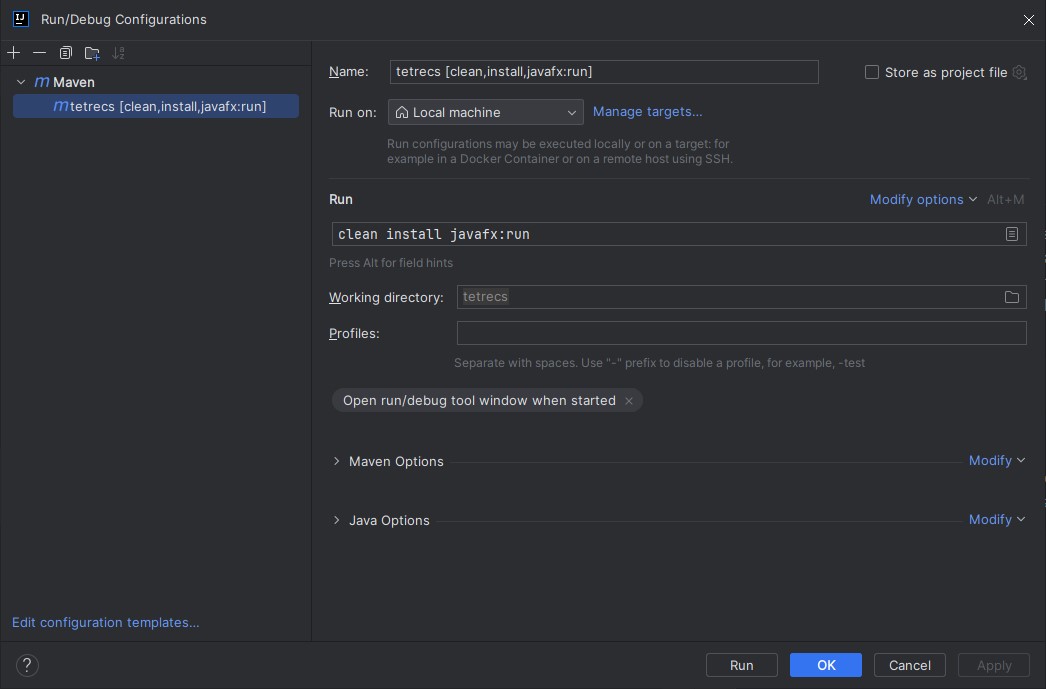
example_intellij_config.jpg

Issues

The game was meant to connect to a server on the University of Southampton's internal network, which requires you to use the University's VPN to connect to. So when you try to launch the game, it will throw errors trying to connect and enable the multiplayer functionality. I might fork this repository and make a single player version of this game if I feel like it at some point but in theory, bypassing the multiplayer connection code should work.

JavaJavaFXGame DevelopmentAcademic

RotationalDynamicsSimulator

Complete

Rotational dynamics simulation and visualization desktop app

Rotational Dynamics Py

This was a group coursework from my Engineering Foundation Year at University of Southampton's Malaysia Campus. It was a software engineering group project where the goal was to create a python app using tkinter as an educational aide to a certain mechanics topic.

We chose to create a rotational dyamics (angular momentum and inertia) calculator and visualizer. I was the only one with any real programming experience, so 99% of the code here is mine, albeit a much younger and less skilled version of myself.

However, despite my lack of experience at the time, I saw the potential of repurposing the bulk of the GUI code for this app into a desktop app template that I can use in the future for rapic prototyping. This app was made in python2, which was already deprecated at the time, because of an outdated coursework spec. And I haven't felt the need to update it. If you want to run it, use python 2.7 and tkinter. It should work, though you might also have to fix some minor bugs before it runs, entropy is real.

Desktop App Template

The core desktop app functionality in this project was then turned into DesktopAppTemplate. Which has python 3 support and will be carried over into the future :)

How to get this ancient thing to work :p

Tested on a Ubuntu 22 VM because I didn't want to have to install python 2 onto any of my physical machines.
As always, start with.
sudo apt-get update -y; sudo apt-get upgrade

install python 2

sudo apt-get install python2

install python-tk (for python2)

sudo apt-get install python-tk

install pip for python 2

wget https://bootstrap.pypa.io/pip/2.7/get-pip.py python2 get-pip.py

use pip to install pillow

python2 -m pip install Pillow

PythonTkinterPhysics SimulationAcademic

CyberVehiclesOverhaul-2.1PL

Complete

CyberVehiclesOverhaul fork supporting Phantom Liberty Vehicles & version 2.1

An extension to the Cyber Vehicles Overhaul mod by Erok

This was initially made when the original mod didn't support Phantom Liberty and 2.1 vehicles, as well as to experiment with game modding further. Has since been abandoned as the mod now natively supports these vehicles


Accurate Speedometer

Using Accurate Speedometer mod is recommended so that the tuned speeds are more realistic. Although NPCs will still drive at "40mph" (or an adjusted realistic ~25mph).

Notes

Cyber Engine Tweaks vehicle system documentation \

List of vehicles in Cyberpunk Wiki

Existing vehicles with new variants:

for these, the existing tweak files can be modified to account for the new variations

Arch Nazare (Vehicle.v_sportbike2_arch_player)
Arch Nazare Racer (Vehicle.v_sportbike2_arch_player_02?)
Arch Nazare Kobold (Vehicle.v_sportbike2_arch_player_03?)
Arch Nazare Itsumade (Vehicle.v_sportbike2_arch_tyger_player?)
Jackie's Arch (Vehicle.v_sportbike2_arch_jackie_player, Vehicle.v_sportbike2_arch_jackie_tuned_player)
Malina-mobile (Vehicle.v_sportbike2_arch_linas_player?)

Yaiba Kusanagi CT-3X (Vehicle.v_sportbike1_yaiba_kusanagi_player?)
Yaiba Kusanagi Akashita (Vehicle.v_sportbike1_yaiba_kusanagi_player_02?)
Yaiba Kusanagi Peacekeeper (Vehicle.v_sportbike1_yaiba_kusanagi_player_03?)
UNKNOWN? (Vehicle.v_sportbike1_yaiba_kusanagi__tyger_player?)
    
Archer Quartz Bandit (Vehicle.v_standard2_archer_quartz_nomad_player?)
Archer Quartz Specter (Vehicle.v_standard2_archer_quartz_nomad_player_02?)

Brennan Apollo (Vehicle.v_sportbike3_brennan_apollo_player)
Brennan Apollo 650-S (Vehicle.v_sportbike3_brennan_apollo_player_02??)

Herrera Outlaw GTS (Vehicle.v_sport1_herrera_outlaw_player) [DONE]
Herrera Outlaw Weiler (Vehicle.v_sport1_herrera_outlaw_heist_player) [DONE]

Mahir Supron FS3 (Vehicle.v_standard3_mahir_supron_player)
Mahir Supron Trailbruiser (Vehicle.v_standard3_mahir_supron_kurtz_player)

Mizutani Shion (Vehicle.v_sport2_mizutani_shion_player) [DONE]
Mizutani Shion Coyote (Vehicle.v_sport2_mizutani_shion_nomad_player?) [DONE?]
Mizutani Shion Samum (Vehicle.v_sport2_mizutani_shion_nomad_02_player??)

Porshe 911 Turbo (Vehicle.v_sport2_porsche_911turbo_player)
Porshe 911 Turbo Cabriolet (Vehicle.v_sport2_porsche_911turbo_cabrio_player)

Quadra Type-66 
Quadra Type-66 Wingate
Quadra Type-66 Hoon

// Type66's should be one of these
(Vehicle.v_sport2_quadra_type66_player)
(Vehicle.v_sport2_quadra_type66_02_player)
(Vehicle.v_sport2_quadra_type66_ncu_player)
(Vehicle.v_sport2_quadra_type66_nomad_player)
(Vehicle.v_sport2_quadra_type66_nomad_player_03)
(Vehicle.v_sport2_quadra_type66_avenger_player)

Thorton Colby
Thorton Colby Barghest
Thorton Colby Vulture

Thorton Galena
Thorton Galena Locust

Entirely new vehicles:

for these, new tweak files will need to be created from TweakDB data

Herrera Riptide GT2 (Vehicle.v_sport1_herrera_riptide_player?)
Herrera Riptide Terrier (Vehicle.v_sport1_herrera_riptide_terrier?)

Makigai Tanishi T400 (Vehicle.v_standard3_makigai_tanishi_player? mrhands?)
Makigai Tanishi Kuma (Vehicle.v_standard3_makigai_tanishi_kuma?)

Militech Hellhound (Vehicle.v_standard3_militech_hellhound_player)

Mizutani Hozuki MH2 
Mizutani Hozuki Hoseki (Vehicle.v_standard2_mizutani_hozuki_player)

Quadra Sport R-7 
Quadra Sport R-7 Charon 
Quadra Sport R-7 Sterling 
Quadra Sport R-7 Chiaroscuro 
Quadra Sport R-7 Vigilante 

// Sport R-7's should be one of these
(Vehicle.v_sport1_quadra_sport_r7_mrhands)
(Vehicle.v_sport1_quadra_sport_r7_netrunner)
(Vehicle.v_sport1_quadra_sport_r7_netrunner_01)
(Vehicle.v_sport1_quadra_sport_r7_netrunner_02)
(Vehicle.v_sport1_quadra_sport_r7_player)
(Vehicle.v_sport1_quadra_sport_r7_player_02)

Thorton Merrimac
Thorton Merrimac Warlock

Changelog

  • Sped up the Herrera Outlaw, made the Weiler variation actually a tuned up version
LuaGame ModdingCyberpunk 2077

EloSimulator

Complete

Elo (and similar) implementation and simulator

Elo Simulator

An implementation of the Elo algorithm and similar ranking algorithms, as well as a simulator environment to find out how quickly these various algorithms find the hidden true elo.

JavaAlgorithmsSimulationAcademic

VidSrcWrapper

Complete

Self-hostable web app for watching movies & shows easily by searching for them on TMDB and watching them with VidSrc

VidSrc Wrapper - TMDB Movie Search

A TypeScript movie search application using The Movie Database (TMDB) API, which also happens hook into VidSrc.. and in theory any other legal streaming service that uses IMDB/TMDB ids.

This isn't hosted anywhere, but it's made in such a way to make it very simple to run on your own servers.

Stack: Full-stack Typescript, Vue 3 + Vite client, Hono server

Setup

Prerequisites: TMDB Read Access Token (Bearer auth) (get one here)

  1. Install dependencies:

    npm install
    
  2. Create .env file in root:

    TMDB_API_KEY=your_tmdb_read_access_token_here
    
  3. Run

    npm run dev
    

This starts:

  • Backend at http://localhost:8080
  • Frontend at http://localhost:3000
VueHonoTypeScriptDockerFull Stack

LinkBlitzer

In Progress

Link bundling, sharing and saving utility, with "open all" functionality.

LinkBlitzer

Making it simple to share and open bundles of links. Paste links into LinkBlitzer, get one shareable link. Recipients see all shared links and can open them individually, select multiple, or all at once.

Example use cases: sharing hotel listings with a friend, saving a list of research articles to your bookmarks to reopen them later, grouping together your team onboarding links, creating and saving reading lists, managing your tab routines.


Packages

This is an npm workspaces monorepo with three packages:

PackageDescription
@linkblitzer/coreEncoding/decoding, validation, shared types
@linkblitzer/websiteVue 3 SPA — create and view blitz links
@linkblitzer/extensionBrowser extension — opens links on behalf of the website (bypassing pop-up limitations)

Core (packages/core)

Shared library consumed by the website and extension. Does nothing on its own.

What it provides:

  • encode(payload) — serializes an array of { url, notes? } objects to URL-safe Base64
  • decode(encoded) — deserializes and validates with Zod, returns { ok: true, data } or { ok: false, error }
  • isValidUrl(url) / validateUrls(urls[]) — URL validation via the URL constructor
  • Zod schemas: BlitzUrlSchema, BlitzPayloadSchema
  • Shared message types: MessageOpen, MessageReady, LinkBlitzerMessage

Commands:

npm run build -w packages/core   # compile TypeScript
npm run test -w packages/core    # run Vitest tests

Or from the root:

npm run build:core
npm test

Website (packages/website)

Vue 3 + Vite SPA with two routes:

  • / — Create mode: enter URLs (with optional notes), validate them inline, generate a shareable blitz link
  • /view?shared=... — View mode: decode the link, display URLs with favicons, select and open them

Blitz link format:

linkblitzer.com/view?shared={url-safe-base64-encoded-json}

The JSON is an array of { url, notes? } objects. Favicons are fetched at view time via Google's favicon service and are not encoded in the link.

Extension integration:

On mount, the view page listens for a LINKBLITZER:READY postMessage from the extension content script. If the extension is present, "Open selected" sends a LINKBLITZER:OPEN message and the extension handles opening the tabs. If the extension is absent, the page falls back to window.open() — which is blocked on most mobile browsers and some desktop ones when opening many tabs at once.

Dev:

npm run dev:website        # from root
# or
npm run dev -w packages/website

Runs Vite dev server, typically at http://localhost:5173.

Build:

npm run build:website
# or
npm run build -w packages/website

Deployment (GitHub Pages — TODO):

The website targets GitHub Pages at linkblitzer.com. Deployment scripts need to be added (e.g. gh-pages npm package or a GitHub Actions workflow that runs vite build and pushes dist/ to the gh-pages branch). The Vite config will likely need a base option set if hosted in a subdirectory.


Extension (packages/extension)

A minimal browser extension built with WXT. It runs as a content script on the LinkBlitzer website and localhost dev URLs.

What it does:

  1. On load, announces itself: window.postMessage({ type: 'LINKBLITZER:READY' }, '*')
  2. Listens for { type: 'LINKBLITZER:OPEN', urls: string[] } messages from the page
  3. Validates event.origin against an allowlist (https://linkblitzer.com, http://localhost:3000, http://localhost:5173)
  4. Opens each URL with window.open(url, '_blank')

Dev (side-load in browser):

# Chrome
npm run dev:ext:chrome     # from root
# or: npm run dev:chrome -w packages/extension

# Firefox
npm run dev:ext:firefox
# or: npm run dev:firefox -w packages/extension

# Safari
npm run dev:ext:safari
# or: npm run dev:safari -w packages/extension

WXT will build the extension and open a browser with it loaded automatically (Chrome/Firefox). For Safari, it generates an Xcode project.

Build:

npm run build:ext             # Chrome (MV3)
npm run build:ext:firefox     # Firefox
npm run build:ext:safari      # Safari

Output is in packages/extension/.output/.

Side-loading (manual install without publishing):

  • Chrome/Edge: Go to chrome://extensions, enable "Developer mode", click "Load unpacked", and select packages/extension/.output/chrome-mv3/
  • Firefox: Go to about:debugging#/runtime/this-firefox, click "Load Temporary Add-on", and select any file inside packages/extension/.output/firefox-mv3/
  • Safari: Build the Safari target (npm run build:ext:safari), open the generated Xcode project, and run it. Enable the extension in Safari's settings under Extensions

Publishing (TODO):

  • Chrome Web Store: Create a developer account, zip the chrome-mv3 output, and submit via the Chrome Developer Dashboard. Review typically takes a few days.
  • Firefox Add-ons (AMO): Submit the firefox-mv3 zip at addons.mozilla.org. Firefox requires source code submission for review.
  • Safari Extensions: Distribute through the Mac App Store. Requires an Apple Developer account and app review. The WXT Safari output is an Xcode project that wraps the extension in a native app container.
  • Edge Add-ons: The Chrome MV3 build can typically be submitted as-is to the Microsoft Edge Add-ons store.

Root commands

npm run dev:website           # website dev server
npm run dev:ext:chrome        # extension dev (Chrome)
npm run dev:ext:firefox       # extension dev (Firefox)
npm run dev:ext:safari        # extension dev (Safari)

npm run build:core            # build core
npm run build:website         # build website
npm run build:ext             # build extension (Chrome)
npm run build:ext:firefox     # build extension (Firefox)
npm run build:ext:safari      # build extension (Safari)

npm test                      # run core tests
npm run lint                  # ESLint
npm run format                # Prettier

Tech stack

  • Vue 3 + TypeScript (Composition API, <script setup>)
  • Vue Router
  • Vite
  • WXT (browser extension framework)
  • Zod
  • Vitest
  • ESLint + Prettier
  • npm workspaces
VueViteTypeScriptBrowser ExtensionWeb Development

yaqinhasan.com

Complete

Yet another dev portfolio site.

yaqinhasan.com

Personal portfolio website built with Vue 3 & TypeScript

Quick Start

Cloning & npm install

git clone https://github.com/yaq1n0/yaqinhasan.com.git
cd yaqinhasan.com
npm ci

Package.json scripts

# Build
npm run build

# Run dev server
npm run dev

# Testing
npm run test
npm run test:watch
npm run test:coverage

# Code quality
npm run lint
npm run lint:fix

# Formatting
npm run prettier
npm run prettier:fix

Feature breakdown

JSON -> Web CV

  • Displays cv.json dynamically using Vue.
  • Allows generation of cv.pdf using render-pdf.ts. (requires playwright setup with npm run setup:playwright)

Interactive "Terminal"

  • Allows users to interact with the website via a "terminal" interface
  • Allows power-users to configure things like dev-mode and themes
  • Unix commands for navigating the site
  • Is quite fun (supposedly)

Theme System

  • Users can pick from various themes
  • Themes come from ThemeRegistry.ts
  • Themes have light and dark modes
  • Theme preference is stored in localStorage
  • Default theme light|dark mode detected from system prefers-dark

CI/CD

There is a barebones CI pipeline in ci.yaml which does

  • Unit testing
  • Validation of themes, including WCAG compliance
  • Linting
  • Formatting

The build process generates a dist/ folder with:

  • Static HTML files for each route
  • Optimized JavaScript and CSS bundles
  • All public assets with proper paths
  • 404.html for fallback handling

Currently deployed to Github Pages using deploy.yml

Links

  • Live Site: yaqinhasan.com
  • GitHub: github.com/yaq1n0/yaqinhasan.com
  • LinkedIn: linkedin.com/in/yaqinhasan
VueViteTypeScriptWeb Development

pwordGen.com

Complete

pwordGen.com website, uses pwordGen package

pwordgen.com Frontend

A minimal, fast, client-side website that generates secure passwords using the pwordgen npm package.

Features

  • Secure Password Generation: Uses cryptographically strong randomness via the pwordgen package
  • Client-Side Only: No data is sent to any server - everything runs in your browser
  • Customizable Options: Control length, character types, exclusions, and requirements
  • Entropy Display: Shows password strength in bits
  • URL Persistence: Options are saved in URL parameters for easy sharing
  • Responsive Design: Works on desktop and mobile devices
  • Accessible: Keyboard navigation and screen reader friendly

Development

Prerequisites

  • Node.js 20+
  • npm

Setup

npm install

Development Commands

# Start development server
npm run dev

# Run tests
npm run test

# Run tests in UI mode
npm run test:ui

# Type checking
npm run type-check

# Linting
npm run lint

# Code formatting
npm run prettier

# Build for production
npm run build

# Preview production build
npm run preview

Tech Stack

  • Vue 3 - Progressive JavaScript framework
  • TypeScript - Type safety and better developer experience
  • Vite - Fast build tool and development server
  • Vitest - Fast unit testing framework
  • ESLint - Code linting
  • Prettier - Code formatting

Testing

The project includes comprehensive tests covering:

  • Component rendering
  • User interactions
  • Password generation
  • Option persistence
  • Error handling
  • Copy functionality

Deployment

This project uses a two-stage GitHub Actions CI/CD pipeline:

1. CI Workflow (.github/workflows/ci.yml)

Runs on every push and pull request to main:

  • Type checking with TypeScript
  • Code linting with ESLint
  • Code formatting check with Prettier
  • Unit tests with Vitest

2. Publish Workflow (.github/workflows/publish.yml)

Runs automatically after CI completes successfully on main:

  • Builds the production bundle
  • Deploys to GitHub Pages

To deploy:

  1. Push changes to main branch
  2. CI workflow runs quality checks
  3. If CI passes, publish workflow automatically deploys to GitHub Pages

Security

  • Uses Web Crypto API for secure random number generation
  • No external dependencies for password generation
  • No telemetry or analytics
  • No network requests during password generation
  • All processing happens client-side

License

MIT

VueViteTypeScriptnpmPackage Development

CryptIt

Complete

Cryptographically secure secret splitting and reconstruction desktop app

CryptIt - File Encryption with Shamir Secret Sharing

A secure, cross-platform file encryption application built with Tauri, Vue 3, and Rust. CryptIt uses AES-256-GCM encryption combined with Shamir Secret Sharing to provide enterprise-grade security for your sensitive files.

Platform Rust Vue Tauri

🔐 Features

Core Functionality

  • File Encryption/Decryption: Secure AES-256-GCM encryption for any file type
  • Shamir Secret Sharing: Split encryption keys into k-of-n shares for enhanced security
  • Cross-Platform: Native desktop app for Windows, macOS, and Linux
  • Simple UI: Intuitive interface for selecting files, configuring shares, and managing encryption

Security Features

  • AES-256-GCM: Industry-standard encryption with authenticated encryption
  • Memory Safety: Rust-powered backend with automatic memory cleanup
  • No Key Persistence: Keys are never stored permanently
  • Secure Random Generation: Cryptographically secure random number generation
  • Custom File Format: Secure .cryptit file format with integrity protection

🏗️ Architecture & Design Decisions

Technology Stack

  • Frontend: Vue 3 + TypeScript + Vite for reactive UI
  • Backend: Rust + Tauri for native performance and security
  • Crypto: aes-gcm crate for encryption, shamirs crate for secret sharing
  • UI: Native file dialogs via tauri-plugin-dialog

Design Decisions

  1. Single Algorithm Focus: Started with AES-256-GCM for MVP simplicity
  2. Modular Architecture: Easy to extend with additional algorithms
  3. Secure by Default: Tauri v2 permissions model for maximum security
  4. Simple File Format: Custom .cryptit format with nonce and ciphertext
  5. Memory-Safe Operations: Automatic cleanup of sensitive data

🎯 MVP Constraints

This MVP was designed to be functional within ~1 hour of development time:

What's Included

  • ✅ Single encryption algorithm (AES-256-GCM)
  • ✅ Shamir Secret Sharing with configurable k-of-n thresholds
  • ✅ File and directory selection dialogs
  • ✅ Basic encrypt/decrypt workflow
  • ✅ Share generation and input handling
  • ✅ Cross-platform compatibility

What's Not Included (Yet)

  • ❌ Multiple encryption algorithms
  • ❌ Batch file processing
  • ❌ Share export to files/QR codes
  • ❌ Progress bars for large files
  • ❌ File metadata preservation
  • ❌ Settings/preferences
  • ❌ Advanced error handling UI

🚀 Future Extensions

Planned Features

  1. Multiple Algorithms: ChaCha20-Poly1305, AES-256-CTR support
  2. Advanced Share Management:
    • Export shares to separate files
    • QR code generation for shares
    • Share validation and testing
  3. Enhanced UI/UX:
    • Progress indicators for large files
    • Drag & drop file selection
    • Dark/light theme toggle
    • Batch file processing
  4. Security Enhancements:
    • Hardware security module (HSM) integration
    • Key derivation from passwords
    • File integrity verification
  5. Enterprise Features:
    • Audit logging
    • Policy management
    • Centralized share storage

Potential Integrations

  • Cloud Storage: Secure cloud backup of encrypted files
  • Password Managers: Integration with 1Password, Bitwarden
  • Hardware Tokens: YubiKey support for additional authentication
  • Mobile Apps: React Native companion for share management

🛠️ Development

Prerequisites

  • Node.js 18+ and npm
  • Rust 1.70+
  • System Dependencies:
    • macOS: Xcode Command Line Tools
    • Linux: build-essential, libwebkit2gtk-4.0-dev, libssl-dev
    • Windows: Microsoft Visual Studio C++ Build Tools

Setup

# Clone the repository
git clone <repository-url>
cd CryptIt

# Install dependencies
npm install

# Run development server
npm run tauri dev

Development Commands

# Start development server with hot reload
npm run tauri dev

# Run Rust tests
cd src-tauri && cargo test

# Run frontend linting
npm run lint

# Type checking
npm run type-check

# Build for development (faster, larger)
npm run tauri build -- --debug

📦 Building & Distribution

Production Build

# Build optimized production version
npm run tauri build

# Build with specific target
npm run tauri build -- --target x86_64-pc-windows-msvc

# Build for all platforms (requires setup)
npm run tauri build -- --target universal-apple-darwin

Platform-Specific Builds

# macOS Universal Binary (Intel + Apple Silicon)
npm run tauri build -- --target universal-apple-darwin

# Windows (x64)
npm run tauri build -- --target x86_64-pc-windows-msvc

# Linux (x64)
npm run tauri build -- --target x86_64-unknown-linux-gnu

Output Locations

  • macOS: src-tauri/target/release/bundle/macos/
  • Windows: src-tauri/target/release/bundle/msi/
  • Linux: src-tauri/target/release/bundle/deb/ or appimage/

🧪 Testing

Automated Testing

# Run all Rust unit tests
cd src-tauri && cargo test

# Run with verbose output
cd src-tauri && cargo test -- --nocapture

# Test specific module
cd src-tauri && cargo test crypto::tests

Manual Testing Checklist

  • File encryption with various file types and sizes
  • Share generation with different k-of-n configurations
  • Decryption with minimum required shares
  • Error handling for insufficient shares
  • Cross-platform file dialog functionality
  • Memory usage with large files

📁 Project Structure

CryptIt/
├── src/                          # Vue frontend
│   ├── App.vue                   # Main application component
│   ├── main.ts                   # Application entry point
│   └── assets/                   # Static assets
├── src-tauri/                    # Rust backend
│   ├── src/
│   │   ├── lib.rs               # Main Tauri application
│   │   ├── crypto.rs            # AES encryption module
│   │   ├── sss.rs              # Shamir Secret Sharing
│   │   └── main.rs              # Application entry point
│   ├── capabilities/
│   │   └── default.json         # Tauri permissions
│   ├── Cargo.toml               # Rust dependencies
│   └── tauri.conf.json          # Tauri configuration
├── .vscode/                      # VSCode configuration
│   ├── launch.json              # Debug configurations
│   ├── settings.json            # Workspace settings
│   └── extensions.json          # Recommended extensions
├── package.json                  # Node.js dependencies
└── README.md                     # This file

🔧 Debugging

Frontend Debugging

# Open browser dev tools in the app
# Right-click → "Inspect Element" or press F12

# Check console for JavaScript errors
# Network tab for Tauri command failures

Backend Debugging

# Run with debug logging
RUST_LOG=debug npm run tauri dev

# Run with application-specific logs
RUST_LOG=cryptit=debug npm run tauri dev

# Enable backtraces for panics
RUST_BACKTRACE=1 npm run tauri dev

VSCode Debugging

  1. Install recommended extensions (see .vscode/extensions.json)
  2. Use provided debug configurations in .vscode/launch.json
  3. Set breakpoints in both Rust and TypeScript code
  4. Run "Tauri Development Debug" configuration

🔒 Security Considerations

Implemented Security Measures

  • Memory Safety: Automatic cleanup of encryption keys
  • Secure Random Generation: CSPRNG for all cryptographic operations
  • Constant-Time Operations: Resistant to timing attacks
  • No Key Storage: Keys exist only in memory during operations
  • Tauri Security Model: Granular permissions for system access

Security Best Practices

  • Always verify share authenticity before decryption
  • Store shares in separate, secure locations
  • Use strong physical security for share storage
  • Regularly test decryption process with backup shares
  • Keep the application updated for security patches

📄 License

This project is licensed under the MIT License - see the LICENSE file for details.

🤝 Contributing

Contributions are welcome! Please read our contributing guidelines and submit pull requests for any improvements.

Development Workflow

  1. Fork the repository
  2. Create a feature branch (git checkout -b feature/amazing-feature)
  3. Make your changes
  4. Run tests (cargo test and manual testing)
  5. Commit your changes (git commit -m 'Add amazing feature')
  6. Push to the branch (git push origin feature/amazing-feature)
  7. Open a Pull Request

Built with ❤️ using Rust, Vue, and Tauri

RustTauriVueCryptographyDesktop App Development

TrayRunner

Complete

Spotlight-inspired macOS native script launcher

TrayRunner

TrayRunner is a macOS menu bar application that allows you to quickly access and run scripts from your computer. The app sits in your menu bar and provides a fast, keyboard-accessible way to search and execute scripts.

Features

  • Global Keyboard Shortcut: Quickly open the script search HUD with ⌘+Shift+Space
  • Script Directory Monitoring: Add script folders that automatically update when changes are detected
  • TODO: Fuzzy Search: Type to quickly find and run the script you need
  • Support for Multiple Script Types: Works with shell (.sh), Python (.py), Ruby (.rb), Perl (.pl), and PHP (.php) scripts // I only tested with .sh so far, might change in the future.

Requirements

  • macOS 15.0 or later // might work with older, I used 15, I don't plan on supporting older
  • Xcode 16.0 or later // might work with older, I used 16 tho

Installation

Option 1: Download the Release

  1. Go to the Releases page
  2. Download the latest version of TrayRunner.app.zip
  3. Extract the ZIP file
  4. Move TrayRunner.app to your Applications folder
  5. Launch the app

Build from Source

Just clone the project and Cmd + R in XCode

Usage

  1. After launching TrayRunner, you'll see a terminal icon in your menu bar
  2. Click on the menu bar icon to open the menu and access settings
  3. Press ⌘+Shift+Space to open the script search overlay
  4. Add script folders by opening Settings → Watched Folders
  5. Start typing to search for scripts, then press Enter to run the selected script

Development

Prerequisites

  • Xcode 13.0 or later
  • Swift 5.5 or later

Project Structure

  • TrayRunner/ - Main source code directory
    • Data/ - Data models and script management
    • UI/ - User interface components
      • Components/ - Reusable UI components
      • Settings/ - Settings interface
      • Search/ - Script search functionality
    • Assets.xcassets/ - App assets and icons

Dependencies

  • KeyboardShortcuts - For global keyboard shortcut handling

Contributing

Contributions are welcome! If you'd like to contribute:

  1. Fork repo
  2. Make PR

License

This project is licensed under the MIT License - see the LICENSE file for details.

SwiftSwiftUImacOS DevelopmentDesktop App DevelopmentShell Scripting

DesktopAppTemplate

Complete

Template for for quickly creating desktop apps using Python + Tkinter

Python 3 Tk based Desktop GUI App template

What is this?

In terms of an MVC design pattern, The framework includes the skeleton for the "model" and state permanence as well as supporting data structures for this. It also includes wrappers to simplify the creation of the UI, or the "view", and has common control flows implemented (page navigation) It also includes the logical structure and file structure to support the implementation of the underlying controller code in /lib/app

Origins

This was forked from a Python software engineering group coursework I made in my Engineering Foundation Year. 99% of the code is mine as I was the only one who could actually code amongst the engineers. The source code for the rotational-dynamics-python coursework can be found here.

Seeing Potential

I saw the potential in repurposing the GUI elements and codebase for the coursework into a template/framework that I could use in the future. I eventually want to make it such that I can quickly implement backend functionality separately to the front-end in a way that is similar to and will be simple to port over to a web-app type deployment with flask.

Documentation

Directory Structure

  • main.py : program entry point

  • README.md : you are here

  • /lib : library for everything.

  • lib/app : your core back-end app code goes here (I suggest using static atomic functions that can be called from the rest of the code)

  • lib/components : you core front-end app code goes here. Each "Page" of the app has its own class file here. Object instance is used and passed around (Singleton design pattern).

  • /lib/resources/config : configuration JSONs go here (you can encourage end user editing of these files, but I suggest using the a preference page for this, so that you can sanitize user configurations. )

  • /lib/resources/images: program image resources go here

  • /lib/core : contains functions responsible for handling core desktop-app-template functionality (preferences, theming etc. )

  • /lib/ui : contains all UI elements that can be used (import UI elements from here)

  • /lib/ui/tk-utils : contains helper functions that simplify repetitive tk actions.

  • /lib/ui/tk-widgets : contains the Class files for the App versions of the tkinter base widgets

  • /lib/ui/compound-widgets : contains the Class files for custom compound widgets made from tk-widgets.

  • /lib/ui/app-widgets : here is where you would put your own custom widgets for your app, if you need them

imports best practices to prevent circular dependencies

  • only import as needed, avoid wildcard imports where possible
  • nothing should be imported into /lib/core
  • import ui components straight from /lib/ui. Internal import routing should be handled by /lib/ui/init.py

How to use (developer)

  • Use the included DemoPage.py and TemplatePage.py as a start point for creating the UI using the App's built in widgets
  • To contribute new AppWidgets, use the Appconvention to prevent conflicts with Tk's default widgets. also try to use polymorphic inheritance from the original Tk widgets.
  • To contribute new components, use thePage convention
  • To contribute new functions, use generate_and/or common sense :P

How to use (end-user)

  • The preferences page should have useful options such as setting the resolution of the program window, and enabling certain settings.

Features to be added

  • DemoPage with most of the widgets implemented for demo purposes.
  • For some reason the program_restart function only works once, I'm assuming it's some kinda pid issue. Long term solution might be to remove the need for having to restart the program at all.
PythonTkinterDesktop App DevelopmentTemplate

TranslateApp

Complete

Desktop translation/conversion app with Google Translate API integration, built with DesktopAppTemplate

Python text converter app

The app was initally meant as a desktop app that would convert strings based on programmed rulesets (eg. randomcase). I think it's currently programmed with UwU-case.

google translate API integration

I then linked the app with google translate's API to get it to speak. I deeply regret this decision.

DEVELOPMENT STATUS

The app was made using an outdated version of DesktopAppTemplate. Which means this thing probably still runs on Python 2.7, and the libraries I used and the API has probably stopped working. I might revisit this at some point to bring it back to life.

PythonDesktop App DevelopmentAPI Integration

FlutterRoboCopy

Complete

Flutter GUI for the Windows robocopy command, built to simplify local NAS backup automation

Flutter RoboCopy

A flutter project to create a GUI for the windows RoboCopy command.

Done to learn flutter but also to eventually automate/simplify my local network SAMBA NAS backup.

MVP works, but was abandoned as there wasn't a need for it because I changed my NAS setup.

FlutterDartDesktop App DevelopmentWindows

PythonTrayShortcuts

Complete

Windows tray script launcher, inspired TrayRunner

PythonTrayShortcuts

Create your own custom tray launchpad with python scripts

Setup (user)

  • install python 3.13 or later
  • pip install -r requirements.txt
  • python3 main.py
  • you can then add the above command to launch on boot etc.

Testing

  • test suffix "_test"
  • unittest python builtin testing library

TODO:

  • proper testing integration with visual studio code

  • auto format code on save in vs code

  • code completions/intellsense in vs code

  • load UI configuration from json file {"items", ["key1", "SEPERATOR", "key2"]}

  • subprocess execution (execute .py file from runner) and drag n drop scripts into /scripts

  • launch on boot support (Windows, MacOS, Linux?). Potentially can make this work as an intrinsic script that does OS detection and executes commands

  • custom logo.png support (should be possible, default to defaultLogo.png in hidden folder)

  • support for launch with admin rights (Windows), elevated (sudo) permissions in Linux and potentially bypassing some MacOS limitations (might need to deal with some stupid Apple Mac API shit)

  • determine async behavior, do we FIFO?

PythonWindowsDesktop App DevelopmentShell Scripting

opl-py

In Progress

Python OpenPowerlifting SDK | monorepo with web app, demo and pretrained models

opl-py

A typed Python SDK for working with OpenPowerlifting data. Query lifters, meets, and rankings from a local DuckDB database built from the official OpenPowerlifting bulk CSV. Includes optional ML-based trajectory prediction analytics module.

0a. PyPI Installation (for usage)

To install opl-py from PyPI for usage:

pip install opl-py

For optional analytics features (trajectory prediction, percentile rankings):

pip install opl-py[analytics]

0b. Local/Editable installation (for development):

To install opl-py as an editable package, not from PyPI, use:

make install

or directly with pip:

pip install -e ".[dev,analytics]"

1. Quick Start

Download and ingest the full OPL dataset (~250 MB) into a local DuckDB file: DuckDB path is {platform_dirs.user_data_dir}/opl-py/opl.duckdb

opl init

Update the database

opl update

Then query it with the opl Python sdk.

import opl

client = opl.OPL()

# Look up a lifter
lifter = client.lifter("Ray Williams #1")
print(lifter.best_total_kg)
print(lifter.competition_count)

for entry in lifter.history():
    print(f"{entry.date}: {entry.total_kg}kg @ {entry.bodyweight_kg}kg")

# Query rankings
top_raw = client.rankings(
    sex=opl.Sex.MALE,
    equipment=opl.Equipment.RAW,
    event=opl.Event.SBD,
    weight_class="93",
    order_by="dots",
    limit=10,
)

# Raw SQL for custom queries
results = client.query(
    "SELECT Federation, COUNT(*) as n FROM entries GROUP BY Federation ORDER BY n DESC LIMIT 10"
)

Web App Development (with HMR)

To run the API and UI locally with hot-reload:

make dev

This starts both servers in parallel:

  • API — uvicorn on http://localhost:8000 with --reload (restarts on Python file changes)
  • UI — Vite dev server on http://localhost:5173 with HMR (React fast refresh)

Additional Documentation

GuideDescription
SDKPython client, models, and enums
AnalyticsPercentile rankings, feature extraction, trajectory prediction
DockerDocker setup for the web app ui

Attribution

This project uses data from the OpenPowerlifting project. OpenPowerlifting data is contribueted to the public domain.

PythonFastAPIReactDockerscikit-learnPyTorchPyPIMachine LearningData analytics

prompt-as-endpoint

In Progress

npm package to simplify creating AI-powered APIs

prompt-as-endpoint

Helper library for creating HTTP endpoints that use LLMs to return schema-validated JSON responses.

Quick Start

npm install
npm run build
npm run demo:dev

Visit http://localhost:3000 and try:

curl -X POST http://localhost:3000/greet \
  -H "Content-Type: application/json" \
  -d '{"firstName":"John","lastName":"Doe"}'

Packages

  • prompt-as-endpoint - Main library
  • prompt-as-endpoint-demo - Demo server

License

MIT

TypeScriptAILLMREST APIZodnpmDeveloper Experience

pwordGen

Complete

Minimalist TypeScript password generation package

pwordgen

A tiny, TypeScript-native password generator for browser and Node.js environments.

Installation

npm install pwordgen

Quick Start

import { generatePassword, estimateEntropyBits } from 'pwordgen';

// Generate a password with defaults (16 chars, all character classes)
const password = generatePassword();

// Estimate entropy
const entropy = estimateEntropyBits({ length: 16 });
console.log(`Entropy: ${entropy.toFixed(1)} bits`);

API

generatePassword(options?): string

Generates a cryptographically secure password.

interface PasswordOptions {
  length: number; // Default: 16
  lowercase: boolean; // Default: true
  uppercase: boolean; // Default: true
  digits: boolean; // Default: true
  symbols: boolean; // Default: true
  custom: string; // Default: ''
  excludeSimilar: boolean; // Default: false (excludes il1Lo0O)
  exclude: string; // Default: ''
  requireEachSelectedClass: boolean; // Default: false
}

Examples

// Custom length
generatePassword({ length: 12 });

// Letters only
generatePassword({ digits: false, symbols: false });

// Exclude similar characters
generatePassword({ excludeSimilar: true });

// Custom character set
generatePassword({
  lowercase: false,
  uppercase: false,
  digits: false,
  symbols: false,
  custom: 'ABCDEF0123456789',
});

// Ensure at least one from each selected class
generatePassword({
  length: 12,
  requireEachSelectedClass: true,
});

estimateEntropyBits(options?): number

Calculates estimated entropy in bits for the given configuration.

const entropy = estimateEntropyBits({
  length: 12,
  digits: false,
  symbols: false,
});

Character Classes

import { CHARACTER_CLASSES } from 'pwordgen';

CHARACTER_CLASSES.lowercase; // "abcdefghijklmnopqrstuvwxyz"
CHARACTER_CLASSES.uppercase; // "ABCDEFGHIJKLMNOPQRSTUVWXYZ"
CHARACTER_CLASSES.digits; // "0123456789"
CHARACTER_CLASSES.symbols; // "!@#$%^&*()_+-=[]{}|;:,.<>?"
CHARACTER_CLASSES.similar; // "il1Lo0O"

Security

  • Uses Web Crypto API (browser) and Node.js crypto module
  • Rejection sampling ensures uniform distribution
  • No network calls or telemetry
  • Cryptographically secure random number generation

Browser Support

Chrome 37+, Firefox 34+, Safari 7.1+, Edge 12+

Node.js Support

Node.js 16+

Development

npm install          # Install dependencies
npm test             # Run tests
npm run build        # Build package
npm run lint         # Lint code
npm run prettier:fix # Format code

License

MIT

TypeScriptnpmPackage Development

ThymPi

Complete

Proof-of-concept robotics platform using sensor data to augment visual navigation systems for autonomously navigating robots.

ThymPi - Final Year Dissertation Research Project

"An Intelligent Approach to Navigating Environments With Compliant Obstacles"

A research project to develop a proof-of-concept system for using sensor data to augment visual navigation systems used by autonomous robots.

A visual navigation system can classify objects but it has no context on the properties of an object, this project proves that you can use sensor data to drive intelligent decision-making such that a truly optimal path can be used.

The final hardware platform was a Raspberry Pi 3 connected to a Pi Camera running OpenCV and MPU6050 IMU, controlling a Thymio using asebamedulla.

It was able to idenfify the obstacles in its surroundings and test object compliance using IMU readings, using it to determine the truly optimal paths, accounting for obstacle compliance.

Setup Guide:

This setup guide isn't step by step but instead a rough guide to help you get started as a lot of the installation process is highly dependent on the platform you intend to run this on.

For reference, this is the development environment I used
Computer: Raspberry Pi 3B+
Operating System: Raspberry Pi OS (legacy)
note: this is the debian 10 (buster) based version

MPU6050 Setup
The installation process for this is very simple, simply follow the instructions in the repository
Repository: https://github.com/m-rtijn/mpu6050

Pi Camera Setup
In order to setup and enable the Pi Camera interface, follow the instructions at the link below
Pi Camera Documentation: https://picamera.readthedocs.io/en/release-1.13/install.html

Thymio Interface Setup
The installation process for this is very well explained in the repository below
GitHub repository: https://github.com/lebalz/thympi

OpenCV Setup
The OpenCV install process is very complicated and I suggest you look up the installation process for your own system.
However, the following article and forum is a good place to get started
Core Electronics: https://core-electronics.com.au/guides/object-identify-raspberry-pi/

PythonOpenCVMachine VisionRoboticsAutonomous NavigationFinal year project

STQL

Complete

A Haskell interpreter for STQL, an SQL-inspired language designed for Turtle RDF file manipulation

PLC

Programming Language Concepts Coursework

How to run

  1. ghc Stql.hs
  2. ./Stql prN.stql
  3. wait patiently

Disclaimer

If something went wrong and you've run cabal install... multiple times, you should delete the dist-newstyle folder and the .ghc.environment... files that showed up as a result cause they, most likely, will be incorrect, and run the command again, once.

HaskellInterpreter DesignCompiler TheoryFormal Language Theory

RunwayRedeclarationCalculator

Complete

Runway redeclaration calculation desktop app

Software Engineering Group Project - Runway Reclaration

A Java + JavaFX desktop app using MVC principles and AGILE software development practices.

JavaJavaFXSoftware EngineeringAcademic

TetrECS

Complete

JavaFX Tetris clone with networked highscores

TetrECS

Tetris game project for Programming 2 (1st year) coursework

Compile and Run

Technically this can be run using just maven cli and javafx cli. But the easiest way is to compile and run is to open the project with intellij IDEA (IDE used for this project) and create a run configuration that does maven clean install and ``javafx:run` for you.

example_intellij_config.jpg

Issues

The game was meant to connect to a server on the University of Southampton's internal network, which requires you to use the University's VPN to connect to. So when you try to launch the game, it will throw errors trying to connect and enable the multiplayer functionality. I might fork this repository and make a single player version of this game if I feel like it at some point but in theory, bypassing the multiplayer connection code should work.

JavaJavaFXGame DevelopmentAcademic

RotationalDynamicsSimulator

Complete

Rotational dynamics simulation and visualization desktop app

Rotational Dynamics Py

This was a group coursework from my Engineering Foundation Year at University of Southampton's Malaysia Campus. It was a software engineering group project where the goal was to create a python app using tkinter as an educational aide to a certain mechanics topic.

We chose to create a rotational dyamics (angular momentum and inertia) calculator and visualizer. I was the only one with any real programming experience, so 99% of the code here is mine, albeit a much younger and less skilled version of myself.

However, despite my lack of experience at the time, I saw the potential of repurposing the bulk of the GUI code for this app into a desktop app template that I can use in the future for rapic prototyping. This app was made in python2, which was already deprecated at the time, because of an outdated coursework spec. And I haven't felt the need to update it. If you want to run it, use python 2.7 and tkinter. It should work, though you might also have to fix some minor bugs before it runs, entropy is real.

Desktop App Template

The core desktop app functionality in this project was then turned into DesktopAppTemplate. Which has python 3 support and will be carried over into the future :)

How to get this ancient thing to work :p

Tested on a Ubuntu 22 VM because I didn't want to have to install python 2 onto any of my physical machines.
As always, start with.
sudo apt-get update -y; sudo apt-get upgrade

install python 2

sudo apt-get install python2

install python-tk (for python2)

sudo apt-get install python-tk

install pip for python 2

wget https://bootstrap.pypa.io/pip/2.7/get-pip.py python2 get-pip.py

use pip to install pillow

python2 -m pip install Pillow

PythonTkinterPhysics SimulationAcademic

CyberVehiclesOverhaul-2.1PL

Complete

CyberVehiclesOverhaul fork supporting Phantom Liberty Vehicles & version 2.1

An extension to the Cyber Vehicles Overhaul mod by Erok

This was initially made when the original mod didn't support Phantom Liberty and 2.1 vehicles, as well as to experiment with game modding further. Has since been abandoned as the mod now natively supports these vehicles


Accurate Speedometer

Using Accurate Speedometer mod is recommended so that the tuned speeds are more realistic. Although NPCs will still drive at "40mph" (or an adjusted realistic ~25mph).

Notes

Cyber Engine Tweaks vehicle system documentation \

List of vehicles in Cyberpunk Wiki

Existing vehicles with new variants:

for these, the existing tweak files can be modified to account for the new variations

Arch Nazare (Vehicle.v_sportbike2_arch_player)
Arch Nazare Racer (Vehicle.v_sportbike2_arch_player_02?)
Arch Nazare Kobold (Vehicle.v_sportbike2_arch_player_03?)
Arch Nazare Itsumade (Vehicle.v_sportbike2_arch_tyger_player?)
Jackie's Arch (Vehicle.v_sportbike2_arch_jackie_player, Vehicle.v_sportbike2_arch_jackie_tuned_player)
Malina-mobile (Vehicle.v_sportbike2_arch_linas_player?)

Yaiba Kusanagi CT-3X (Vehicle.v_sportbike1_yaiba_kusanagi_player?)
Yaiba Kusanagi Akashita (Vehicle.v_sportbike1_yaiba_kusanagi_player_02?)
Yaiba Kusanagi Peacekeeper (Vehicle.v_sportbike1_yaiba_kusanagi_player_03?)
UNKNOWN? (Vehicle.v_sportbike1_yaiba_kusanagi__tyger_player?)
    
Archer Quartz Bandit (Vehicle.v_standard2_archer_quartz_nomad_player?)
Archer Quartz Specter (Vehicle.v_standard2_archer_quartz_nomad_player_02?)

Brennan Apollo (Vehicle.v_sportbike3_brennan_apollo_player)
Brennan Apollo 650-S (Vehicle.v_sportbike3_brennan_apollo_player_02??)

Herrera Outlaw GTS (Vehicle.v_sport1_herrera_outlaw_player) [DONE]
Herrera Outlaw Weiler (Vehicle.v_sport1_herrera_outlaw_heist_player) [DONE]

Mahir Supron FS3 (Vehicle.v_standard3_mahir_supron_player)
Mahir Supron Trailbruiser (Vehicle.v_standard3_mahir_supron_kurtz_player)

Mizutani Shion (Vehicle.v_sport2_mizutani_shion_player) [DONE]
Mizutani Shion Coyote (Vehicle.v_sport2_mizutani_shion_nomad_player?) [DONE?]
Mizutani Shion Samum (Vehicle.v_sport2_mizutani_shion_nomad_02_player??)

Porshe 911 Turbo (Vehicle.v_sport2_porsche_911turbo_player)
Porshe 911 Turbo Cabriolet (Vehicle.v_sport2_porsche_911turbo_cabrio_player)

Quadra Type-66 
Quadra Type-66 Wingate
Quadra Type-66 Hoon

// Type66's should be one of these
(Vehicle.v_sport2_quadra_type66_player)
(Vehicle.v_sport2_quadra_type66_02_player)
(Vehicle.v_sport2_quadra_type66_ncu_player)
(Vehicle.v_sport2_quadra_type66_nomad_player)
(Vehicle.v_sport2_quadra_type66_nomad_player_03)
(Vehicle.v_sport2_quadra_type66_avenger_player)

Thorton Colby
Thorton Colby Barghest
Thorton Colby Vulture

Thorton Galena
Thorton Galena Locust

Entirely new vehicles:

for these, new tweak files will need to be created from TweakDB data

Herrera Riptide GT2 (Vehicle.v_sport1_herrera_riptide_player?)
Herrera Riptide Terrier (Vehicle.v_sport1_herrera_riptide_terrier?)

Makigai Tanishi T400 (Vehicle.v_standard3_makigai_tanishi_player? mrhands?)
Makigai Tanishi Kuma (Vehicle.v_standard3_makigai_tanishi_kuma?)

Militech Hellhound (Vehicle.v_standard3_militech_hellhound_player)

Mizutani Hozuki MH2 
Mizutani Hozuki Hoseki (Vehicle.v_standard2_mizutani_hozuki_player)

Quadra Sport R-7 
Quadra Sport R-7 Charon 
Quadra Sport R-7 Sterling 
Quadra Sport R-7 Chiaroscuro 
Quadra Sport R-7 Vigilante 

// Sport R-7's should be one of these
(Vehicle.v_sport1_quadra_sport_r7_mrhands)
(Vehicle.v_sport1_quadra_sport_r7_netrunner)
(Vehicle.v_sport1_quadra_sport_r7_netrunner_01)
(Vehicle.v_sport1_quadra_sport_r7_netrunner_02)
(Vehicle.v_sport1_quadra_sport_r7_player)
(Vehicle.v_sport1_quadra_sport_r7_player_02)

Thorton Merrimac
Thorton Merrimac Warlock

Changelog

  • Sped up the Herrera Outlaw, made the Weiler variation actually a tuned up version
LuaGame ModdingCyberpunk 2077

EloSimulator

Complete

Elo (and similar) implementation and simulator

Elo Simulator

An implementation of the Elo algorithm and similar ranking algorithms, as well as a simulator environment to find out how quickly these various algorithms find the hidden true elo.

JavaAlgorithmsSimulationAcademic

VidSrcWrapper

Complete

Self-hostable web app for watching movies & shows easily by searching for them on TMDB and watching them with VidSrc

VidSrc Wrapper - TMDB Movie Search

A TypeScript movie search application using The Movie Database (TMDB) API, which also happens hook into VidSrc.. and in theory any other legal streaming service that uses IMDB/TMDB ids.

This isn't hosted anywhere, but it's made in such a way to make it very simple to run on your own servers.

Stack: Full-stack Typescript, Vue 3 + Vite client, Hono server

Setup

Prerequisites: TMDB Read Access Token (Bearer auth) (get one here)

  1. Install dependencies:

    npm install
    
  2. Create .env file in root:

    TMDB_API_KEY=your_tmdb_read_access_token_here
    
  3. Run

    npm run dev
    

This starts:

  • Backend at http://localhost:8080
  • Frontend at http://localhost:3000
VueHonoTypeScriptDockerFull Stack

LinkBlitzer

In Progress

Link bundling, sharing and saving utility, with "open all" functionality.

LinkBlitzer

Making it simple to share and open bundles of links. Paste links into LinkBlitzer, get one shareable link. Recipients see all shared links and can open them individually, select multiple, or all at once.

Example use cases: sharing hotel listings with a friend, saving a list of research articles to your bookmarks to reopen them later, grouping together your team onboarding links, creating and saving reading lists, managing your tab routines.


Packages

This is an npm workspaces monorepo with three packages:

PackageDescription
@linkblitzer/coreEncoding/decoding, validation, shared types
@linkblitzer/websiteVue 3 SPA — create and view blitz links
@linkblitzer/extensionBrowser extension — opens links on behalf of the website (bypassing pop-up limitations)

Core (packages/core)

Shared library consumed by the website and extension. Does nothing on its own.

What it provides:

  • encode(payload) — serializes an array of { url, notes? } objects to URL-safe Base64
  • decode(encoded) — deserializes and validates with Zod, returns { ok: true, data } or { ok: false, error }
  • isValidUrl(url) / validateUrls(urls[]) — URL validation via the URL constructor
  • Zod schemas: BlitzUrlSchema, BlitzPayloadSchema
  • Shared message types: MessageOpen, MessageReady, LinkBlitzerMessage

Commands:

npm run build -w packages/core   # compile TypeScript
npm run test -w packages/core    # run Vitest tests

Or from the root:

npm run build:core
npm test

Website (packages/website)

Vue 3 + Vite SPA with two routes:

  • / — Create mode: enter URLs (with optional notes), validate them inline, generate a shareable blitz link
  • /view?shared=... — View mode: decode the link, display URLs with favicons, select and open them

Blitz link format:

linkblitzer.com/view?shared={url-safe-base64-encoded-json}

The JSON is an array of { url, notes? } objects. Favicons are fetched at view time via Google's favicon service and are not encoded in the link.

Extension integration:

On mount, the view page listens for a LINKBLITZER:READY postMessage from the extension content script. If the extension is present, "Open selected" sends a LINKBLITZER:OPEN message and the extension handles opening the tabs. If the extension is absent, the page falls back to window.open() — which is blocked on most mobile browsers and some desktop ones when opening many tabs at once.

Dev:

npm run dev:website        # from root
# or
npm run dev -w packages/website

Runs Vite dev server, typically at http://localhost:5173.

Build:

npm run build:website
# or
npm run build -w packages/website

Deployment (GitHub Pages — TODO):

The website targets GitHub Pages at linkblitzer.com. Deployment scripts need to be added (e.g. gh-pages npm package or a GitHub Actions workflow that runs vite build and pushes dist/ to the gh-pages branch). The Vite config will likely need a base option set if hosted in a subdirectory.


Extension (packages/extension)

A minimal browser extension built with WXT. It runs as a content script on the LinkBlitzer website and localhost dev URLs.

What it does:

  1. On load, announces itself: window.postMessage({ type: 'LINKBLITZER:READY' }, '*')
  2. Listens for { type: 'LINKBLITZER:OPEN', urls: string[] } messages from the page
  3. Validates event.origin against an allowlist (https://linkblitzer.com, http://localhost:3000, http://localhost:5173)
  4. Opens each URL with window.open(url, '_blank')

Dev (side-load in browser):

# Chrome
npm run dev:ext:chrome     # from root
# or: npm run dev:chrome -w packages/extension

# Firefox
npm run dev:ext:firefox
# or: npm run dev:firefox -w packages/extension

# Safari
npm run dev:ext:safari
# or: npm run dev:safari -w packages/extension

WXT will build the extension and open a browser with it loaded automatically (Chrome/Firefox). For Safari, it generates an Xcode project.

Build:

npm run build:ext             # Chrome (MV3)
npm run build:ext:firefox     # Firefox
npm run build:ext:safari      # Safari

Output is in packages/extension/.output/.

Side-loading (manual install without publishing):

  • Chrome/Edge: Go to chrome://extensions, enable "Developer mode", click "Load unpacked", and select packages/extension/.output/chrome-mv3/
  • Firefox: Go to about:debugging#/runtime/this-firefox, click "Load Temporary Add-on", and select any file inside packages/extension/.output/firefox-mv3/
  • Safari: Build the Safari target (npm run build:ext:safari), open the generated Xcode project, and run it. Enable the extension in Safari's settings under Extensions

Publishing (TODO):

  • Chrome Web Store: Create a developer account, zip the chrome-mv3 output, and submit via the Chrome Developer Dashboard. Review typically takes a few days.
  • Firefox Add-ons (AMO): Submit the firefox-mv3 zip at addons.mozilla.org. Firefox requires source code submission for review.
  • Safari Extensions: Distribute through the Mac App Store. Requires an Apple Developer account and app review. The WXT Safari output is an Xcode project that wraps the extension in a native app container.
  • Edge Add-ons: The Chrome MV3 build can typically be submitted as-is to the Microsoft Edge Add-ons store.

Root commands

npm run dev:website           # website dev server
npm run dev:ext:chrome        # extension dev (Chrome)
npm run dev:ext:firefox       # extension dev (Firefox)
npm run dev:ext:safari        # extension dev (Safari)

npm run build:core            # build core
npm run build:website         # build website
npm run build:ext             # build extension (Chrome)
npm run build:ext:firefox     # build extension (Firefox)
npm run build:ext:safari      # build extension (Safari)

npm test                      # run core tests
npm run lint                  # ESLint
npm run format                # Prettier

Tech stack

  • Vue 3 + TypeScript (Composition API, <script setup>)
  • Vue Router
  • Vite
  • WXT (browser extension framework)
  • Zod
  • Vitest
  • ESLint + Prettier
  • npm workspaces
VueViteTypeScriptBrowser ExtensionWeb Development

yaqinhasan.com

Complete

Yet another dev portfolio site.

yaqinhasan.com

Personal portfolio website built with Vue 3 & TypeScript

Quick Start

Cloning & npm install

git clone https://github.com/yaq1n0/yaqinhasan.com.git
cd yaqinhasan.com
npm ci

Package.json scripts

# Build
npm run build

# Run dev server
npm run dev

# Testing
npm run test
npm run test:watch
npm run test:coverage

# Code quality
npm run lint
npm run lint:fix

# Formatting
npm run prettier
npm run prettier:fix

Feature breakdown

JSON -> Web CV

  • Displays cv.json dynamically using Vue.
  • Allows generation of cv.pdf using render-pdf.ts. (requires playwright setup with npm run setup:playwright)

Interactive "Terminal"

  • Allows users to interact with the website via a "terminal" interface
  • Allows power-users to configure things like dev-mode and themes
  • Unix commands for navigating the site
  • Is quite fun (supposedly)

Theme System

  • Users can pick from various themes
  • Themes come from ThemeRegistry.ts
  • Themes have light and dark modes
  • Theme preference is stored in localStorage
  • Default theme light|dark mode detected from system prefers-dark

CI/CD

There is a barebones CI pipeline in ci.yaml which does

  • Unit testing
  • Validation of themes, including WCAG compliance
  • Linting
  • Formatting

The build process generates a dist/ folder with:

  • Static HTML files for each route
  • Optimized JavaScript and CSS bundles
  • All public assets with proper paths
  • 404.html for fallback handling

Currently deployed to Github Pages using deploy.yml

Links

  • Live Site: yaqinhasan.com
  • GitHub: github.com/yaq1n0/yaqinhasan.com
  • LinkedIn: linkedin.com/in/yaqinhasan
VueViteTypeScriptWeb Development

pwordGen.com

Complete

pwordGen.com website, uses pwordGen package

pwordgen.com Frontend

A minimal, fast, client-side website that generates secure passwords using the pwordgen npm package.

Features

  • Secure Password Generation: Uses cryptographically strong randomness via the pwordgen package
  • Client-Side Only: No data is sent to any server - everything runs in your browser
  • Customizable Options: Control length, character types, exclusions, and requirements
  • Entropy Display: Shows password strength in bits
  • URL Persistence: Options are saved in URL parameters for easy sharing
  • Responsive Design: Works on desktop and mobile devices
  • Accessible: Keyboard navigation and screen reader friendly

Development

Prerequisites

  • Node.js 20+
  • npm

Setup

npm install

Development Commands

# Start development server
npm run dev

# Run tests
npm run test

# Run tests in UI mode
npm run test:ui

# Type checking
npm run type-check

# Linting
npm run lint

# Code formatting
npm run prettier

# Build for production
npm run build

# Preview production build
npm run preview

Tech Stack

  • Vue 3 - Progressive JavaScript framework
  • TypeScript - Type safety and better developer experience
  • Vite - Fast build tool and development server
  • Vitest - Fast unit testing framework
  • ESLint - Code linting
  • Prettier - Code formatting

Testing

The project includes comprehensive tests covering:

  • Component rendering
  • User interactions
  • Password generation
  • Option persistence
  • Error handling
  • Copy functionality

Deployment

This project uses a two-stage GitHub Actions CI/CD pipeline:

1. CI Workflow (.github/workflows/ci.yml)

Runs on every push and pull request to main:

  • Type checking with TypeScript
  • Code linting with ESLint
  • Code formatting check with Prettier
  • Unit tests with Vitest

2. Publish Workflow (.github/workflows/publish.yml)

Runs automatically after CI completes successfully on main:

  • Builds the production bundle
  • Deploys to GitHub Pages

To deploy:

  1. Push changes to main branch
  2. CI workflow runs quality checks
  3. If CI passes, publish workflow automatically deploys to GitHub Pages

Security

  • Uses Web Crypto API for secure random number generation
  • No external dependencies for password generation
  • No telemetry or analytics
  • No network requests during password generation
  • All processing happens client-side

License

MIT

VueViteTypeScriptnpmPackage Development

CryptIt

Complete

Cryptographically secure secret splitting and reconstruction desktop app

CryptIt - File Encryption with Shamir Secret Sharing

A secure, cross-platform file encryption application built with Tauri, Vue 3, and Rust. CryptIt uses AES-256-GCM encryption combined with Shamir Secret Sharing to provide enterprise-grade security for your sensitive files.

Platform Rust Vue Tauri

🔐 Features

Core Functionality

  • File Encryption/Decryption: Secure AES-256-GCM encryption for any file type
  • Shamir Secret Sharing: Split encryption keys into k-of-n shares for enhanced security
  • Cross-Platform: Native desktop app for Windows, macOS, and Linux
  • Simple UI: Intuitive interface for selecting files, configuring shares, and managing encryption

Security Features

  • AES-256-GCM: Industry-standard encryption with authenticated encryption
  • Memory Safety: Rust-powered backend with automatic memory cleanup
  • No Key Persistence: Keys are never stored permanently
  • Secure Random Generation: Cryptographically secure random number generation
  • Custom File Format: Secure .cryptit file format with integrity protection

🏗️ Architecture & Design Decisions

Technology Stack

  • Frontend: Vue 3 + TypeScript + Vite for reactive UI
  • Backend: Rust + Tauri for native performance and security
  • Crypto: aes-gcm crate for encryption, shamirs crate for secret sharing
  • UI: Native file dialogs via tauri-plugin-dialog

Design Decisions

  1. Single Algorithm Focus: Started with AES-256-GCM for MVP simplicity
  2. Modular Architecture: Easy to extend with additional algorithms
  3. Secure by Default: Tauri v2 permissions model for maximum security
  4. Simple File Format: Custom .cryptit format with nonce and ciphertext
  5. Memory-Safe Operations: Automatic cleanup of sensitive data

🎯 MVP Constraints

This MVP was designed to be functional within ~1 hour of development time:

What's Included

  • ✅ Single encryption algorithm (AES-256-GCM)
  • ✅ Shamir Secret Sharing with configurable k-of-n thresholds
  • ✅ File and directory selection dialogs
  • ✅ Basic encrypt/decrypt workflow
  • ✅ Share generation and input handling
  • ✅ Cross-platform compatibility

What's Not Included (Yet)

  • ❌ Multiple encryption algorithms
  • ❌ Batch file processing
  • ❌ Share export to files/QR codes
  • ❌ Progress bars for large files
  • ❌ File metadata preservation
  • ❌ Settings/preferences
  • ❌ Advanced error handling UI

🚀 Future Extensions

Planned Features

  1. Multiple Algorithms: ChaCha20-Poly1305, AES-256-CTR support
  2. Advanced Share Management:
    • Export shares to separate files
    • QR code generation for shares
    • Share validation and testing
  3. Enhanced UI/UX:
    • Progress indicators for large files
    • Drag & drop file selection
    • Dark/light theme toggle
    • Batch file processing
  4. Security Enhancements:
    • Hardware security module (HSM) integration
    • Key derivation from passwords
    • File integrity verification
  5. Enterprise Features:
    • Audit logging
    • Policy management
    • Centralized share storage

Potential Integrations

  • Cloud Storage: Secure cloud backup of encrypted files
  • Password Managers: Integration with 1Password, Bitwarden
  • Hardware Tokens: YubiKey support for additional authentication
  • Mobile Apps: React Native companion for share management

🛠️ Development

Prerequisites

  • Node.js 18+ and npm
  • Rust 1.70+
  • System Dependencies:
    • macOS: Xcode Command Line Tools
    • Linux: build-essential, libwebkit2gtk-4.0-dev, libssl-dev
    • Windows: Microsoft Visual Studio C++ Build Tools

Setup

# Clone the repository
git clone <repository-url>
cd CryptIt

# Install dependencies
npm install

# Run development server
npm run tauri dev

Development Commands

# Start development server with hot reload
npm run tauri dev

# Run Rust tests
cd src-tauri && cargo test

# Run frontend linting
npm run lint

# Type checking
npm run type-check

# Build for development (faster, larger)
npm run tauri build -- --debug

📦 Building & Distribution

Production Build

# Build optimized production version
npm run tauri build

# Build with specific target
npm run tauri build -- --target x86_64-pc-windows-msvc

# Build for all platforms (requires setup)
npm run tauri build -- --target universal-apple-darwin

Platform-Specific Builds

# macOS Universal Binary (Intel + Apple Silicon)
npm run tauri build -- --target universal-apple-darwin

# Windows (x64)
npm run tauri build -- --target x86_64-pc-windows-msvc

# Linux (x64)
npm run tauri build -- --target x86_64-unknown-linux-gnu

Output Locations

  • macOS: src-tauri/target/release/bundle/macos/
  • Windows: src-tauri/target/release/bundle/msi/
  • Linux: src-tauri/target/release/bundle/deb/ or appimage/

🧪 Testing

Automated Testing

# Run all Rust unit tests
cd src-tauri && cargo test

# Run with verbose output
cd src-tauri && cargo test -- --nocapture

# Test specific module
cd src-tauri && cargo test crypto::tests

Manual Testing Checklist

  • File encryption with various file types and sizes
  • Share generation with different k-of-n configurations
  • Decryption with minimum required shares
  • Error handling for insufficient shares
  • Cross-platform file dialog functionality
  • Memory usage with large files

📁 Project Structure

CryptIt/
├── src/                          # Vue frontend
│   ├── App.vue                   # Main application component
│   ├── main.ts                   # Application entry point
│   └── assets/                   # Static assets
├── src-tauri/                    # Rust backend
│   ├── src/
│   │   ├── lib.rs               # Main Tauri application
│   │   ├── crypto.rs            # AES encryption module
│   │   ├── sss.rs              # Shamir Secret Sharing
│   │   └── main.rs              # Application entry point
│   ├── capabilities/
│   │   └── default.json         # Tauri permissions
│   ├── Cargo.toml               # Rust dependencies
│   └── tauri.conf.json          # Tauri configuration
├── .vscode/                      # VSCode configuration
│   ├── launch.json              # Debug configurations
│   ├── settings.json            # Workspace settings
│   └── extensions.json          # Recommended extensions
├── package.json                  # Node.js dependencies
└── README.md                     # This file

🔧 Debugging

Frontend Debugging

# Open browser dev tools in the app
# Right-click → "Inspect Element" or press F12

# Check console for JavaScript errors
# Network tab for Tauri command failures

Backend Debugging

# Run with debug logging
RUST_LOG=debug npm run tauri dev

# Run with application-specific logs
RUST_LOG=cryptit=debug npm run tauri dev

# Enable backtraces for panics
RUST_BACKTRACE=1 npm run tauri dev

VSCode Debugging

  1. Install recommended extensions (see .vscode/extensions.json)
  2. Use provided debug configurations in .vscode/launch.json
  3. Set breakpoints in both Rust and TypeScript code
  4. Run "Tauri Development Debug" configuration

🔒 Security Considerations

Implemented Security Measures

  • Memory Safety: Automatic cleanup of encryption keys
  • Secure Random Generation: CSPRNG for all cryptographic operations
  • Constant-Time Operations: Resistant to timing attacks
  • No Key Storage: Keys exist only in memory during operations
  • Tauri Security Model: Granular permissions for system access

Security Best Practices

  • Always verify share authenticity before decryption
  • Store shares in separate, secure locations
  • Use strong physical security for share storage
  • Regularly test decryption process with backup shares
  • Keep the application updated for security patches

📄 License

This project is licensed under the MIT License - see the LICENSE file for details.

🤝 Contributing

Contributions are welcome! Please read our contributing guidelines and submit pull requests for any improvements.

Development Workflow

  1. Fork the repository
  2. Create a feature branch (git checkout -b feature/amazing-feature)
  3. Make your changes
  4. Run tests (cargo test and manual testing)
  5. Commit your changes (git commit -m 'Add amazing feature')
  6. Push to the branch (git push origin feature/amazing-feature)
  7. Open a Pull Request

Built with ❤️ using Rust, Vue, and Tauri

RustTauriVueCryptographyDesktop App Development

TrayRunner

Complete

Spotlight-inspired macOS native script launcher

TrayRunner

TrayRunner is a macOS menu bar application that allows you to quickly access and run scripts from your computer. The app sits in your menu bar and provides a fast, keyboard-accessible way to search and execute scripts.

Features

  • Global Keyboard Shortcut: Quickly open the script search HUD with ⌘+Shift+Space
  • Script Directory Monitoring: Add script folders that automatically update when changes are detected
  • TODO: Fuzzy Search: Type to quickly find and run the script you need
  • Support for Multiple Script Types: Works with shell (.sh), Python (.py), Ruby (.rb), Perl (.pl), and PHP (.php) scripts // I only tested with .sh so far, might change in the future.

Requirements

  • macOS 15.0 or later // might work with older, I used 15, I don't plan on supporting older
  • Xcode 16.0 or later // might work with older, I used 16 tho

Installation

Option 1: Download the Release

  1. Go to the Releases page
  2. Download the latest version of TrayRunner.app.zip
  3. Extract the ZIP file
  4. Move TrayRunner.app to your Applications folder
  5. Launch the app

Build from Source

Just clone the project and Cmd + R in XCode

Usage

  1. After launching TrayRunner, you'll see a terminal icon in your menu bar
  2. Click on the menu bar icon to open the menu and access settings
  3. Press ⌘+Shift+Space to open the script search overlay
  4. Add script folders by opening Settings → Watched Folders
  5. Start typing to search for scripts, then press Enter to run the selected script

Development

Prerequisites

  • Xcode 13.0 or later
  • Swift 5.5 or later

Project Structure

  • TrayRunner/ - Main source code directory
    • Data/ - Data models and script management
    • UI/ - User interface components
      • Components/ - Reusable UI components
      • Settings/ - Settings interface
      • Search/ - Script search functionality
    • Assets.xcassets/ - App assets and icons

Dependencies

  • KeyboardShortcuts - For global keyboard shortcut handling

Contributing

Contributions are welcome! If you'd like to contribute:

  1. Fork repo
  2. Make PR

License

This project is licensed under the MIT License - see the LICENSE file for details.

SwiftSwiftUImacOS DevelopmentDesktop App DevelopmentShell Scripting

DesktopAppTemplate

Complete

Template for for quickly creating desktop apps using Python + Tkinter

Python 3 Tk based Desktop GUI App template

What is this?

In terms of an MVC design pattern, The framework includes the skeleton for the "model" and state permanence as well as supporting data structures for this. It also includes wrappers to simplify the creation of the UI, or the "view", and has common control flows implemented (page navigation) It also includes the logical structure and file structure to support the implementation of the underlying controller code in /lib/app

Origins

This was forked from a Python software engineering group coursework I made in my Engineering Foundation Year. 99% of the code is mine as I was the only one who could actually code amongst the engineers. The source code for the rotational-dynamics-python coursework can be found here.

Seeing Potential

I saw the potential in repurposing the GUI elements and codebase for the coursework into a template/framework that I could use in the future. I eventually want to make it such that I can quickly implement backend functionality separately to the front-end in a way that is similar to and will be simple to port over to a web-app type deployment with flask.

Documentation

Directory Structure

  • main.py : program entry point

  • README.md : you are here

  • /lib : library for everything.

  • lib/app : your core back-end app code goes here (I suggest using static atomic functions that can be called from the rest of the code)

  • lib/components : you core front-end app code goes here. Each "Page" of the app has its own class file here. Object instance is used and passed around (Singleton design pattern).

  • /lib/resources/config : configuration JSONs go here (you can encourage end user editing of these files, but I suggest using the a preference page for this, so that you can sanitize user configurations. )

  • /lib/resources/images: program image resources go here

  • /lib/core : contains functions responsible for handling core desktop-app-template functionality (preferences, theming etc. )

  • /lib/ui : contains all UI elements that can be used (import UI elements from here)

  • /lib/ui/tk-utils : contains helper functions that simplify repetitive tk actions.

  • /lib/ui/tk-widgets : contains the Class files for the App versions of the tkinter base widgets

  • /lib/ui/compound-widgets : contains the Class files for custom compound widgets made from tk-widgets.

  • /lib/ui/app-widgets : here is where you would put your own custom widgets for your app, if you need them

imports best practices to prevent circular dependencies

  • only import as needed, avoid wildcard imports where possible
  • nothing should be imported into /lib/core
  • import ui components straight from /lib/ui. Internal import routing should be handled by /lib/ui/init.py

How to use (developer)

  • Use the included DemoPage.py and TemplatePage.py as a start point for creating the UI using the App's built in widgets
  • To contribute new AppWidgets, use the Appconvention to prevent conflicts with Tk's default widgets. also try to use polymorphic inheritance from the original Tk widgets.
  • To contribute new components, use thePage convention
  • To contribute new functions, use generate_and/or common sense :P

How to use (end-user)

  • The preferences page should have useful options such as setting the resolution of the program window, and enabling certain settings.

Features to be added

  • DemoPage with most of the widgets implemented for demo purposes.
  • For some reason the program_restart function only works once, I'm assuming it's some kinda pid issue. Long term solution might be to remove the need for having to restart the program at all.
PythonTkinterDesktop App DevelopmentTemplate

TranslateApp

Complete

Desktop translation/conversion app with Google Translate API integration, built with DesktopAppTemplate

Python text converter app

The app was initally meant as a desktop app that would convert strings based on programmed rulesets (eg. randomcase). I think it's currently programmed with UwU-case.

google translate API integration

I then linked the app with google translate's API to get it to speak. I deeply regret this decision.

DEVELOPMENT STATUS

The app was made using an outdated version of DesktopAppTemplate. Which means this thing probably still runs on Python 2.7, and the libraries I used and the API has probably stopped working. I might revisit this at some point to bring it back to life.

PythonDesktop App DevelopmentAPI Integration

FlutterRoboCopy

Complete

Flutter GUI for the Windows robocopy command, built to simplify local NAS backup automation

Flutter RoboCopy

A flutter project to create a GUI for the windows RoboCopy command.

Done to learn flutter but also to eventually automate/simplify my local network SAMBA NAS backup.

MVP works, but was abandoned as there wasn't a need for it because I changed my NAS setup.

FlutterDartDesktop App DevelopmentWindows

PythonTrayShortcuts

Complete

Windows tray script launcher, inspired TrayRunner

PythonTrayShortcuts

Create your own custom tray launchpad with python scripts

Setup (user)

  • install python 3.13 or later
  • pip install -r requirements.txt
  • python3 main.py
  • you can then add the above command to launch on boot etc.

Testing

  • test suffix "_test"
  • unittest python builtin testing library

TODO:

  • proper testing integration with visual studio code

  • auto format code on save in vs code

  • code completions/intellsense in vs code

  • load UI configuration from json file {"items", ["key1", "SEPERATOR", "key2"]}

  • subprocess execution (execute .py file from runner) and drag n drop scripts into /scripts

  • launch on boot support (Windows, MacOS, Linux?). Potentially can make this work as an intrinsic script that does OS detection and executes commands

  • custom logo.png support (should be possible, default to defaultLogo.png in hidden folder)

  • support for launch with admin rights (Windows), elevated (sudo) permissions in Linux and potentially bypassing some MacOS limitations (might need to deal with some stupid Apple Mac API shit)

  • determine async behavior, do we FIFO?

PythonWindowsDesktop App DevelopmentShell Scripting

opl-py

In Progress

Python OpenPowerlifting SDK | monorepo with web app, demo and pretrained models

opl-py

A typed Python SDK for working with OpenPowerlifting data. Query lifters, meets, and rankings from a local DuckDB database built from the official OpenPowerlifting bulk CSV. Includes optional ML-based trajectory prediction analytics module.

0a. PyPI Installation (for usage)

To install opl-py from PyPI for usage:

pip install opl-py

For optional analytics features (trajectory prediction, percentile rankings):

pip install opl-py[analytics]

0b. Local/Editable installation (for development):

To install opl-py as an editable package, not from PyPI, use:

make install

or directly with pip:

pip install -e ".[dev,analytics]"

1. Quick Start

Download and ingest the full OPL dataset (~250 MB) into a local DuckDB file: DuckDB path is {platform_dirs.user_data_dir}/opl-py/opl.duckdb

opl init

Update the database

opl update

Then query it with the opl Python sdk.

import opl

client = opl.OPL()

# Look up a lifter
lifter = client.lifter("Ray Williams #1")
print(lifter.best_total_kg)
print(lifter.competition_count)

for entry in lifter.history():
    print(f"{entry.date}: {entry.total_kg}kg @ {entry.bodyweight_kg}kg")

# Query rankings
top_raw = client.rankings(
    sex=opl.Sex.MALE,
    equipment=opl.Equipment.RAW,
    event=opl.Event.SBD,
    weight_class="93",
    order_by="dots",
    limit=10,
)

# Raw SQL for custom queries
results = client.query(
    "SELECT Federation, COUNT(*) as n FROM entries GROUP BY Federation ORDER BY n DESC LIMIT 10"
)

Web App Development (with HMR)

To run the API and UI locally with hot-reload:

make dev

This starts both servers in parallel:

  • API — uvicorn on http://localhost:8000 with --reload (restarts on Python file changes)
  • UI — Vite dev server on http://localhost:5173 with HMR (React fast refresh)

Additional Documentation

GuideDescription
SDKPython client, models, and enums
AnalyticsPercentile rankings, feature extraction, trajectory prediction
DockerDocker setup for the web app ui

Attribution

This project uses data from the OpenPowerlifting project. OpenPowerlifting data is contribueted to the public domain.

PythonFastAPIReactDockerscikit-learnPyTorchPyPIMachine LearningData analytics

prompt-as-endpoint

In Progress

npm package to simplify creating AI-powered APIs

prompt-as-endpoint

Helper library for creating HTTP endpoints that use LLMs to return schema-validated JSON responses.

Quick Start

npm install
npm run build
npm run demo:dev

Visit http://localhost:3000 and try:

curl -X POST http://localhost:3000/greet \
  -H "Content-Type: application/json" \
  -d '{"firstName":"John","lastName":"Doe"}'

Packages

  • prompt-as-endpoint - Main library
  • prompt-as-endpoint-demo - Demo server

License

MIT

TypeScriptAILLMREST APIZodnpmDeveloper Experience

pwordGen

Complete

Minimalist TypeScript password generation package

pwordgen

A tiny, TypeScript-native password generator for browser and Node.js environments.

Installation

npm install pwordgen

Quick Start

import { generatePassword, estimateEntropyBits } from 'pwordgen';

// Generate a password with defaults (16 chars, all character classes)
const password = generatePassword();

// Estimate entropy
const entropy = estimateEntropyBits({ length: 16 });
console.log(`Entropy: ${entropy.toFixed(1)} bits`);

API

generatePassword(options?): string

Generates a cryptographically secure password.

interface PasswordOptions {
  length: number; // Default: 16
  lowercase: boolean; // Default: true
  uppercase: boolean; // Default: true
  digits: boolean; // Default: true
  symbols: boolean; // Default: true
  custom: string; // Default: ''
  excludeSimilar: boolean; // Default: false (excludes il1Lo0O)
  exclude: string; // Default: ''
  requireEachSelectedClass: boolean; // Default: false
}

Examples

// Custom length
generatePassword({ length: 12 });

// Letters only
generatePassword({ digits: false, symbols: false });

// Exclude similar characters
generatePassword({ excludeSimilar: true });

// Custom character set
generatePassword({
  lowercase: false,
  uppercase: false,
  digits: false,
  symbols: false,
  custom: 'ABCDEF0123456789',
});

// Ensure at least one from each selected class
generatePassword({
  length: 12,
  requireEachSelectedClass: true,
});

estimateEntropyBits(options?): number

Calculates estimated entropy in bits for the given configuration.

const entropy = estimateEntropyBits({
  length: 12,
  digits: false,
  symbols: false,
});

Character Classes

import { CHARACTER_CLASSES } from 'pwordgen';

CHARACTER_CLASSES.lowercase; // "abcdefghijklmnopqrstuvwxyz"
CHARACTER_CLASSES.uppercase; // "ABCDEFGHIJKLMNOPQRSTUVWXYZ"
CHARACTER_CLASSES.digits; // "0123456789"
CHARACTER_CLASSES.symbols; // "!@#$%^&*()_+-=[]{}|;:,.<>?"
CHARACTER_CLASSES.similar; // "il1Lo0O"

Security

  • Uses Web Crypto API (browser) and Node.js crypto module
  • Rejection sampling ensures uniform distribution
  • No network calls or telemetry
  • Cryptographically secure random number generation

Browser Support

Chrome 37+, Firefox 34+, Safari 7.1+, Edge 12+

Node.js Support

Node.js 16+

Development

npm install          # Install dependencies
npm test             # Run tests
npm run build        # Build package
npm run lint         # Lint code
npm run prettier:fix # Format code

License

MIT

TypeScriptnpmPackage Development

ThymPi

Complete

Proof-of-concept robotics platform using sensor data to augment visual navigation systems for autonomously navigating robots.

ThymPi - Final Year Dissertation Research Project

"An Intelligent Approach to Navigating Environments With Compliant Obstacles"

A research project to develop a proof-of-concept system for using sensor data to augment visual navigation systems used by autonomous robots.

A visual navigation system can classify objects but it has no context on the properties of an object, this project proves that you can use sensor data to drive intelligent decision-making such that a truly optimal path can be used.

The final hardware platform was a Raspberry Pi 3 connected to a Pi Camera running OpenCV and MPU6050 IMU, controlling a Thymio using asebamedulla.

It was able to idenfify the obstacles in its surroundings and test object compliance using IMU readings, using it to determine the truly optimal paths, accounting for obstacle compliance.

Setup Guide:

This setup guide isn't step by step but instead a rough guide to help you get started as a lot of the installation process is highly dependent on the platform you intend to run this on.

For reference, this is the development environment I used
Computer: Raspberry Pi 3B+
Operating System: Raspberry Pi OS (legacy)
note: this is the debian 10 (buster) based version

MPU6050 Setup
The installation process for this is very simple, simply follow the instructions in the repository
Repository: https://github.com/m-rtijn/mpu6050

Pi Camera Setup
In order to setup and enable the Pi Camera interface, follow the instructions at the link below
Pi Camera Documentation: https://picamera.readthedocs.io/en/release-1.13/install.html

Thymio Interface Setup
The installation process for this is very well explained in the repository below
GitHub repository: https://github.com/lebalz/thympi

OpenCV Setup
The OpenCV install process is very complicated and I suggest you look up the installation process for your own system.
However, the following article and forum is a good place to get started
Core Electronics: https://core-electronics.com.au/guides/object-identify-raspberry-pi/

PythonOpenCVMachine VisionRoboticsAutonomous NavigationFinal year project

STQL

Complete

A Haskell interpreter for STQL, an SQL-inspired language designed for Turtle RDF file manipulation

PLC

Programming Language Concepts Coursework

How to run

  1. ghc Stql.hs
  2. ./Stql prN.stql
  3. wait patiently

Disclaimer

If something went wrong and you've run cabal install... multiple times, you should delete the dist-newstyle folder and the .ghc.environment... files that showed up as a result cause they, most likely, will be incorrect, and run the command again, once.

HaskellInterpreter DesignCompiler TheoryFormal Language Theory

RunwayRedeclarationCalculator

Complete

Runway redeclaration calculation desktop app

Software Engineering Group Project - Runway Reclaration

A Java + JavaFX desktop app using MVC principles and AGILE software development practices.

JavaJavaFXSoftware EngineeringAcademic

TetrECS

Complete

JavaFX Tetris clone with networked highscores

TetrECS

Tetris game project for Programming 2 (1st year) coursework

Compile and Run

Technically this can be run using just maven cli and javafx cli. But the easiest way is to compile and run is to open the project with intellij IDEA (IDE used for this project) and create a run configuration that does maven clean install and ``javafx:run` for you.

example_intellij_config.jpg

Issues

The game was meant to connect to a server on the University of Southampton's internal network, which requires you to use the University's VPN to connect to. So when you try to launch the game, it will throw errors trying to connect and enable the multiplayer functionality. I might fork this repository and make a single player version of this game if I feel like it at some point but in theory, bypassing the multiplayer connection code should work.

JavaJavaFXGame DevelopmentAcademic

RotationalDynamicsSimulator

Complete

Rotational dynamics simulation and visualization desktop app

Rotational Dynamics Py

This was a group coursework from my Engineering Foundation Year at University of Southampton's Malaysia Campus. It was a software engineering group project where the goal was to create a python app using tkinter as an educational aide to a certain mechanics topic.

We chose to create a rotational dyamics (angular momentum and inertia) calculator and visualizer. I was the only one with any real programming experience, so 99% of the code here is mine, albeit a much younger and less skilled version of myself.

However, despite my lack of experience at the time, I saw the potential of repurposing the bulk of the GUI code for this app into a desktop app template that I can use in the future for rapic prototyping. This app was made in python2, which was already deprecated at the time, because of an outdated coursework spec. And I haven't felt the need to update it. If you want to run it, use python 2.7 and tkinter. It should work, though you might also have to fix some minor bugs before it runs, entropy is real.

Desktop App Template

The core desktop app functionality in this project was then turned into DesktopAppTemplate. Which has python 3 support and will be carried over into the future :)

How to get this ancient thing to work :p

Tested on a Ubuntu 22 VM because I didn't want to have to install python 2 onto any of my physical machines.
As always, start with.
sudo apt-get update -y; sudo apt-get upgrade

install python 2

sudo apt-get install python2

install python-tk (for python2)

sudo apt-get install python-tk

install pip for python 2

wget https://bootstrap.pypa.io/pip/2.7/get-pip.py python2 get-pip.py

use pip to install pillow

python2 -m pip install Pillow

PythonTkinterPhysics SimulationAcademic

CyberVehiclesOverhaul-2.1PL

Complete

CyberVehiclesOverhaul fork supporting Phantom Liberty Vehicles & version 2.1

An extension to the Cyber Vehicles Overhaul mod by Erok

This was initially made when the original mod didn't support Phantom Liberty and 2.1 vehicles, as well as to experiment with game modding further. Has since been abandoned as the mod now natively supports these vehicles


Accurate Speedometer

Using Accurate Speedometer mod is recommended so that the tuned speeds are more realistic. Although NPCs will still drive at "40mph" (or an adjusted realistic ~25mph).

Notes

Cyber Engine Tweaks vehicle system documentation \

List of vehicles in Cyberpunk Wiki

Existing vehicles with new variants:

for these, the existing tweak files can be modified to account for the new variations

Arch Nazare (Vehicle.v_sportbike2_arch_player)
Arch Nazare Racer (Vehicle.v_sportbike2_arch_player_02?)
Arch Nazare Kobold (Vehicle.v_sportbike2_arch_player_03?)
Arch Nazare Itsumade (Vehicle.v_sportbike2_arch_tyger_player?)
Jackie's Arch (Vehicle.v_sportbike2_arch_jackie_player, Vehicle.v_sportbike2_arch_jackie_tuned_player)
Malina-mobile (Vehicle.v_sportbike2_arch_linas_player?)

Yaiba Kusanagi CT-3X (Vehicle.v_sportbike1_yaiba_kusanagi_player?)
Yaiba Kusanagi Akashita (Vehicle.v_sportbike1_yaiba_kusanagi_player_02?)
Yaiba Kusanagi Peacekeeper (Vehicle.v_sportbike1_yaiba_kusanagi_player_03?)
UNKNOWN? (Vehicle.v_sportbike1_yaiba_kusanagi__tyger_player?)
    
Archer Quartz Bandit (Vehicle.v_standard2_archer_quartz_nomad_player?)
Archer Quartz Specter (Vehicle.v_standard2_archer_quartz_nomad_player_02?)

Brennan Apollo (Vehicle.v_sportbike3_brennan_apollo_player)
Brennan Apollo 650-S (Vehicle.v_sportbike3_brennan_apollo_player_02??)

Herrera Outlaw GTS (Vehicle.v_sport1_herrera_outlaw_player) [DONE]
Herrera Outlaw Weiler (Vehicle.v_sport1_herrera_outlaw_heist_player) [DONE]

Mahir Supron FS3 (Vehicle.v_standard3_mahir_supron_player)
Mahir Supron Trailbruiser (Vehicle.v_standard3_mahir_supron_kurtz_player)

Mizutani Shion (Vehicle.v_sport2_mizutani_shion_player) [DONE]
Mizutani Shion Coyote (Vehicle.v_sport2_mizutani_shion_nomad_player?) [DONE?]
Mizutani Shion Samum (Vehicle.v_sport2_mizutani_shion_nomad_02_player??)

Porshe 911 Turbo (Vehicle.v_sport2_porsche_911turbo_player)
Porshe 911 Turbo Cabriolet (Vehicle.v_sport2_porsche_911turbo_cabrio_player)

Quadra Type-66 
Quadra Type-66 Wingate
Quadra Type-66 Hoon

// Type66's should be one of these
(Vehicle.v_sport2_quadra_type66_player)
(Vehicle.v_sport2_quadra_type66_02_player)
(Vehicle.v_sport2_quadra_type66_ncu_player)
(Vehicle.v_sport2_quadra_type66_nomad_player)
(Vehicle.v_sport2_quadra_type66_nomad_player_03)
(Vehicle.v_sport2_quadra_type66_avenger_player)

Thorton Colby
Thorton Colby Barghest
Thorton Colby Vulture

Thorton Galena
Thorton Galena Locust

Entirely new vehicles:

for these, new tweak files will need to be created from TweakDB data

Herrera Riptide GT2 (Vehicle.v_sport1_herrera_riptide_player?)
Herrera Riptide Terrier (Vehicle.v_sport1_herrera_riptide_terrier?)

Makigai Tanishi T400 (Vehicle.v_standard3_makigai_tanishi_player? mrhands?)
Makigai Tanishi Kuma (Vehicle.v_standard3_makigai_tanishi_kuma?)

Militech Hellhound (Vehicle.v_standard3_militech_hellhound_player)

Mizutani Hozuki MH2 
Mizutani Hozuki Hoseki (Vehicle.v_standard2_mizutani_hozuki_player)

Quadra Sport R-7 
Quadra Sport R-7 Charon 
Quadra Sport R-7 Sterling 
Quadra Sport R-7 Chiaroscuro 
Quadra Sport R-7 Vigilante 

// Sport R-7's should be one of these
(Vehicle.v_sport1_quadra_sport_r7_mrhands)
(Vehicle.v_sport1_quadra_sport_r7_netrunner)
(Vehicle.v_sport1_quadra_sport_r7_netrunner_01)
(Vehicle.v_sport1_quadra_sport_r7_netrunner_02)
(Vehicle.v_sport1_quadra_sport_r7_player)
(Vehicle.v_sport1_quadra_sport_r7_player_02)

Thorton Merrimac
Thorton Merrimac Warlock

Changelog

  • Sped up the Herrera Outlaw, made the Weiler variation actually a tuned up version
LuaGame ModdingCyberpunk 2077

EloSimulator

Complete

Elo (and similar) implementation and simulator

Elo Simulator

An implementation of the Elo algorithm and similar ranking algorithms, as well as a simulator environment to find out how quickly these various algorithms find the hidden true elo.

JavaAlgorithmsSimulationAcademic

VidSrcWrapper

Complete

Self-hostable web app for watching movies & shows easily by searching for them on TMDB and watching them with VidSrc

VidSrc Wrapper - TMDB Movie Search

A TypeScript movie search application using The Movie Database (TMDB) API, which also happens hook into VidSrc.. and in theory any other legal streaming service that uses IMDB/TMDB ids.

This isn't hosted anywhere, but it's made in such a way to make it very simple to run on your own servers.

Stack: Full-stack Typescript, Vue 3 + Vite client, Hono server

Setup

Prerequisites: TMDB Read Access Token (Bearer auth) (get one here)

  1. Install dependencies:

    npm install
    
  2. Create .env file in root:

    TMDB_API_KEY=your_tmdb_read_access_token_here
    
  3. Run

    npm run dev
    

This starts:

  • Backend at http://localhost:8080
  • Frontend at http://localhost:3000
VueHonoTypeScriptDockerFull Stack

LinkBlitzer

In Progress

Link bundling, sharing and saving utility, with "open all" functionality.

LinkBlitzer

Making it simple to share and open bundles of links. Paste links into LinkBlitzer, get one shareable link. Recipients see all shared links and can open them individually, select multiple, or all at once.

Example use cases: sharing hotel listings with a friend, saving a list of research articles to your bookmarks to reopen them later, grouping together your team onboarding links, creating and saving reading lists, managing your tab routines.


Packages

This is an npm workspaces monorepo with three packages:

PackageDescription
@linkblitzer/coreEncoding/decoding, validation, shared types
@linkblitzer/websiteVue 3 SPA — create and view blitz links
@linkblitzer/extensionBrowser extension — opens links on behalf of the website (bypassing pop-up limitations)

Core (packages/core)

Shared library consumed by the website and extension. Does nothing on its own.

What it provides:

  • encode(payload) — serializes an array of { url, notes? } objects to URL-safe Base64
  • decode(encoded) — deserializes and validates with Zod, returns { ok: true, data } or { ok: false, error }
  • isValidUrl(url) / validateUrls(urls[]) — URL validation via the URL constructor
  • Zod schemas: BlitzUrlSchema, BlitzPayloadSchema
  • Shared message types: MessageOpen, MessageReady, LinkBlitzerMessage

Commands:

npm run build -w packages/core   # compile TypeScript
npm run test -w packages/core    # run Vitest tests

Or from the root:

npm run build:core
npm test

Website (packages/website)

Vue 3 + Vite SPA with two routes:

  • / — Create mode: enter URLs (with optional notes), validate them inline, generate a shareable blitz link
  • /view?shared=... — View mode: decode the link, display URLs with favicons, select and open them

Blitz link format:

linkblitzer.com/view?shared={url-safe-base64-encoded-json}

The JSON is an array of { url, notes? } objects. Favicons are fetched at view time via Google's favicon service and are not encoded in the link.

Extension integration:

On mount, the view page listens for a LINKBLITZER:READY postMessage from the extension content script. If the extension is present, "Open selected" sends a LINKBLITZER:OPEN message and the extension handles opening the tabs. If the extension is absent, the page falls back to window.open() — which is blocked on most mobile browsers and some desktop ones when opening many tabs at once.

Dev:

npm run dev:website        # from root
# or
npm run dev -w packages/website

Runs Vite dev server, typically at http://localhost:5173.

Build:

npm run build:website
# or
npm run build -w packages/website

Deployment (GitHub Pages — TODO):

The website targets GitHub Pages at linkblitzer.com. Deployment scripts need to be added (e.g. gh-pages npm package or a GitHub Actions workflow that runs vite build and pushes dist/ to the gh-pages branch). The Vite config will likely need a base option set if hosted in a subdirectory.


Extension (packages/extension)

A minimal browser extension built with WXT. It runs as a content script on the LinkBlitzer website and localhost dev URLs.

What it does:

  1. On load, announces itself: window.postMessage({ type: 'LINKBLITZER:READY' }, '*')
  2. Listens for { type: 'LINKBLITZER:OPEN', urls: string[] } messages from the page
  3. Validates event.origin against an allowlist (https://linkblitzer.com, http://localhost:3000, http://localhost:5173)
  4. Opens each URL with window.open(url, '_blank')

Dev (side-load in browser):

# Chrome
npm run dev:ext:chrome     # from root
# or: npm run dev:chrome -w packages/extension

# Firefox
npm run dev:ext:firefox
# or: npm run dev:firefox -w packages/extension

# Safari
npm run dev:ext:safari
# or: npm run dev:safari -w packages/extension

WXT will build the extension and open a browser with it loaded automatically (Chrome/Firefox). For Safari, it generates an Xcode project.

Build:

npm run build:ext             # Chrome (MV3)
npm run build:ext:firefox     # Firefox
npm run build:ext:safari      # Safari

Output is in packages/extension/.output/.

Side-loading (manual install without publishing):

  • Chrome/Edge: Go to chrome://extensions, enable "Developer mode", click "Load unpacked", and select packages/extension/.output/chrome-mv3/
  • Firefox: Go to about:debugging#/runtime/this-firefox, click "Load Temporary Add-on", and select any file inside packages/extension/.output/firefox-mv3/
  • Safari: Build the Safari target (npm run build:ext:safari), open the generated Xcode project, and run it. Enable the extension in Safari's settings under Extensions

Publishing (TODO):

  • Chrome Web Store: Create a developer account, zip the chrome-mv3 output, and submit via the Chrome Developer Dashboard. Review typically takes a few days.
  • Firefox Add-ons (AMO): Submit the firefox-mv3 zip at addons.mozilla.org. Firefox requires source code submission for review.
  • Safari Extensions: Distribute through the Mac App Store. Requires an Apple Developer account and app review. The WXT Safari output is an Xcode project that wraps the extension in a native app container.
  • Edge Add-ons: The Chrome MV3 build can typically be submitted as-is to the Microsoft Edge Add-ons store.

Root commands

npm run dev:website           # website dev server
npm run dev:ext:chrome        # extension dev (Chrome)
npm run dev:ext:firefox       # extension dev (Firefox)
npm run dev:ext:safari        # extension dev (Safari)

npm run build:core            # build core
npm run build:website         # build website
npm run build:ext             # build extension (Chrome)
npm run build:ext:firefox     # build extension (Firefox)
npm run build:ext:safari      # build extension (Safari)

npm test                      # run core tests
npm run lint                  # ESLint
npm run format                # Prettier

Tech stack

  • Vue 3 + TypeScript (Composition API, <script setup>)
  • Vue Router
  • Vite
  • WXT (browser extension framework)
  • Zod
  • Vitest
  • ESLint + Prettier
  • npm workspaces
VueViteTypeScriptBrowser ExtensionWeb Development

yaqinhasan.com

Complete

Yet another dev portfolio site.

yaqinhasan.com

Personal portfolio website built with Vue 3 & TypeScript

Quick Start

Cloning & npm install

git clone https://github.com/yaq1n0/yaqinhasan.com.git
cd yaqinhasan.com
npm ci

Package.json scripts

# Build
npm run build

# Run dev server
npm run dev

# Testing
npm run test
npm run test:watch
npm run test:coverage

# Code quality
npm run lint
npm run lint:fix

# Formatting
npm run prettier
npm run prettier:fix

Feature breakdown

JSON -> Web CV

  • Displays cv.json dynamically using Vue.
  • Allows generation of cv.pdf using render-pdf.ts. (requires playwright setup with npm run setup:playwright)

Interactive "Terminal"

  • Allows users to interact with the website via a "terminal" interface
  • Allows power-users to configure things like dev-mode and themes
  • Unix commands for navigating the site
  • Is quite fun (supposedly)

Theme System

  • Users can pick from various themes
  • Themes come from ThemeRegistry.ts
  • Themes have light and dark modes
  • Theme preference is stored in localStorage
  • Default theme light|dark mode detected from system prefers-dark

CI/CD

There is a barebones CI pipeline in ci.yaml which does

  • Unit testing
  • Validation of themes, including WCAG compliance
  • Linting
  • Formatting

The build process generates a dist/ folder with:

  • Static HTML files for each route
  • Optimized JavaScript and CSS bundles
  • All public assets with proper paths
  • 404.html for fallback handling

Currently deployed to Github Pages using deploy.yml

Links

  • Live Site: yaqinhasan.com
  • GitHub: github.com/yaq1n0/yaqinhasan.com
  • LinkedIn: linkedin.com/in/yaqinhasan
VueViteTypeScriptWeb Development

pwordGen.com

Complete

pwordGen.com website, uses pwordGen package

pwordgen.com Frontend

A minimal, fast, client-side website that generates secure passwords using the pwordgen npm package.

Features

  • Secure Password Generation: Uses cryptographically strong randomness via the pwordgen package
  • Client-Side Only: No data is sent to any server - everything runs in your browser
  • Customizable Options: Control length, character types, exclusions, and requirements
  • Entropy Display: Shows password strength in bits
  • URL Persistence: Options are saved in URL parameters for easy sharing
  • Responsive Design: Works on desktop and mobile devices
  • Accessible: Keyboard navigation and screen reader friendly

Development

Prerequisites

  • Node.js 20+
  • npm

Setup

npm install

Development Commands

# Start development server
npm run dev

# Run tests
npm run test

# Run tests in UI mode
npm run test:ui

# Type checking
npm run type-check

# Linting
npm run lint

# Code formatting
npm run prettier

# Build for production
npm run build

# Preview production build
npm run preview

Tech Stack

  • Vue 3 - Progressive JavaScript framework
  • TypeScript - Type safety and better developer experience
  • Vite - Fast build tool and development server
  • Vitest - Fast unit testing framework
  • ESLint - Code linting
  • Prettier - Code formatting

Testing

The project includes comprehensive tests covering:

  • Component rendering
  • User interactions
  • Password generation
  • Option persistence
  • Error handling
  • Copy functionality

Deployment

This project uses a two-stage GitHub Actions CI/CD pipeline:

1. CI Workflow (.github/workflows/ci.yml)

Runs on every push and pull request to main:

  • Type checking with TypeScript
  • Code linting with ESLint
  • Code formatting check with Prettier
  • Unit tests with Vitest

2. Publish Workflow (.github/workflows/publish.yml)

Runs automatically after CI completes successfully on main:

  • Builds the production bundle
  • Deploys to GitHub Pages

To deploy:

  1. Push changes to main branch
  2. CI workflow runs quality checks
  3. If CI passes, publish workflow automatically deploys to GitHub Pages

Security

  • Uses Web Crypto API for secure random number generation
  • No external dependencies for password generation
  • No telemetry or analytics
  • No network requests during password generation
  • All processing happens client-side

License

MIT

VueViteTypeScriptnpmPackage Development

CryptIt

Complete

Cryptographically secure secret splitting and reconstruction desktop app

CryptIt - File Encryption with Shamir Secret Sharing

A secure, cross-platform file encryption application built with Tauri, Vue 3, and Rust. CryptIt uses AES-256-GCM encryption combined with Shamir Secret Sharing to provide enterprise-grade security for your sensitive files.

Platform Rust Vue Tauri

🔐 Features

Core Functionality

  • File Encryption/Decryption: Secure AES-256-GCM encryption for any file type
  • Shamir Secret Sharing: Split encryption keys into k-of-n shares for enhanced security
  • Cross-Platform: Native desktop app for Windows, macOS, and Linux
  • Simple UI: Intuitive interface for selecting files, configuring shares, and managing encryption

Security Features

  • AES-256-GCM: Industry-standard encryption with authenticated encryption
  • Memory Safety: Rust-powered backend with automatic memory cleanup
  • No Key Persistence: Keys are never stored permanently
  • Secure Random Generation: Cryptographically secure random number generation
  • Custom File Format: Secure .cryptit file format with integrity protection

🏗️ Architecture & Design Decisions

Technology Stack

  • Frontend: Vue 3 + TypeScript + Vite for reactive UI
  • Backend: Rust + Tauri for native performance and security
  • Crypto: aes-gcm crate for encryption, shamirs crate for secret sharing
  • UI: Native file dialogs via tauri-plugin-dialog

Design Decisions

  1. Single Algorithm Focus: Started with AES-256-GCM for MVP simplicity
  2. Modular Architecture: Easy to extend with additional algorithms
  3. Secure by Default: Tauri v2 permissions model for maximum security
  4. Simple File Format: Custom .cryptit format with nonce and ciphertext
  5. Memory-Safe Operations: Automatic cleanup of sensitive data

🎯 MVP Constraints

This MVP was designed to be functional within ~1 hour of development time:

What's Included

  • ✅ Single encryption algorithm (AES-256-GCM)
  • ✅ Shamir Secret Sharing with configurable k-of-n thresholds
  • ✅ File and directory selection dialogs
  • ✅ Basic encrypt/decrypt workflow
  • ✅ Share generation and input handling
  • ✅ Cross-platform compatibility

What's Not Included (Yet)

  • ❌ Multiple encryption algorithms
  • ❌ Batch file processing
  • ❌ Share export to files/QR codes
  • ❌ Progress bars for large files
  • ❌ File metadata preservation
  • ❌ Settings/preferences
  • ❌ Advanced error handling UI

🚀 Future Extensions

Planned Features

  1. Multiple Algorithms: ChaCha20-Poly1305, AES-256-CTR support
  2. Advanced Share Management:
    • Export shares to separate files
    • QR code generation for shares
    • Share validation and testing
  3. Enhanced UI/UX:
    • Progress indicators for large files
    • Drag & drop file selection
    • Dark/light theme toggle
    • Batch file processing
  4. Security Enhancements:
    • Hardware security module (HSM) integration
    • Key derivation from passwords
    • File integrity verification
  5. Enterprise Features:
    • Audit logging
    • Policy management
    • Centralized share storage

Potential Integrations

  • Cloud Storage: Secure cloud backup of encrypted files
  • Password Managers: Integration with 1Password, Bitwarden
  • Hardware Tokens: YubiKey support for additional authentication
  • Mobile Apps: React Native companion for share management

🛠️ Development

Prerequisites

  • Node.js 18+ and npm
  • Rust 1.70+
  • System Dependencies:
    • macOS: Xcode Command Line Tools
    • Linux: build-essential, libwebkit2gtk-4.0-dev, libssl-dev
    • Windows: Microsoft Visual Studio C++ Build Tools

Setup

# Clone the repository
git clone <repository-url>
cd CryptIt

# Install dependencies
npm install

# Run development server
npm run tauri dev

Development Commands

# Start development server with hot reload
npm run tauri dev

# Run Rust tests
cd src-tauri && cargo test

# Run frontend linting
npm run lint

# Type checking
npm run type-check

# Build for development (faster, larger)
npm run tauri build -- --debug

📦 Building & Distribution

Production Build

# Build optimized production version
npm run tauri build

# Build with specific target
npm run tauri build -- --target x86_64-pc-windows-msvc

# Build for all platforms (requires setup)
npm run tauri build -- --target universal-apple-darwin

Platform-Specific Builds

# macOS Universal Binary (Intel + Apple Silicon)
npm run tauri build -- --target universal-apple-darwin

# Windows (x64)
npm run tauri build -- --target x86_64-pc-windows-msvc

# Linux (x64)
npm run tauri build -- --target x86_64-unknown-linux-gnu

Output Locations

  • macOS: src-tauri/target/release/bundle/macos/
  • Windows: src-tauri/target/release/bundle/msi/
  • Linux: src-tauri/target/release/bundle/deb/ or appimage/

🧪 Testing

Automated Testing

# Run all Rust unit tests
cd src-tauri && cargo test

# Run with verbose output
cd src-tauri && cargo test -- --nocapture

# Test specific module
cd src-tauri && cargo test crypto::tests

Manual Testing Checklist

  • File encryption with various file types and sizes
  • Share generation with different k-of-n configurations
  • Decryption with minimum required shares
  • Error handling for insufficient shares
  • Cross-platform file dialog functionality
  • Memory usage with large files

📁 Project Structure

CryptIt/
├── src/                          # Vue frontend
│   ├── App.vue                   # Main application component
│   ├── main.ts                   # Application entry point
│   └── assets/                   # Static assets
├── src-tauri/                    # Rust backend
│   ├── src/
│   │   ├── lib.rs               # Main Tauri application
│   │   ├── crypto.rs            # AES encryption module
│   │   ├── sss.rs              # Shamir Secret Sharing
│   │   └── main.rs              # Application entry point
│   ├── capabilities/
│   │   └── default.json         # Tauri permissions
│   ├── Cargo.toml               # Rust dependencies
│   └── tauri.conf.json          # Tauri configuration
├── .vscode/                      # VSCode configuration
│   ├── launch.json              # Debug configurations
│   ├── settings.json            # Workspace settings
│   └── extensions.json          # Recommended extensions
├── package.json                  # Node.js dependencies
└── README.md                     # This file

🔧 Debugging

Frontend Debugging

# Open browser dev tools in the app
# Right-click → "Inspect Element" or press F12

# Check console for JavaScript errors
# Network tab for Tauri command failures

Backend Debugging

# Run with debug logging
RUST_LOG=debug npm run tauri dev

# Run with application-specific logs
RUST_LOG=cryptit=debug npm run tauri dev

# Enable backtraces for panics
RUST_BACKTRACE=1 npm run tauri dev

VSCode Debugging

  1. Install recommended extensions (see .vscode/extensions.json)
  2. Use provided debug configurations in .vscode/launch.json
  3. Set breakpoints in both Rust and TypeScript code
  4. Run "Tauri Development Debug" configuration

🔒 Security Considerations

Implemented Security Measures

  • Memory Safety: Automatic cleanup of encryption keys
  • Secure Random Generation: CSPRNG for all cryptographic operations
  • Constant-Time Operations: Resistant to timing attacks
  • No Key Storage: Keys exist only in memory during operations
  • Tauri Security Model: Granular permissions for system access

Security Best Practices

  • Always verify share authenticity before decryption
  • Store shares in separate, secure locations
  • Use strong physical security for share storage
  • Regularly test decryption process with backup shares
  • Keep the application updated for security patches

📄 License

This project is licensed under the MIT License - see the LICENSE file for details.

🤝 Contributing

Contributions are welcome! Please read our contributing guidelines and submit pull requests for any improvements.

Development Workflow

  1. Fork the repository
  2. Create a feature branch (git checkout -b feature/amazing-feature)
  3. Make your changes
  4. Run tests (cargo test and manual testing)
  5. Commit your changes (git commit -m 'Add amazing feature')
  6. Push to the branch (git push origin feature/amazing-feature)
  7. Open a Pull Request

Built with ❤️ using Rust, Vue, and Tauri

RustTauriVueCryptographyDesktop App Development

TrayRunner

Complete

Spotlight-inspired macOS native script launcher

TrayRunner

TrayRunner is a macOS menu bar application that allows you to quickly access and run scripts from your computer. The app sits in your menu bar and provides a fast, keyboard-accessible way to search and execute scripts.

Features

  • Global Keyboard Shortcut: Quickly open the script search HUD with ⌘+Shift+Space
  • Script Directory Monitoring: Add script folders that automatically update when changes are detected
  • TODO: Fuzzy Search: Type to quickly find and run the script you need
  • Support for Multiple Script Types: Works with shell (.sh), Python (.py), Ruby (.rb), Perl (.pl), and PHP (.php) scripts // I only tested with .sh so far, might change in the future.

Requirements

  • macOS 15.0 or later // might work with older, I used 15, I don't plan on supporting older
  • Xcode 16.0 or later // might work with older, I used 16 tho

Installation

Option 1: Download the Release

  1. Go to the Releases page
  2. Download the latest version of TrayRunner.app.zip
  3. Extract the ZIP file
  4. Move TrayRunner.app to your Applications folder
  5. Launch the app

Build from Source

Just clone the project and Cmd + R in XCode

Usage

  1. After launching TrayRunner, you'll see a terminal icon in your menu bar
  2. Click on the menu bar icon to open the menu and access settings
  3. Press ⌘+Shift+Space to open the script search overlay
  4. Add script folders by opening Settings → Watched Folders
  5. Start typing to search for scripts, then press Enter to run the selected script

Development

Prerequisites

  • Xcode 13.0 or later
  • Swift 5.5 or later

Project Structure

  • TrayRunner/ - Main source code directory
    • Data/ - Data models and script management
    • UI/ - User interface components
      • Components/ - Reusable UI components
      • Settings/ - Settings interface
      • Search/ - Script search functionality
    • Assets.xcassets/ - App assets and icons

Dependencies

  • KeyboardShortcuts - For global keyboard shortcut handling

Contributing

Contributions are welcome! If you'd like to contribute:

  1. Fork repo
  2. Make PR

License

This project is licensed under the MIT License - see the LICENSE file for details.

SwiftSwiftUImacOS DevelopmentDesktop App DevelopmentShell Scripting

DesktopAppTemplate

Complete

Template for for quickly creating desktop apps using Python + Tkinter

Python 3 Tk based Desktop GUI App template

What is this?

In terms of an MVC design pattern, The framework includes the skeleton for the "model" and state permanence as well as supporting data structures for this. It also includes wrappers to simplify the creation of the UI, or the "view", and has common control flows implemented (page navigation) It also includes the logical structure and file structure to support the implementation of the underlying controller code in /lib/app

Origins

This was forked from a Python software engineering group coursework I made in my Engineering Foundation Year. 99% of the code is mine as I was the only one who could actually code amongst the engineers. The source code for the rotational-dynamics-python coursework can be found here.

Seeing Potential

I saw the potential in repurposing the GUI elements and codebase for the coursework into a template/framework that I could use in the future. I eventually want to make it such that I can quickly implement backend functionality separately to the front-end in a way that is similar to and will be simple to port over to a web-app type deployment with flask.

Documentation

Directory Structure

  • main.py : program entry point

  • README.md : you are here

  • /lib : library for everything.

  • lib/app : your core back-end app code goes here (I suggest using static atomic functions that can be called from the rest of the code)

  • lib/components : you core front-end app code goes here. Each "Page" of the app has its own class file here. Object instance is used and passed around (Singleton design pattern).

  • /lib/resources/config : configuration JSONs go here (you can encourage end user editing of these files, but I suggest using the a preference page for this, so that you can sanitize user configurations. )

  • /lib/resources/images: program image resources go here

  • /lib/core : contains functions responsible for handling core desktop-app-template functionality (preferences, theming etc. )

  • /lib/ui : contains all UI elements that can be used (import UI elements from here)

  • /lib/ui/tk-utils : contains helper functions that simplify repetitive tk actions.

  • /lib/ui/tk-widgets : contains the Class files for the App versions of the tkinter base widgets

  • /lib/ui/compound-widgets : contains the Class files for custom compound widgets made from tk-widgets.

  • /lib/ui/app-widgets : here is where you would put your own custom widgets for your app, if you need them

imports best practices to prevent circular dependencies

  • only import as needed, avoid wildcard imports where possible
  • nothing should be imported into /lib/core
  • import ui components straight from /lib/ui. Internal import routing should be handled by /lib/ui/init.py

How to use (developer)

  • Use the included DemoPage.py and TemplatePage.py as a start point for creating the UI using the App's built in widgets
  • To contribute new AppWidgets, use the Appconvention to prevent conflicts with Tk's default widgets. also try to use polymorphic inheritance from the original Tk widgets.
  • To contribute new components, use thePage convention
  • To contribute new functions, use generate_and/or common sense :P

How to use (end-user)

  • The preferences page should have useful options such as setting the resolution of the program window, and enabling certain settings.

Features to be added

  • DemoPage with most of the widgets implemented for demo purposes.
  • For some reason the program_restart function only works once, I'm assuming it's some kinda pid issue. Long term solution might be to remove the need for having to restart the program at all.
PythonTkinterDesktop App DevelopmentTemplate

TranslateApp

Complete

Desktop translation/conversion app with Google Translate API integration, built with DesktopAppTemplate

Python text converter app

The app was initally meant as a desktop app that would convert strings based on programmed rulesets (eg. randomcase). I think it's currently programmed with UwU-case.

google translate API integration

I then linked the app with google translate's API to get it to speak. I deeply regret this decision.

DEVELOPMENT STATUS

The app was made using an outdated version of DesktopAppTemplate. Which means this thing probably still runs on Python 2.7, and the libraries I used and the API has probably stopped working. I might revisit this at some point to bring it back to life.

PythonDesktop App DevelopmentAPI Integration

FlutterRoboCopy

Complete

Flutter GUI for the Windows robocopy command, built to simplify local NAS backup automation

Flutter RoboCopy

A flutter project to create a GUI for the windows RoboCopy command.

Done to learn flutter but also to eventually automate/simplify my local network SAMBA NAS backup.

MVP works, but was abandoned as there wasn't a need for it because I changed my NAS setup.

FlutterDartDesktop App DevelopmentWindows

PythonTrayShortcuts

Complete

Windows tray script launcher, inspired TrayRunner

PythonTrayShortcuts

Create your own custom tray launchpad with python scripts

Setup (user)

  • install python 3.13 or later
  • pip install -r requirements.txt
  • python3 main.py
  • you can then add the above command to launch on boot etc.

Testing

  • test suffix "_test"
  • unittest python builtin testing library

TODO:

  • proper testing integration with visual studio code

  • auto format code on save in vs code

  • code completions/intellsense in vs code

  • load UI configuration from json file {"items", ["key1", "SEPERATOR", "key2"]}

  • subprocess execution (execute .py file from runner) and drag n drop scripts into /scripts

  • launch on boot support (Windows, MacOS, Linux?). Potentially can make this work as an intrinsic script that does OS detection and executes commands

  • custom logo.png support (should be possible, default to defaultLogo.png in hidden folder)

  • support for launch with admin rights (Windows), elevated (sudo) permissions in Linux and potentially bypassing some MacOS limitations (might need to deal with some stupid Apple Mac API shit)

  • determine async behavior, do we FIFO?

PythonWindowsDesktop App DevelopmentShell Scripting

opl-py

In Progress

Python OpenPowerlifting SDK | monorepo with web app, demo and pretrained models

opl-py

A typed Python SDK for working with OpenPowerlifting data. Query lifters, meets, and rankings from a local DuckDB database built from the official OpenPowerlifting bulk CSV. Includes optional ML-based trajectory prediction analytics module.

0a. PyPI Installation (for usage)

To install opl-py from PyPI for usage:

pip install opl-py

For optional analytics features (trajectory prediction, percentile rankings):

pip install opl-py[analytics]

0b. Local/Editable installation (for development):

To install opl-py as an editable package, not from PyPI, use:

make install

or directly with pip:

pip install -e ".[dev,analytics]"

1. Quick Start

Download and ingest the full OPL dataset (~250 MB) into a local DuckDB file: DuckDB path is {platform_dirs.user_data_dir}/opl-py/opl.duckdb

opl init

Update the database

opl update

Then query it with the opl Python sdk.

import opl

client = opl.OPL()

# Look up a lifter
lifter = client.lifter("Ray Williams #1")
print(lifter.best_total_kg)
print(lifter.competition_count)

for entry in lifter.history():
    print(f"{entry.date}: {entry.total_kg}kg @ {entry.bodyweight_kg}kg")

# Query rankings
top_raw = client.rankings(
    sex=opl.Sex.MALE,
    equipment=opl.Equipment.RAW,
    event=opl.Event.SBD,
    weight_class="93",
    order_by="dots",
    limit=10,
)

# Raw SQL for custom queries
results = client.query(
    "SELECT Federation, COUNT(*) as n FROM entries GROUP BY Federation ORDER BY n DESC LIMIT 10"
)

Web App Development (with HMR)

To run the API and UI locally with hot-reload:

make dev

This starts both servers in parallel:

  • API — uvicorn on http://localhost:8000 with --reload (restarts on Python file changes)
  • UI — Vite dev server on http://localhost:5173 with HMR (React fast refresh)

Additional Documentation

GuideDescription
SDKPython client, models, and enums
AnalyticsPercentile rankings, feature extraction, trajectory prediction
DockerDocker setup for the web app ui

Attribution

This project uses data from the OpenPowerlifting project. OpenPowerlifting data is contribueted to the public domain.

PythonFastAPIReactDockerscikit-learnPyTorchPyPIMachine LearningData analytics

prompt-as-endpoint

In Progress

npm package to simplify creating AI-powered APIs

prompt-as-endpoint

Helper library for creating HTTP endpoints that use LLMs to return schema-validated JSON responses.

Quick Start

npm install
npm run build
npm run demo:dev

Visit http://localhost:3000 and try:

curl -X POST http://localhost:3000/greet \
  -H "Content-Type: application/json" \
  -d '{"firstName":"John","lastName":"Doe"}'

Packages

  • prompt-as-endpoint - Main library
  • prompt-as-endpoint-demo - Demo server

License

MIT

TypeScriptAILLMREST APIZodnpmDeveloper Experience

pwordGen

Complete

Minimalist TypeScript password generation package

pwordgen

A tiny, TypeScript-native password generator for browser and Node.js environments.

Installation

npm install pwordgen

Quick Start

import { generatePassword, estimateEntropyBits } from 'pwordgen';

// Generate a password with defaults (16 chars, all character classes)
const password = generatePassword();

// Estimate entropy
const entropy = estimateEntropyBits({ length: 16 });
console.log(`Entropy: ${entropy.toFixed(1)} bits`);

API

generatePassword(options?): string

Generates a cryptographically secure password.

interface PasswordOptions {
  length: number; // Default: 16
  lowercase: boolean; // Default: true
  uppercase: boolean; // Default: true
  digits: boolean; // Default: true
  symbols: boolean; // Default: true
  custom: string; // Default: ''
  excludeSimilar: boolean; // Default: false (excludes il1Lo0O)
  exclude: string; // Default: ''
  requireEachSelectedClass: boolean; // Default: false
}

Examples

// Custom length
generatePassword({ length: 12 });

// Letters only
generatePassword({ digits: false, symbols: false });

// Exclude similar characters
generatePassword({ excludeSimilar: true });

// Custom character set
generatePassword({
  lowercase: false,
  uppercase: false,
  digits: false,
  symbols: false,
  custom: 'ABCDEF0123456789',
});

// Ensure at least one from each selected class
generatePassword({
  length: 12,
  requireEachSelectedClass: true,
});

estimateEntropyBits(options?): number

Calculates estimated entropy in bits for the given configuration.

const entropy = estimateEntropyBits({
  length: 12,
  digits: false,
  symbols: false,
});

Character Classes

import { CHARACTER_CLASSES } from 'pwordgen';

CHARACTER_CLASSES.lowercase; // "abcdefghijklmnopqrstuvwxyz"
CHARACTER_CLASSES.uppercase; // "ABCDEFGHIJKLMNOPQRSTUVWXYZ"
CHARACTER_CLASSES.digits; // "0123456789"
CHARACTER_CLASSES.symbols; // "!@#$%^&*()_+-=[]{}|;:,.<>?"
CHARACTER_CLASSES.similar; // "il1Lo0O"

Security

  • Uses Web Crypto API (browser) and Node.js crypto module
  • Rejection sampling ensures uniform distribution
  • No network calls or telemetry
  • Cryptographically secure random number generation

Browser Support

Chrome 37+, Firefox 34+, Safari 7.1+, Edge 12+

Node.js Support

Node.js 16+

Development

npm install          # Install dependencies
npm test             # Run tests
npm run build        # Build package
npm run lint         # Lint code
npm run prettier:fix # Format code

License

MIT

TypeScriptnpmPackage Development

ThymPi

Complete

Proof-of-concept robotics platform using sensor data to augment visual navigation systems for autonomously navigating robots.

ThymPi - Final Year Dissertation Research Project

"An Intelligent Approach to Navigating Environments With Compliant Obstacles"

A research project to develop a proof-of-concept system for using sensor data to augment visual navigation systems used by autonomous robots.

A visual navigation system can classify objects but it has no context on the properties of an object, this project proves that you can use sensor data to drive intelligent decision-making such that a truly optimal path can be used.

The final hardware platform was a Raspberry Pi 3 connected to a Pi Camera running OpenCV and MPU6050 IMU, controlling a Thymio using asebamedulla.

It was able to idenfify the obstacles in its surroundings and test object compliance using IMU readings, using it to determine the truly optimal paths, accounting for obstacle compliance.

Setup Guide:

This setup guide isn't step by step but instead a rough guide to help you get started as a lot of the installation process is highly dependent on the platform you intend to run this on.

For reference, this is the development environment I used
Computer: Raspberry Pi 3B+
Operating System: Raspberry Pi OS (legacy)
note: this is the debian 10 (buster) based version

MPU6050 Setup
The installation process for this is very simple, simply follow the instructions in the repository
Repository: https://github.com/m-rtijn/mpu6050

Pi Camera Setup
In order to setup and enable the Pi Camera interface, follow the instructions at the link below
Pi Camera Documentation: https://picamera.readthedocs.io/en/release-1.13/install.html

Thymio Interface Setup
The installation process for this is very well explained in the repository below
GitHub repository: https://github.com/lebalz/thympi

OpenCV Setup
The OpenCV install process is very complicated and I suggest you look up the installation process for your own system.
However, the following article and forum is a good place to get started
Core Electronics: https://core-electronics.com.au/guides/object-identify-raspberry-pi/

PythonOpenCVMachine VisionRoboticsAutonomous NavigationFinal year project

STQL

Complete

A Haskell interpreter for STQL, an SQL-inspired language designed for Turtle RDF file manipulation

PLC

Programming Language Concepts Coursework

How to run

  1. ghc Stql.hs
  2. ./Stql prN.stql
  3. wait patiently

Disclaimer

If something went wrong and you've run cabal install... multiple times, you should delete the dist-newstyle folder and the .ghc.environment... files that showed up as a result cause they, most likely, will be incorrect, and run the command again, once.

HaskellInterpreter DesignCompiler TheoryFormal Language Theory

RunwayRedeclarationCalculator

Complete

Runway redeclaration calculation desktop app

Software Engineering Group Project - Runway Reclaration

A Java + JavaFX desktop app using MVC principles and AGILE software development practices.

JavaJavaFXSoftware EngineeringAcademic

TetrECS

Complete

JavaFX Tetris clone with networked highscores

TetrECS

Tetris game project for Programming 2 (1st year) coursework

Compile and Run

Technically this can be run using just maven cli and javafx cli. But the easiest way is to compile and run is to open the project with intellij IDEA (IDE used for this project) and create a run configuration that does maven clean install and ``javafx:run` for you.

example_intellij_config.jpg

Issues

The game was meant to connect to a server on the University of Southampton's internal network, which requires you to use the University's VPN to connect to. So when you try to launch the game, it will throw errors trying to connect and enable the multiplayer functionality. I might fork this repository and make a single player version of this game if I feel like it at some point but in theory, bypassing the multiplayer connection code should work.

JavaJavaFXGame DevelopmentAcademic

RotationalDynamicsSimulator

Complete

Rotational dynamics simulation and visualization desktop app

Rotational Dynamics Py

This was a group coursework from my Engineering Foundation Year at University of Southampton's Malaysia Campus. It was a software engineering group project where the goal was to create a python app using tkinter as an educational aide to a certain mechanics topic.

We chose to create a rotational dyamics (angular momentum and inertia) calculator and visualizer. I was the only one with any real programming experience, so 99% of the code here is mine, albeit a much younger and less skilled version of myself.

However, despite my lack of experience at the time, I saw the potential of repurposing the bulk of the GUI code for this app into a desktop app template that I can use in the future for rapic prototyping. This app was made in python2, which was already deprecated at the time, because of an outdated coursework spec. And I haven't felt the need to update it. If you want to run it, use python 2.7 and tkinter. It should work, though you might also have to fix some minor bugs before it runs, entropy is real.

Desktop App Template

The core desktop app functionality in this project was then turned into DesktopAppTemplate. Which has python 3 support and will be carried over into the future :)

How to get this ancient thing to work :p

Tested on a Ubuntu 22 VM because I didn't want to have to install python 2 onto any of my physical machines.
As always, start with.
sudo apt-get update -y; sudo apt-get upgrade

install python 2

sudo apt-get install python2

install python-tk (for python2)

sudo apt-get install python-tk

install pip for python 2

wget https://bootstrap.pypa.io/pip/2.7/get-pip.py python2 get-pip.py

use pip to install pillow

python2 -m pip install Pillow

PythonTkinterPhysics SimulationAcademic

CyberVehiclesOverhaul-2.1PL

Complete

CyberVehiclesOverhaul fork supporting Phantom Liberty Vehicles & version 2.1

An extension to the Cyber Vehicles Overhaul mod by Erok

This was initially made when the original mod didn't support Phantom Liberty and 2.1 vehicles, as well as to experiment with game modding further. Has since been abandoned as the mod now natively supports these vehicles


Accurate Speedometer

Using Accurate Speedometer mod is recommended so that the tuned speeds are more realistic. Although NPCs will still drive at "40mph" (or an adjusted realistic ~25mph).

Notes

Cyber Engine Tweaks vehicle system documentation \

List of vehicles in Cyberpunk Wiki

Existing vehicles with new variants:

for these, the existing tweak files can be modified to account for the new variations

Arch Nazare (Vehicle.v_sportbike2_arch_player)
Arch Nazare Racer (Vehicle.v_sportbike2_arch_player_02?)
Arch Nazare Kobold (Vehicle.v_sportbike2_arch_player_03?)
Arch Nazare Itsumade (Vehicle.v_sportbike2_arch_tyger_player?)
Jackie's Arch (Vehicle.v_sportbike2_arch_jackie_player, Vehicle.v_sportbike2_arch_jackie_tuned_player)
Malina-mobile (Vehicle.v_sportbike2_arch_linas_player?)

Yaiba Kusanagi CT-3X (Vehicle.v_sportbike1_yaiba_kusanagi_player?)
Yaiba Kusanagi Akashita (Vehicle.v_sportbike1_yaiba_kusanagi_player_02?)
Yaiba Kusanagi Peacekeeper (Vehicle.v_sportbike1_yaiba_kusanagi_player_03?)
UNKNOWN? (Vehicle.v_sportbike1_yaiba_kusanagi__tyger_player?)
    
Archer Quartz Bandit (Vehicle.v_standard2_archer_quartz_nomad_player?)
Archer Quartz Specter (Vehicle.v_standard2_archer_quartz_nomad_player_02?)

Brennan Apollo (Vehicle.v_sportbike3_brennan_apollo_player)
Brennan Apollo 650-S (Vehicle.v_sportbike3_brennan_apollo_player_02??)

Herrera Outlaw GTS (Vehicle.v_sport1_herrera_outlaw_player) [DONE]
Herrera Outlaw Weiler (Vehicle.v_sport1_herrera_outlaw_heist_player) [DONE]

Mahir Supron FS3 (Vehicle.v_standard3_mahir_supron_player)
Mahir Supron Trailbruiser (Vehicle.v_standard3_mahir_supron_kurtz_player)

Mizutani Shion (Vehicle.v_sport2_mizutani_shion_player) [DONE]
Mizutani Shion Coyote (Vehicle.v_sport2_mizutani_shion_nomad_player?) [DONE?]
Mizutani Shion Samum (Vehicle.v_sport2_mizutani_shion_nomad_02_player??)

Porshe 911 Turbo (Vehicle.v_sport2_porsche_911turbo_player)
Porshe 911 Turbo Cabriolet (Vehicle.v_sport2_porsche_911turbo_cabrio_player)

Quadra Type-66 
Quadra Type-66 Wingate
Quadra Type-66 Hoon

// Type66's should be one of these
(Vehicle.v_sport2_quadra_type66_player)
(Vehicle.v_sport2_quadra_type66_02_player)
(Vehicle.v_sport2_quadra_type66_ncu_player)
(Vehicle.v_sport2_quadra_type66_nomad_player)
(Vehicle.v_sport2_quadra_type66_nomad_player_03)
(Vehicle.v_sport2_quadra_type66_avenger_player)

Thorton Colby
Thorton Colby Barghest
Thorton Colby Vulture

Thorton Galena
Thorton Galena Locust

Entirely new vehicles:

for these, new tweak files will need to be created from TweakDB data

Herrera Riptide GT2 (Vehicle.v_sport1_herrera_riptide_player?)
Herrera Riptide Terrier (Vehicle.v_sport1_herrera_riptide_terrier?)

Makigai Tanishi T400 (Vehicle.v_standard3_makigai_tanishi_player? mrhands?)
Makigai Tanishi Kuma (Vehicle.v_standard3_makigai_tanishi_kuma?)

Militech Hellhound (Vehicle.v_standard3_militech_hellhound_player)

Mizutani Hozuki MH2 
Mizutani Hozuki Hoseki (Vehicle.v_standard2_mizutani_hozuki_player)

Quadra Sport R-7 
Quadra Sport R-7 Charon 
Quadra Sport R-7 Sterling 
Quadra Sport R-7 Chiaroscuro 
Quadra Sport R-7 Vigilante 

// Sport R-7's should be one of these
(Vehicle.v_sport1_quadra_sport_r7_mrhands)
(Vehicle.v_sport1_quadra_sport_r7_netrunner)
(Vehicle.v_sport1_quadra_sport_r7_netrunner_01)
(Vehicle.v_sport1_quadra_sport_r7_netrunner_02)
(Vehicle.v_sport1_quadra_sport_r7_player)
(Vehicle.v_sport1_quadra_sport_r7_player_02)

Thorton Merrimac
Thorton Merrimac Warlock

Changelog

  • Sped up the Herrera Outlaw, made the Weiler variation actually a tuned up version
LuaGame ModdingCyberpunk 2077

EloSimulator

Complete

Elo (and similar) implementation and simulator

Elo Simulator

An implementation of the Elo algorithm and similar ranking algorithms, as well as a simulator environment to find out how quickly these various algorithms find the hidden true elo.

JavaAlgorithmsSimulationAcademic